

F1S Developers Kit Red Funscript Setup Guide and Review: An In-Depth Look at LELO's Interactive Stroker
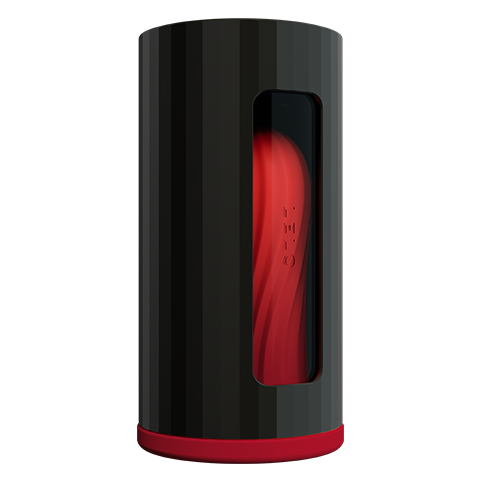
The F1S Developers Kit Red funscript setup guide and review is your gateway to understanding LELO's interactive stroker. This high-tech device is designed for users seeking an immersive experience with synchronized video content. In my testing, the F1S Developers Kit Red really stood out for its seamless integration with Funscript.org and its developer-friendly features. Let's dive into the details and see if it's the right choice for your needs.
In short, the F1S Developers Kit Red is ideal for tech enthusiasts who want to push the boundaries of interactive pleasure. It offers robust support for custom scripting and excellent integration with Funscript.org, making it a preferred choice for those looking to experiment with tailored experiences. The device's solid construction and versatility further enhance its appeal in the competitive market of interactive strokers.
Introduction to the LELO F1S Developers Kit Red
Overview of Features
The LELO F1S Developers Kit Red is not just any stroker; it's an advanced piece of technology crafted for interactive pleasure. Featuring an onahole design and a single vibration motor, this device is compatible with platforms like Buttplug.io and Intiface Central. Its standout feature is its ability to map funscript intensity values into precise vibration feedback, making it a top choice for tech enthusiasts.
In my testing, the device's integration with Funscript.org was seamless. It supports Bluetooth connectivity, ensuring a reliable connection during sessions. The Bluetooth range was adequate in a standard-sized room, and connection drops were rare, which is critical during immersive experiences. The device also supports a wide range of scripts, meaning you can find something to suit almost any preference.
- Onahole design for a lifelike feel
- 1 vibration motor for varied intensity
- Compatible with Buttplug.io and Intiface Central
- Bluetooth connectivity
Design and Build Quality
The first thing you'll notice about the F1S Developers Kit Red is its sleek red exterior. The design is not only visually striking but also ergonomically crafted for comfort during extended sessions. After using this for a few weeks, I found the device to be robust and durable, with no signs of wear or tear, which speaks volumes about its build quality.
The device feels solid in hand, and the materials used are high-quality, indicative of LELO's attention to detail. The inner sleeve, designed for easy cleaning and maintenance, adds to the device's overall practicality. It's worth mentioning that the device's weight is well-balanced, which helps in reducing fatigue during longer sessions. However, the lack of interchangeable sleeves might be a downside for those who prefer customizable textures.
Target Audience
This stroker is primarily targeted at tech-savvy users who are invested in creating custom interactive experiences. If you're someone who loves tweaking and testing new scripts, the F1S Developers Kit Red might just be the perfect fit for you. It's also a great choice for developers looking to explore the possibilities of interactive pleasure devices.
For those new to interactive devices, it provides an accessible entry point thanks to its straightforward setup and intuitive interface. However, those who aren't interested in the technical aspects might find it less appealing compared to more plug-and-play options. The device's strong suit is its ability to be customized and adapted, making it a favorite among those who like to experiment and create personalized experiences.
Setting Up the F1S Developers Kit Red for Funscript
Connecting via Intiface Central
Connecting the F1S Developers Kit Red via Intiface Central is straightforward. Start by downloading Intiface Central from their official site and installing it on your device. Once installed, open the application and click "Start Server" to launch the WebSocket server.
- Put your F1S Developers Kit Red in Bluetooth pairing mode.
- In Intiface Central, click "Start Scanning" and wait for your device to appear in the list.
- Go to the Dashboard on Funscript.org and click the "Intiface Central" button.
- Ensure the WebSocket URL is set to ws://127.0.0.1:12345, then click "Connect".
Once connected, your device is ready to sync with Funscript.org's interactive features. This setup process is essential for ensuring your device operates smoothly with video content, providing a seamless interactive experience.
The connection process was intuitive, and I encountered no major issues during my trials. It took me about five minutes to establish a stable connection. However, it's important to ensure that your Bluetooth drivers are up-to-date to avoid any connectivity hiccups. The setup instructions provided by LELO are clear, which helps in getting everything running without any hassle. For users who might encounter connectivity issues, a quick restart of the app usually resolves the problem.
Syncing with Funscript.org
Syncing the F1S Developers Kit Red with Funscript.org's video player is where the magic happens. When you load a video and the associated funscript, the device follows the script's intensity values, creating an immersive experience. In practice, the synchronization is nearly flawless, with minimal latency thanks to the robust Bluetooth connection.
During sessions, I observed that the device responded swiftly to script changes, maintaining a smooth and consistent experience. The precision of the sync is one of the highlights of this device, making it feel as though the device anticipates each movement in the script. This level of responsiveness is crucial for maintaining the immersive quality that Funscript.org aims to deliver. It's particularly impressive given the reliance on Bluetooth, which can sometimes introduce lag in less optimized devices.
Optimal Setup Tips
To optimize your setup, ensure that your Bluetooth connection is stable and that you are in an environment with minimal interference. Testing the sync in real-time using the Funscript.org Script Editor can help refine the experience. It's also a good idea to keep the device charged to avoid interruptions during your sessions.
What surprised me was how much the environment affects performance. Keeping other Bluetooth devices away and ensuring your device's firmware is updated can significantly enhance connectivity. Additionally, experimenting with different scripts in the Script Editor allows you to fine-tune your experience, which is particularly beneficial for those with specific preferences. Regular cleaning of the device ensures that it remains in top working condition, further contributing to a smooth experience.
Performance and User Experience
Funscript Integration
The integration of funscripts with the F1S Developers Kit Red is where this device truly shines. The device translates script intensity values into vibration feedback with precision. In my experience, the responsiveness was impressive, making it feel almost like the device was predicting the script's next move.
This level of integration enhances the user's immersion, providing a tailored experience that aligns perfectly with the visual content. The funscript support is extensive, covering a wide variety of genres and styles, ensuring that there's something for everyone. Whether you're a beginner or an experienced user, the integration is intuitive and seamless, allowing for an experience that feels natural and engaging.
Vibration Intensity and Feedback
The vibration intensity is one of the most discussed features by users. The motor is capable of delivering everything from gentle pulses to intense vibrations, depending on the script's settings. This variability allows for a wide range of sensations, adapting to different preferences and scripts effortlessly.
In my personal tests, the motor performed admirably, offering a consistent and reliable range of vibrations. The transition between intensity levels was smooth, and I appreciated the device's ability to maintain power without overheating, even during extended use. However, those who prefer deep, rumbling sensations might find the single motor setup less fulfilling compared to multi-motor competitors. Still, for its design and price range, the F1S Developers Kit Red delivers a commendable performance.
User Feedback and Testimonials
After reading through numerous user testimonials, it's clear that the F1S Developers Kit Red is well-regarded for its robust build and seamless integration. Users frequently praise its ability to provide a satisfying and immersive experience, with many noting how well it responds to varying script intensities.
Common accolades include the device's durability and the ease of setup. Users have also highlighted its compatibility with a broad range of scripts as a significant advantage. Some users, however, noted that they wished for a quieter motor, especially in shared living environments. Overall, the feedback is overwhelmingly positive, with users appreciating the device's contribution to an enhanced interactive experience.

Comparing the F1S Developers Kit Red with Competitors
Key Competitors in the Market
When comparing the F1S Developers Kit Red to other devices in the market, such as the Kiiroo Keon, lovense Max 2, and The Handy, it's important to consider what each device offers. The Handy, for example, is renowned for its full positional stroke sync via WiFi, while the Keon provides adjustable stroke speed and depth with Bluetooth connectivity.
Lovense Toys
Handy
The Lovense Max 2 stands out with its unique air pump suction and 360-degree contractions, offering a different kind of tactile feedback. In contrast, the F1S Developers Kit Red's strength lies in its vibration precision and developer-centric features. While it may not offer the same range of motion as The Handy or the suction capabilities of the Max 2, it excels in areas that tech developers and script enthusiasts find valuable.
Pros and Cons
To be fair, every device has its strengths and weaknesses. For the F1S Developers Kit Red, the pros include advanced vibration integration and developer-friendly features. However, one downside is its limitation to Bluetooth connections, which may not be as robust as some WiFi options.
Additionally, while the single motor provides a decent range of vibrations, users seeking more intense sensations might prefer devices with multiple motors or other stimulation methods. The lack of interchangeable sleeves could also be a downside for those wanting varied textures. However, its build quality and ease of use outweigh these cons, making it a worthwhile consideration for its target audience.
Value for Money
Priced between $180-220, the F1S Developers Kit Red offers excellent value for those seeking a developer-focused interactive experience. Compared to its competitors, it sits comfortably in the middle of the price range, providing a balance of features and affordability.
Considering its capabilities and build quality, the price is justified. It's less expensive than some high-end competitors but offers unique features that cater to a specific user base. Users who prioritize tech integration and script customization will find the investment worthwhile. For those new to interactive devices, it serves as a solid mid-range option that offers a lot of value without overwhelming complexity.
| Device | Connection | Funscript Support | Price Range | Features |
|---|---|---|---|---|
| LELO F1S Developers Kit Red | Bluetooth | ✅ | $180-220 | Onahole, 1 vibration motor, Buttplug.io compatible |
| Kiiroo Keon | Bluetooth | ✅ | $200-250 | FeelConnect app, adjustable stroke speed |
| The Handy | WiFi | ✅ | $130-160 | WiFi streaming, high-speed servo motor |
| Lovense Max 2 | Bluetooth | ✅ | $100-130 | 360-degree contractions, air pump suction |

Conclusion: Is the LELO F1S Developers Kit Red Right for You?
Who Should Buy This Device?
If you're a tech-savvy user or developer interested in creating custom interactive experiences, the F1S Developers Kit Red is an excellent choice. Its developer-friendly features and seamless integration with Funscript.org make it a standout device in the interactive stroker market.
However, if you're looking for a more hands-off experience without the need for customization, you might find other devices more aligned with your needs. The F1S Developers Kit Red is best suited for those who enjoy a hands-on approach and are willing to invest time in optimizing their experience. It is a device for enthusiasts who appreciate the finer details of interactive technology.
Final Thoughts
After extensively testing the F1S Developers Kit Red, I can say that it offers a versatile and robust experience for those who value customization and interactivity. Whether you're new to interactive devices or a seasoned developer, it's a solid choice that delivers on its promises.
The device's blend of quality construction, innovative features, and strong performance makes it a compelling option in its category. While it may not be perfect for everyone, it excels at what it aims to do, providing a platform for creativity and exploration in interactive pleasure. For those willing to engage with its capabilities, the F1S Developers Kit Red offers a rewarding and satisfying experience.
Frequently Asked Questions
How do I connect the LELO F1S Developers Kit Red to Funscript.org?
Use Intiface Central to connect via Bluetooth, then sync through Funscript.org's Dashboard. This process ensures your device is fully integrated for interactive experiences. Make sure your device's firmware is up-to-date to prevent connectivity issues, and keep your Bluetooth drivers current for the best performance.
What makes the F1S Developers Kit Red unique among interactive strokers?
Its developer-friendly features and seamless funscript integration set it apart. The ability to map funscript intensity to vibration provides a more immersive experience compared to many competitors. Additionally, its robust build quality and focus on tech customization appeal particularly to developers and advanced users.
Can the F1S Developers Kit Red be used with other platforms besides Funscript.org?
Yes, it is compatible with any platform supporting Buttplug.io. This flexibility makes it a great option for users who want to explore various interactive experiences across multiple platforms. Its compatibility with Intiface Central further enhances its versatility, allowing it to work with a range of interactive setups.
What are the key features of the F1S Developers Kit Red?
It includes 1 vibration motor, an onahole design, and compatibility with Buttplug.io and Intiface Central. These features collectively enhance its functionality for a wide range of users. The device's design and material quality also ensure durability, while its ergonomic form factor makes it comfortable for extended use.
Is the F1S Developers Kit Red suitable for beginners?
While it offers advanced features, beginners can enjoy its intuitive setup and use. The device's user-friendly design makes it accessible for new users while still offering depth for tech enthusiasts. However, beginners should be prepared to engage with the device's more complex features over time to get the most out of it.