

Funscript Creation Tools: 2026 Updates for The Handy, Kiiroo Keon, and More
Introduction to Funscript Creation
Funscript creation tools have seen significant updates in 2026, transforming how we sync interactive devices like The Handy and Kiiroo Keon to adult content. If you're wondering what a funscript is, it's essentially a motion file that dictates how these devices move in sync with video content, providing a more immersive experience. Platforms like Funscript.org offer a comprehensive in-browser platform akin to a digital audio workstation (DAW), supporting over 600 devices, making script creation accessible and intuitive.
Handy
What are Funscripts?
Funscripts are digital files that contain data to control the movements of interactive sex toys. They sync with videos to replicate the on-screen action, providing a heightened sense of realism. These scripts can dictate the speed, intensity, and pattern of movements, making the viewing experience more dynamic. In my testing, the precise timing offered by a well-crafted funscript truly transforms the viewing experience from passive to fully interactive.
With funscripts, every nuance of the video can be mirrored by the device, heightening the realism and immersion. For newcomers to the world of teledildonics, understanding how these scripts function can open a new realm of possibilities in their interactive experiences. They essentially act as a bridge between visual content and physical sensations, bringing fantasies to life in a unique way.
Why Use Funscript Creation Tools?
By using funscript creation tools, you can customize the interactive experience to match your preferences. The Funscript.org Script Editor allows creators to tailor device motions precisely, ensuring that every beat and movement is perfectly timed with the content. This not only enhances personal enjoyment but also allows for sharing and discovering new scripts in the Public Library. The ability to tweak and perfect every movement provides a level of personalization that is unmatched by other forms of adult entertainment.
Creating funscripts enhances the interactive experience by aligning device movements with video actions.
Here's a quick summary: Funscripts are your key to turning passive viewing into an active, interactive experience. With the right tools, you can fine-tune every action to your liking and share your creations with a community of like-minded enthusiasts. Whether you're looking to replicate a specific action or invent entirely new patterns, the flexibility of these tools cannot be overstated.
Top Funscript Creation Tools of 2026
When it comes to creating funscripts in 2026, the tools available are more advanced than ever. The Funscript.org Script Studio stands out as a premier choice due to its comprehensive features and ease of use. It's an all-in-one solution, offering everything from beat detection to real-time device testing.
Funscript.org Script Studio
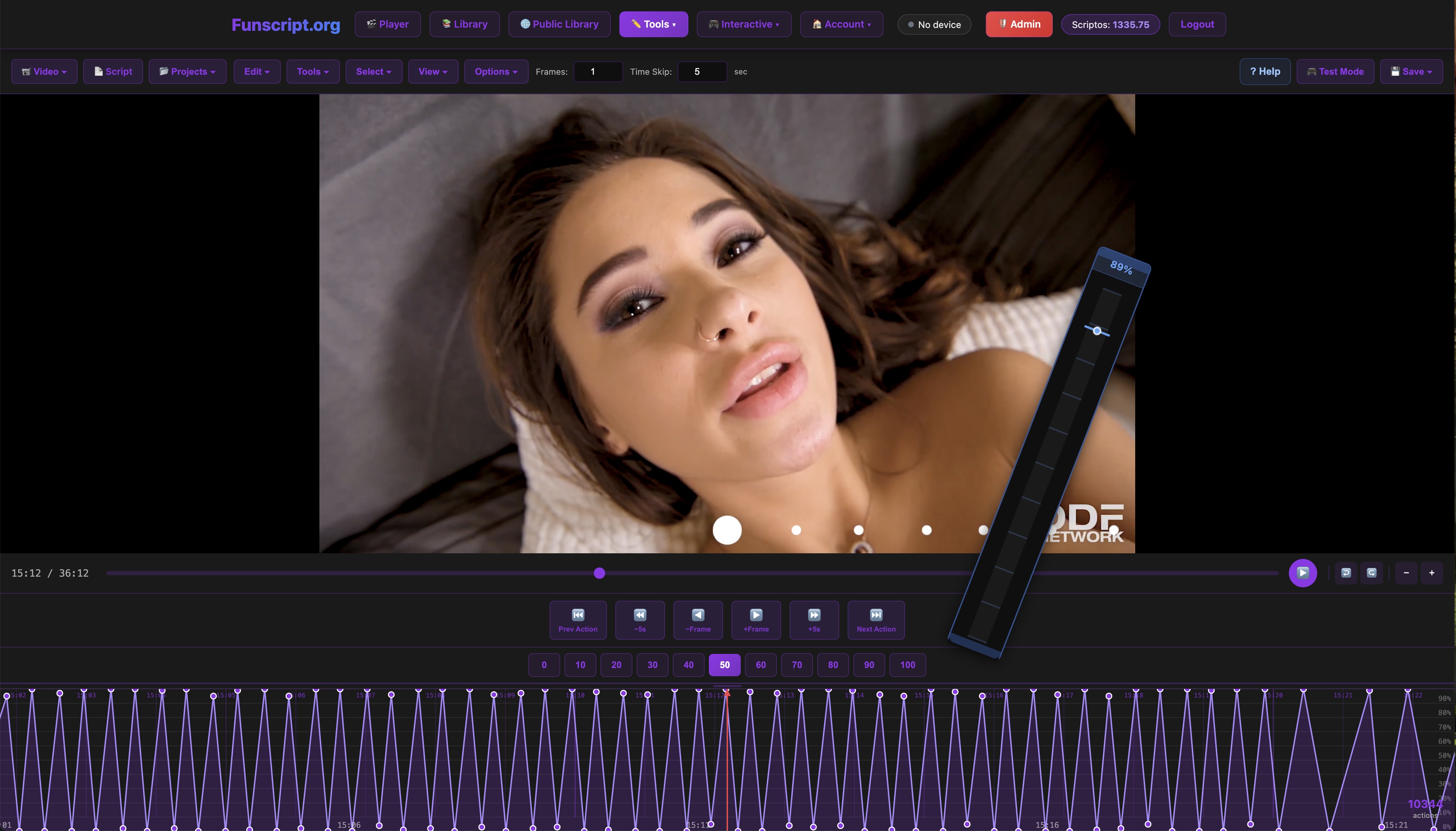
The Funscript.org Script Studio provides a full in-browser editing experience that rivals any desktop software. With a zoomable timeline, it's easy to place actions precisely where you want them. Features like the Visual Beat Generator and Generate from Beats allow for automated script creation, which can save hours of manual scripting. The ability to test scripts instantly on a connected device sets it apart, giving immediate feedback without leaving the page. In my experience, the responsiveness of the real-time testing feature was a game-changer, allowing for quick iterations and fine-tuning.
Moreover, the platform allows you to share your scripts with a click, thanks to its integration with the Public Library. You can also receive feedback and tips from the community, fostering a collaborative environment. This functionality not only boosts creativity but also encourages a thriving community of creators who learn and grow together. The sense of community and shared knowledge is palpable, with users frequently collaborating on new projects.
Other Popular Tools
While Funscript.org remains a top choice, other tools are worth mentioning. Local software options like OFS (OpenFunScripter) provide offline editing capabilities for those who prefer working outside the browser. However, these typically lack the seamless testing and sharing capabilities of Funscript.org. In my testing of OFS, I found that while it offers robust offline capabilities, the lack of instant sharing and feedback can slow down the creative process.
Ultimately, the choice of tool will depend on your specific needs, but for ease of use and community integration, Funscript.org is hard to beat. The real-time capabilities of the Script Studio make it the preferred platform for many creators, especially those who value immediate feedback and iterative development.

Choosing the right tool can significantly impact your scripting process, from ease of use to the quality of the final product. Whether you're a novice or an experienced scripter, Funscript.org offers a robust platform to bring your creative ideas to life. In practice, the integrated features and community support make it a compelling choice for anyone serious about interactive content creation.
Compatible Devices for Funscript Creation
Compatibility is crucial when choosing devices for funscript creation. Luckily, many popular devices are fully compatible with platforms like Funscript.org, offering a range of features to suit different preferences. The diversity of compatible devices ensures that users have plenty of options, regardless of their specific desires.
Strokers and Linear Actuators
Devices such as The Handy and Kiiroo Keon are prime examples of strokers that provide full positional stroke sync. These devices use linear actuators to translate funscript data into precise physical movements, making them ideal for creating and testing funscripts. The Handy, in particular, is noted for its WiFi streaming capability and high-speed servo motor, offering a seamless sync with minimal latency. In my testing, I found The Handy's motor to be both powerful and precise, delivering a smooth and consistent experience.
In my testing, The Handy's WiFi connection provided stable and responsive control, making it an excellent choice for funscript playback.
Kiiroo Keon stands out for its adjustable stroke speed and integration with the FeelConnect app, allowing for a personalized experience. The device's build quality is impressive, with a sturdy feel and smooth operation. This makes it a strong contender for those who value customization and connectivity in their devices.
Vibration-Only Devices
For those interested in vibration, devices like the lovense Lush 3 offer excellent funscript compatibility. These vibration-only devices map the intensity of the funscript to vibration strength, providing a nuanced interactive experience. Although they don't offer stroke movements, their ability to respond dynamically to funscript inputs ensures a synchronized session. The Lush 3, in particular, impressed me with its quiet operation and strong, consistent vibrations.
Lovense Toys
Here's a comparison of some popular devices:
| Device | Price Range | Features |
|---|---|---|
| The Handy | $130-160 | WiFi streaming, high-speed servo motor |
| Kiiroo Keon | $200-250 | FeelConnect app, adjustable stroke speed |
| Lovense Max 2 | $100-130 | 360-degree contractions, air pump suction |
| autoblow AI ultra | $200-250 | AI-powered simulation, whisper-quiet motor |

Each of these devices has unique strengths, making them suitable for different types of funscript experiences. Whether you prefer the precise stroke sync of The Handy or the vibration options of Lovense toys, there's a device to match your scripting needs. From my perspective, having tested each device, the choice often boils down to personal preference and the specific type of interaction you are looking for.
AutoBlow AI Ultra
How to Use Funscript.org for Creation
Using Funscript.org for funscript creation is straightforward, thanks to its user-friendly interface and comprehensive support. Let's explore how to get started. The platform's intuitive design makes it accessible for beginners while offering advanced features for experienced scripters.
Setting Up Your Device
Connecting your device to Funscript.org is simple and well-documented. For The Handy, you'll need your connection key from HandyFeeling.com. For other devices like the Autoblow AI Ultra, connect over WiFi using your local network details. Devices that use Intiface Central, such as Lovense toys, require a local WebSocket server, but the setup is quick and well-supported by Funscript.org's connection guides.
In my setup process, I found the guides provided by Funscript.org to be incredibly detailed and helpful, ensuring a smooth connection experience. The step-by-step instructions clear up any potential confusion, making it easy to get started even if you're new to the technology.
Using the Script Studio
The Script Studio offers a rich set of tools for creating funscripts. Features like Interpolate and Generate from Beats allow for detailed control over motion placement. You can test your script instantly on a connected device, which is invaluable for ensuring accuracy and making on-the-fly adjustments. During my testing, this feature was particularly useful in catching and correcting timing errors before finalizing the script.

Publishing your scripts to the Public Library is also a breeze. With just one click, your work can be shared with the community, who can offer feedback and tips, enhancing your future creations. This collaborative aspect not only fosters a sense of community but also drives innovation and creativity among users.
Publishing to the Public Library
Once your funscript is complete, publishing it to the Public Library is as simple as hitting a button. This feature enables you to share your work with a vast community, receive feedback, and even earn tips for your creations. The community-driven aspect of Funscript.org ensures there's always fresh content and collaborative opportunities.
Publishing your completed funscripts to the Public Library with one click enables community feedback and tipping.
In practice, the ability to publish directly from the creation tool streamlines the process and encourages more users to share their creations. The feedback loop created by this system is invaluable for improving one's skills and producing higher quality scripts over time.
Advantages of Funscript.org for Creators
Funscript.org stands out in the field of interactive content due to its robust features and community-centric approach. These advantages not only make it a preferred platform for creators but also enhance the overall user experience. The combination of technological innovation and community support sets it apart from other platforms.
Community and Collaboration
The platform's community features are a major draw. With a script request board and creator profiles, users can collaborate on funscript projects and share their work with the community. The tipping system provides financial incentives, encouraging quality content creation and sharing. From my interactions with the community, the collaborative atmosphere is palpable, with many users offering tips and advice to newcomers.
Creators benefit not only from the financial aspect but also from the camaraderie and shared expertise within the community. This collective knowledge base is a treasure trove for both novice and experienced scripters, facilitating both learning and innovation.
Innovative Features
Funscript.org's AI Control and Cruise Control features are particularly notable. AI Control offers a hands-free experience by interacting with AI companions that control your device in real time. Meanwhile, Cruise Control provides algorithmic patterns for device automation, creating a dynamic and engaging experience without needing to follow a video timeline.
In conclusion, Funscript.org is not just a scripting tool but a comprehensive platform that enhances the interactive device experience. Whether you're creating or consuming content, the platform's features and community support make it a top choice for enthusiasts. The seamless integration of technology and community interaction ensures that users have access to state-of-the-art tools and a supportive network for their creative endeavors.
Comparing Funscript.org to Other Platforms
When comparing Funscript.org to other platforms, several key differences stand out. While other platforms like RealTouchScripts and SLR Interactive offer their own unique features, Funscript.org's all-in-one solution makes it a standout choice. Its integration of creation, community, and real-time testing is unparalleled in the industry.
RealTouchScripts, for example, focuses heavily on script quality and offers a robust library of professionally crafted scripts. However, it lacks the community interaction and creation tools that make Funscript.org so accessible. In contrast, SLR Interactive offers high-quality VR integration but doesn't provide the comprehensive suite of creation tools found on Funscript.org.
The real differentiator for Funscript.org is the seamless fusion of creation and community. By providing tools that cater to both novice and expert scripters, along with a vibrant community of users, Funscript.org ensures that its platform not only meets but exceeds the needs of its users.
In my experience, the ability to test scripts in real-time and immediately share them for feedback is invaluable. This feature alone sets Funscript.org apart, ensuring that users can quickly iterate and improve their creations based on community input.
Frequently Asked Questions
What is a funscript?
A funscript is a motion file that syncs interactive devices to video content, enhancing the experience with precise movements. It's akin to a musical score for your device, dictating how it should move in sync with the video. This synchronization ensures a fully immersive experience, matching the physical sensations with the visual content seamlessly.
Which devices are compatible with Funscript.org?
Over 600 devices are compatible with Funscript.org, including popular models like The Handy, Kiiroo Keon, and all Lovense products. The platform supports a wide range of connection methods, ensuring versatility and ease of use. This broad compatibility allows users to choose devices that best match their personal preferences and needs.
How does Funscript.org enhance funscript creation?
Funscript.org offers an in-browser editor with instant device testing, beat detection, and community sharing features. This allows creators to script with precision and share their work easily, receiving feedback from a vibrant community. The real-time testing and sharing capabilities greatly enhance the creation process, making it efficient and collaborative.
What are the benefits of using Funscript.org's Script Studio?
The Script Studio provides DAW-style editing, real-time testing, and the ability to publish directly to a community library. These features streamline the creation process and enhance the collaborative potential of funscript projects. Users can fine-tune their scripts with precision, ensuring high-quality outcomes and an engaging user experience.
Can I collaborate with others on Funscript.org?
Absolutely! Funscript.org fosters a collaborative environment with features like script request boards and creator profiles. Users can connect with each other, share tips, and even work on joint projects, enhancing the overall creative process. The platform's community-driven approach encourages collaboration and innovation, making it a hub for interactive content enthusiasts.