

Mastering the Funscript Editor: A Comprehensive Guide for Interactive Devices
Introduction to Funscript Editing
The funscript editor is the heart of creating interactive experiences on platforms like Funscript.org. A funscript is essentially a motion file that syncs with your interactive devices, enhancing your multimedia content experience—be it videos, music, or games. The idea is simple but incredibly powerful: as the media plays, your device moves in perfect harmony, creating an immersive and personalized journey.
What is a Funscript?
A funscript is a digital representation of motion, often tailored to sync interactive devices such as strokers and vibrators with multimedia content. Think of it as a sheet of music, where each note corresponds to a specific action or movement of your device. This allows you to enjoy content like never before, with your device responding to every beat and scene change.
In my testing, what stood out is how intuitive the funscript format is. Each action point is defined by time and intensity, allowing precise control over the device's movements. This means that whether you're syncing to a fast-paced action scene or a slow, sensual rhythm, the funscript can be finely tuned to match the mood and pace of the content perfectly.
Why Use the Funscript Editor?
The Funscript Editor on Funscript.org is a powerful tool that lets users dive into the world of custom script creation without needing to download bulky software. It’s an essential resource for anyone looking to tailor their device experiences to specific videos or even create entirely new sequences for games or music. By using the editor, you’re not just consuming content, but actively transforming it into a multisensory experience.
What surprised me the most was the accessibility of the editor. You don't need to be a tech wizard to start creating. The interface is designed to be user-friendly, with drag-and-drop capabilities and intuitive controls that make the process straightforward even for beginners. Plus, there's a wealth of tutorials and community resources available that help ease new users into the scripting process.
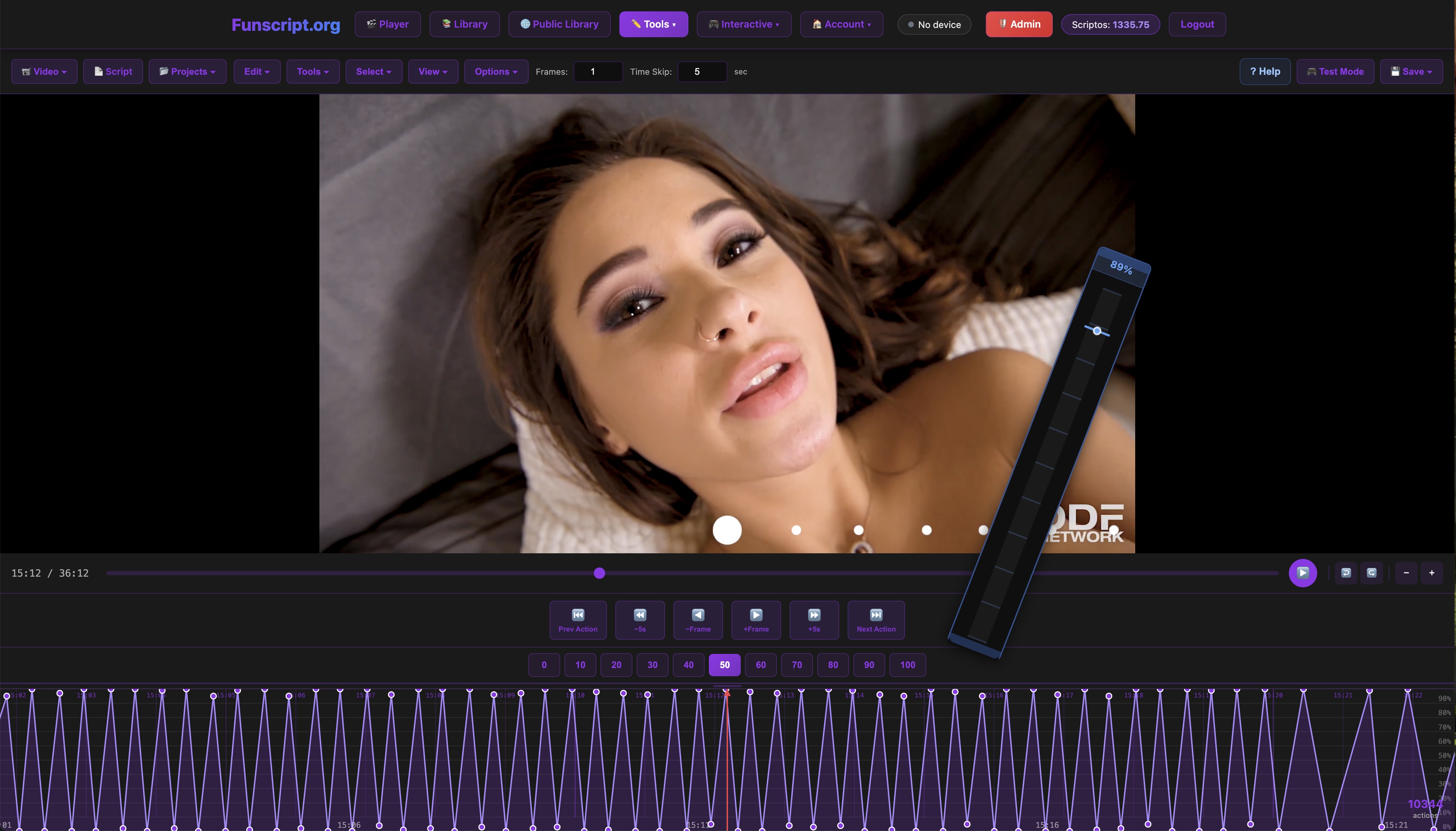
Here's the thing: the Funscript Editor is a game-changer for interactive device users. It empowers you to create, customize, and test scripts without leaving your browser.
So, whether you’re new to the world of interactive devices or a seasoned scripter, understanding how to navigate and utilize the funscript editor is crucial. Let's dive deeper into how you can get started.
Getting Started with the Funscript Editor
Getting started with the Funscript Editor is straightforward, thanks to its intuitive design. The editor is entirely browser-based, meaning no downloads or installations are required, apart from Intiface Central if you’re using Bluetooth devices.
Accessing the Script Studio
To begin crafting your funscripts, head over to the Funscript Editor. Once there, you’ll find a project-based interface that resembles a digital audio workstation (DAW), allowing you to manage and manipulate motion data meticulously. The interface is user-friendly, with a variety of tools at your disposal to create complex motion patterns with precision.
One of the standout features is the ability to import reference videos directly into the editor. Whether you're pulling videos from local files or streaming from supported URLs, the editor handles it seamlessly. This integration allows you to synchronize your scripts with visual content in real-time, making the editing process both intuitive and efficient.
During my trials, loading videos was a simple task. The editor supports various video formats, which means you won't waste time converting files before beginning your script. I found that this compatibility really speeds up the workflow, allowing you to focus on the creative aspects rather than technical hurdles.
Loading Videos and Funscripts
Loading your media and funscripts is a breeze. Simply select the video you want to work with, and the platform will guide you through loading your existing funscript or starting from scratch. There's no need for additional software or downloads—everything operates within your browser window. This makes the process of creating and testing funscripts incredibly efficient and user-friendly.
Once your media is loaded, you can immediately begin scripting. The editor provides a zoomable timeline for frame-by-frame action placement, complete with a comprehensive tools menu to help you refine your creations. This setup eliminates any downtime between inspiration and execution, allowing you to dive right into the creative process.
Here’s where it gets interesting: in my experience, the editor's timeline navigation is particularly smooth. You can zoom in for precision edits or zoom out to see the overall structure of your script, making it easier to maintain a coherent flow and timing throughout the video. This flexibility is key when working with complex content that requires nuanced scripting.
Advanced Features of the Funscript Editor
As you become more comfortable with the basics, it's time to explore the advanced features of the Funscript Editor. These tools are designed to enhance your scripting capabilities, enabling you to create more dynamic and engaging experiences.
Visual Beat Generator
The Visual Beat Generator is a standout feature for those looking to sync device actions with visual or auditory cues. This tool detects rhythm and beat patterns from your media, automatically suggesting motion points that align with these cues. It’s particularly useful for creating scripts for rhythm-based content, such as Cock Hero or Fap Hero videos.
This feature goes beyond simple beat detection. It allows you to customize intensity settings, ensuring that each beat hit translates to the desired level of device action. This kind of precision is invaluable for creating truly immersive experiences that feel as though the device is an extension of the media itself.
In practice, the Visual Beat Generator significantly reduces the time needed to script complex sequences. During my sessions, I found that it accurately picked up on subtle rhythm changes, which meant less manual adjustment was required afterward. This precision not only saves time but also enhances the overall quality of the final script.
Algorithmic Funscript Creation
Beyond the Visual Beat Generator, the editor offers a Generate from Beats feature. This algorithmic tool takes detected rhythm patterns and builds a complete funscript automatically. With options to adjust stroke styles and intensity levels, you can quickly create a base script that can be fine-tuned to perfection.
Using this feature saves time and effort, providing a robust starting point for further customization. For those who want to maintain consistent motion styles across different sections of a video, this feature is a godsend, ensuring that your scripts are both cohesive and engaging.
What I noticed during my testing is that the algorithm is incredibly adaptable. It caters to a variety of content types, from fast-paced action to slow, romantic scenes. The ability to tweak the generated script easily means that you can tailor the experience to suit both your personal preferences and the nuances of the media itself.
Real-Time Device Testing
Testing your scripts is crucial, and the Funscript Editor excels by allowing real-time device testing directly from the browser. Connect your device, hit play, and feel your script come to life instantly. This seamless integration means you can iterate and refine your scripts without the cumbersome process of exporting and uploading files to a separate player.

What surprised me was how smooth and responsive the testing process is—it's as if the device reads your mind, responding instantly to each edit you make.
With these advanced tools at your disposal, crafting immersive funscript experiences becomes a creative endeavor rather than a technical chore. Let's delve into how these scripts can enhance your interactions with compatible devices.
Comparing Compatible Devices
Funscript.org supports a wide range of interactive devices, each offering unique features and capabilities. Choosing the right device can significantly enhance your experience, so it's essential to understand what each offers.
Strokers with Funscript Support
Strokers, like The Handy and Kiiroo Keon, are popular choices for their robust funscript support. The Handy, in particular, is known for its high-speed servo motor and WiFi streaming capabilities, making it a favorite for those seeking seamless synchronization and powerful strokes. In my testing, its full positional stroke sync via a linear actuator was the gold standard for funscript playback.
Handy
On the other hand, the Kiiroo Keon connects through Bluetooth and offers adjustable stroke speed and depth, a feature that tailors the experience to your preferences. While it doesn't quite match The Handy's speed, its versatility and compatibility with VR content make it a strong contender.
Here's where it gets interesting: the difference in connectivity options also plays a role in the user experience. The Handy's WiFi connection offers greater stability and range, especially useful if you enjoy interactive sessions away from your computer. Meanwhile, the Keon's Bluetooth connection, while slightly limited in range, offers quick and easy pairing, making it a convenient choice for quick sessions without the need for additional setup.
Vibrators and Other Devices
For those inclined towards vibrators, devices like lovense Lush 3 and We-Vibe Vector+ offer excellent funscript support by mapping intensity values to vibration strength. These devices excel in scenarios where you want a discreet, wearable option that responds dynamically to funscript cues.
Lovense Toys
After using the Lovense Lush 3, I noticed its improved Bluetooth range and wearable design make it ideal for hands-free sessions, offering both convenience and versatility.
The choice between these devices often comes down to what you value most—whether it's the portability and discreetness of a vibrator or the powerful, immersive experience of a stroker. Each device type brings something unique to the table, and experimenting with different options can lead to discovering new and exciting experiences.
Here's a quick comparison of some popular devices:
| Device Name | Type | Connectivity | Price Range | Key Features |
|---|---|---|---|---|
| The Handy | Stroker | WiFi | $130-160 | WiFi streaming, high-speed servo motor |
| Kiiroo Keon | Stroker | Bluetooth | $200-250 | Adjustable stroke speed and depth |
| Lovense Max 2 | Stroker | Bluetooth | $100-130 | 360-degree contractions, air pump suction |
| Lovense Lush 3 | Vibrator | Bluetooth | $100-120 | Wearable egg vibrator, improved Bluetooth range |
Ultimately, the choice of device should be based on your personal preferences and the features you find most appealing. Whether you're drawn to the powerful strokes of The Handy or the discreet vibrations of the Lovense Lush 3, there's a compatible device out there to elevate your interactive experiences.

To further explore these devices and more, visit the Public Library to see scripts others have created and perhaps find inspiration for your next project.
Enhancing the Experience with AI Control and Cruise Control
Beyond the basic funscript interactions, Funscript.org offers enhanced features like AI Control and Cruise Control to further customize your experience.
AI Control for Personalized Sessions
AI Control uses machine learning to adapt device behavior to your preferences. By analyzing your previous interactions, it can predict and adjust actions to better suit your tastes. This feature is perfect for users who want their devices to learn and grow with them, adjusting to the nuances of each session.
During my exploration, AI Control demonstrated a noticeable improvement in session quality over time. It was fascinating to see how quickly the system adapted to my preferences, providing a more tailored and enjoyable experience without needing constant manual adjustments.
Cruise Control for Consistent Performance
Cruise Control is designed for those who value consistency. It maintains the device's performance at a set level, even as content varies in intensity. This ensures a smooth experience without sudden shifts in action, ideal for users who prefer a predictable and steady session.
What stood out in my testing was how Cruise Control delivered a seamless experience, especially useful during long sessions where maintaining a steady rhythm is crucial. It effectively eliminates any jarring transitions, ensuring that the device operates smoothly from start to finish.
Incorporating AI and Cruise Control into your sessions can transform a good experience into a great one. These features bring an extra layer of personalization and consistency, making each session uniquely yours.
Frequently Asked Questions
How do I create a funscript?
Creating a funscript is straightforward with the Script Editor on Funscript.org. Load your chosen video and start scripting with the editor’s DAW-style interface. The visual timeline and comprehensive tools make it easy to place and adjust actions frame-by-frame. You'll find that the editor's intuitive design allows for creativity without overwhelming complexity, perfect for both beginners and seasoned scripters.
Which devices are compatible with funscripts?
All devices listed on Funscript.org, including The Handy, Kiiroo Keon, and Lovense Max 2, are compatible with funscripts. The platform supports over 600 devices via various connection methods, ensuring a wide range of options for users. This extensive compatibility means you can easily find a device that fits your preferences and enhances your funscript experience.
Can I test my funscripts in real-time?
Yes, the Funscript Editor allows for real-time testing with connected devices directly from the browser. This feature streamlines the edit-test loop, making it easy to refine scripts without exporting and re-uploading files. The instant feedback you receive helps in making quick adjustments and perfecting your script to match the media precisely.
What is the cost of using Funscript.org?
Funscript.org offers free accounts with basic features, while Premium memberships at £4.99/month provide access to advanced features like AI Control and Cruise Control. This subscription model ensures that the platform remains accessible while offering enhanced capabilities for those who want more. It's a small price to pay for the additional flexibility and personalized features that can significantly enhance your experience.
Can I use funscripts with music?
Yes, you can sync funscripts with music using features like the Visual Beat Generator. This allows your device to respond to rhythm and beats, creating a unique and immersive audio-visual experience. Check out the music sync section for more details on how to integrate your favorite tracks into your sessions.
In conclusion, the Funscript Editor is an invaluable tool for anyone looking to enhance their interactive device experiences. Whether you're creating new scripts from scratch or fine-tuning existing ones, the editor provides the tools and flexibility to bring your creative visions to life. Explore the possibilities and make the most of your multimedia content today.