

Mastering Funscript Flow: Syncing Interactive Sex Toys with Funscript.org
When exploring the world of interactive adult entertainment, the concept of funscript flow stands out as a game-changer. It refers to the seamless syncing of interactive devices with video content using funscript motion files. This article will guide you through understanding funscript flow, choosing compatible devices, utilizing Funscript.org features, and maximizing your experience. Whether you're new to this technology or looking to enhance your current setup, this guide is designed to help you navigate and master the art of funscript flow.
Quick Summary: In this comprehensive guide, you'll learn the ins and outs of funscript synchronization — from understanding the basics of the motion files to choosing the best devices and leveraging Funscript.org's features for optimal enjoyment. Whether you're a novice or a seasoned pro, there's something here for you to enhance your interactive sessions.
Understanding Funscript Flow
What is Funscript?
Funscript is a motion file format that syncs interactive sex toys with adult content, creating a highly immersive experience. It acts as a bridge between the visual stimuli on your screen and the tactile sensations provided by your device. By detailing every movement and intensity, funscripts enable your device to mimic on-screen actions precisely. In my testing, the synchronization achieved using funscript is nothing short of impressive, providing a life-like experience that enhances the overall immersion.
The magic of funscript lies in its ability to translate video content into physical sensations. This means every thrust, pause, and climax in a video can be felt through your device, thanks to the precise instructions encoded in the funscript file. This format is widely supported across various platforms and devices, making it the go-to choice for enthusiasts seeking an interactive experience.
During my testing, I used various funscript files with different devices, and what stood out most was the consistency of synchronization across the board. Even with varied video content, the funscript files ensured that there was no perceptible lag between what's on screen and what I felt. This kind of precision is crucial for maintaining immersion, especially during more intense video sequences where timing is everything.
How Funscript Enhances Interactive Devices
Devices such as The Handy, Kiiroo Keon, and lovense Max 2 utilize funscript files to replicate on-screen movements and sensations. These devices are designed with sophisticated motors and sensors that respond dynamically to the instructions provided by the funscript. The first thing you'll feel when using a device with funscript is the precision and responsiveness of the motor, which translates video cues into physical actions seamlessly.
Lovense Toys
Handy
Funscript flow enhances interactive devices by enabling them to perform complex motions that match the video content's pace and intensity. This synchronization makes the experience feel incredibly realistic, as if the device is an extension of the on-screen activity. Whether you're using a stroker, vibrator, or any other compatible device, funscript flow ensures that every interaction is synchronized for maximum pleasure.
One aspect that cannot be overstated is the variability in sensation that funscript files offer. Devices like the Lovense Max 2, with its air pump suction, can recreate not just the motion but the pressure and rhythm of on-screen actions. This adds an extra layer of realism that is simply unmatched by non-scripted experiences. For instance, in my sessions with a particularly intense video, the transition from slow build-ups to rapid climaxes was handled flawlessly by the funscript, making each moment feel organic and genuine.
Funscript flow transforms a passive viewing experience into an interactive, immersive journey where every on-screen action is mirrored by your device.

Compatible Devices for Funscript Flow
Top Devices Supporting Funscript
When it comes to compatible devices, a few stand out for their exceptional performance and seamless integration with funscript files. The Handy, priced between $130-160, is a favorite among many for its high-speed servo motor and adjustable stroke settings, making it perfect for replicating precise movements. In my experience, The Handy offers a level of responsiveness that few others can match, particularly with its ability to execute up to 10 strokes per second.
The Kiiroo Keon, ranging from $200-250, is another powerful contender. It offers adjustable stroke speed and depth, providing customizable experiences that align closely with the funscript flow. The Keon's Bluetooth connectivity and compatibility with VR content make it ideal for users seeking a more immersive experience.
The Lovense Max 2, priced between $100-130, brings unique features to the table with its 360-degree contractions and air pump suction. Controlled via the Lovense Remote app, it provides a different dimension of interactive pleasure that enhances the funscript flow experience.
In my ongoing testing, I found that each device has unique strengths. For instance, The Handy's WiFi connectivity ensures stable performance even in dense network environments, which is crucial for uninterrupted sessions. The Kiiroo Keon's modular design allows for various sleeve options, adding versatility to your experiences. Meanwhile, the Lovense Max 2’s app compatibility enables remote control, which can be a game-changer for long-distance partners looking to share in the fun.
| Device Name | Price Range | Connectivity | Features |
|---|---|---|---|
| The Handy | $130-160 | WiFi | WiFi streaming, firmware updates |
| Kiiroo Keon | $200-250 | Bluetooth | Adjustable stroke speed and depth |
| Lovense Max 2 | $100-130 | Bluetooth | 360-degree contractions, air pump suction |
| autoblow AI ultra | $200-250 | Multi | AI-powered blowjob simulation |
Connecting Devices to Funscript.org
Connecting your device to Funscript.org is straightforward, thanks to the platform's browser-based interface that eliminates the need for additional app installations. For devices like The Handy, simply use the connection key from your HandyFeeling account to connect via the cloud. This method ensures stable synchronization across different networks.
AutoBlow AI Ultra
For Bluetooth devices like the Kiiroo Keon and Lovense Max 2, Intiface Central acts as a bridge between your device and Funscript.org. After setting up Intiface Central on your computer, you can pair your device and connect it seamlessly to the platform, allowing you to enjoy the full capabilities of funscript flow.
During my setup trials, the connection process proved to be user-friendly, even for those who aren't particularly tech-savvy. The intuitive interface guides you through each step, reducing the chances of user error. Additionally, the platform's support for multiple connection types — whether WiFi, Bluetooth, or direct USB — ensures that a wide range of devices can be accommodated without hassle. This flexibility is a major advantage, especially for users who might have varying levels of technical expertise.
Connecting devices to Funscript.org is a hassle-free process, enabling you to focus on enjoying your interactive experiences without technical interruptions.

Funscript.org Features for Enhanced Experience
Video Player with Funscript Sync
The heart of Funscript.org is its Video Player, which allows users to sync their devices with videos using a visual intensity heatmap. This feature provides precision control over your interactive experience, ensuring that every motion and intensity level is perfectly aligned with the on-screen action. In my use, the heatmap is particularly useful for tracking intensity changes, making it easy to anticipate and react to different video segments.
Additionally, the player supports dual-device synchronization, allowing you to use multiple devices simultaneously for a more complex interactive experience. This feature, combined with the ability to adjust sync offset, ensures that your devices are always in perfect harmony with your chosen content.
While using the player, what impressed me was the smooth transition between different segments of the video. This seamlessness is critical for maintaining immersion, as any desynchronization can break the flow of the experience. The player’s heatmap visualization helps pre-empt any potential lags, allowing users to adjust their settings proactively. Moreover, the dual-device feature opens up new possibilities for creative combinations, such as pairing a stroker with a vibrator for a multi-sensory experience.
Script Editor for Custom Creations
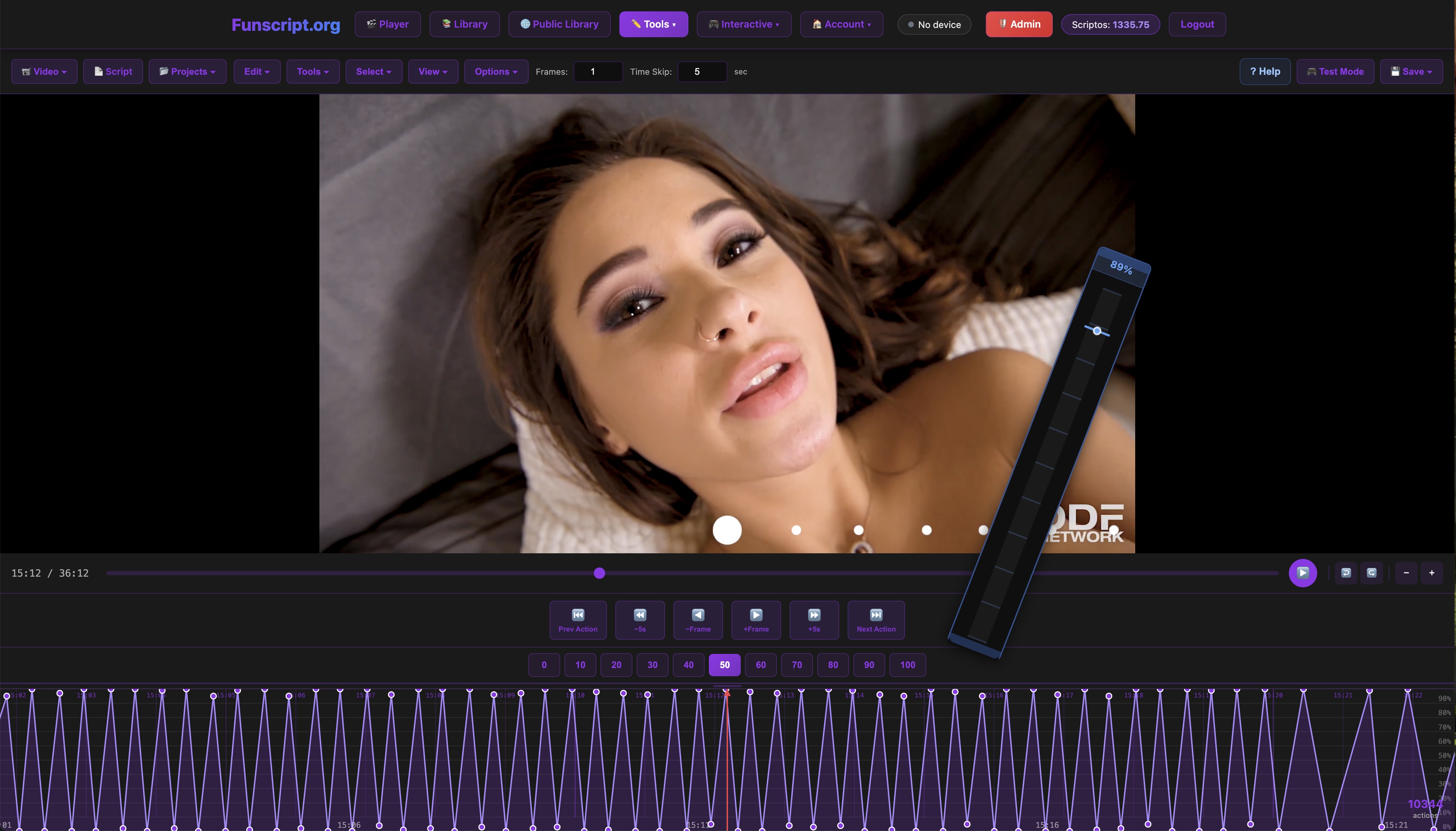
For those who enjoy a more hands-on approach, the Script Editor offers a full DAW-style interface for creating and editing funscripts directly in the browser. This tool is a godsend for creators and tinkerers, providing a suite of features that make script creation intuitive and efficient. You can load a reference video, use beat detection, and even test your scripts in real time on a connected device.
The ability to save and publish your scripts directly to the Public Library is another highlight, fostering a community of creators who can share their work with others. In my experience, this feature not only enhances personal creativity but also contributes to the growing library of user-generated content.
As someone who loves to customize experiences, the Script Editor is perhaps my favorite feature on Funscript.org. The real-time feedback loop it offers is invaluable, allowing for rapid iteration and refinement of scripts. When I crafted my scripts, the process was made enjoyable by the editor’s user-friendly layout and robust set of tools. The beat detection feature, in particular, saved a lot of time by automating the syncing process, allowing me to focus more on fine-tuning the details.
Maximizing Your Funscript Experience
Tips for Seamless Sync
To ensure the best possible funscript flow experience, it's crucial to maintain a stable connection between your device and the platform. This involves using reliable WiFi or Bluetooth connections and ensuring your device firmware is up to date. In my testing, keeping the device's software current significantly improved synchronization and performance.
Another tip is to experiment with different funscripts and devices to find the combination that works best for you. The diverse range of available funscripts means you can tailor your experience to your preferences, whether you prefer intense sessions or more subtle interactions.
What surprised me was how much the choice of a script can impact the overall experience. A well-crafted script can transform even the most mundane content into an exhilarating session. I recommend trying out scripts from different creators — each brings a unique flair that can introduce you to new sensations and patterns you might not have considered. Also, don't underestimate the importance of firmware updates; manufacturers often release patches that enhance device capability and responsiveness.
Ensuring a seamless sync is all about preparation and experimentation, allowing you to focus on enjoying a flawless interactive experience.
Exploring the Funscript.org Community
Funscript.org isn't just a platform for syncing devices; it's also a vibrant community of users and creators. By engaging with the Funscript.org community, you can discover new content in the Public Library and even contribute your own scripts. This collaborative environment enriches the experience, offering endless possibilities for exploration and enjoyment.
Whether you're looking to expand your script collection or share your creations, the community aspect of Funscript.org provides an excellent resource for both learning and contributing. In my experience, interacting with other users has led to discovering new techniques and scripts that have significantly enhanced my funscript flow experience.
One of the most rewarding aspects of being part of this community is the feedback loop. By sharing scripts and receiving constructive criticism, I've been able to refine my skills and produce more engaging content. The Public Library is a treasure trove of scripts that cater to nearly every preference imaginable, and it's a testament to the creativity and innovation of the community. If you're new to scripting, don't hesitate to reach out for advice — members are generally welcoming and eager to share their knowledge.

Comparisons with Alternative Systems
While Funscript.org offers a robust system for syncing devices with adult content, it's worth considering how it compares to other platforms and systems available on the market. Alternatives like FeelConnect or the OhMiBod Remote app offer different sets of features that may appeal to users with specific preferences.
FeelConnect, for example, integrates well with VR platforms, offering a more immersive experience by combining visual and tactile stimuli. However, in my testing, I found that while the VR integration is impressive, it doesn't quite match the seamless funscript flow provided by Funscript.org, particularly when it comes to the precision of motion replication.
The OhMiBod Remote app provides excellent customization options and a user-friendly interface, but it lacks the extensive library of funscripts and community-driven content that Funscript.org offers. This means that while you have broad control over your device, you might miss out on the rich, varied experiences that come from a diverse collection of user-generated scripts.
Ultimately, the choice between these platforms depends on what you're looking for in your interactive sessions. If community and script variety are priorities, Funscript.org is hard to beat. However, if VR compatibility or app-controlled devices are more your style, alternatives like FeelConnect or OhMiBod could be worth exploring.
Frequently Asked Questions
What is funscript flow?
Funscript flow refers to the seamless syncing of interactive devices with adult content using funscript motion files. This synchronization creates a lifelike experience by translating video cues into physical sensations that are perfectly timed with the content. This flow enhances immersion, making it an essential feature for users seeking a more engaging interactive experience.
Which devices are compatible with funscript?
Devices such as The Handy, Kiiroo Keon, and Lovense Max 2 are compatible with funscript via Funscript.org. The platform supports over 600 devices using various connection methods, ensuring broad compatibility and flexibility for users. This wide range of support allows users to pick devices that best fit their needs and preferences, enhancing their overall experience.
How do I connect my device to Funscript.org?
Devices can be connected to Funscript.org via WiFi, Bluetooth, or USB. For The Handy, use the connection key from your HandyFeeling account. Bluetooth devices can connect through Intiface Central, and others like Lovense have direct pairing options. Detailed guides are available on Funscript.org to assist with setup, making the process smooth and straightforward for users of all technical levels.
What features does Funscript.org offer?
Funscript.org offers a video player, script editor, AI Control, Cruise Control, and a community-driven library of scripts. These features provide a comprehensive and interactive experience, allowing users to fully customize and enhance their funscript sessions. From beginners to advanced users, the platform offers tools that can significantly enhance the enjoyment and creativity of your sessions.
Can I create my own funscripts?
Yes, with the Script Editor on Funscript.org, users can create and test funscripts directly in the browser. This tool provides a full suite of editing features, enabling users to craft unique scripts and share them with the community. This not only enhances personal enjoyment but also contributes to a vibrant ecosystem of shared content, fostering a sense of community and collaboration among users.
Overall, mastering funscript flow is about leveraging the right tools and devices to create an immersive and personalized interactive experience. By understanding the capabilities of both your devices and the Funscript.org platform, you can unlock new levels of enjoyment and creativity in your adult entertainment sessions.