

Mastering Funscript Generation: A Guide to Interactive Devices and Funscript.org
Have you ever wanted to take your interactive device experiences to the next level? Enter the world of funscript generators. A funscript generator automates the creation of motion files that sync interactive devices to video content, revolutionizing how you engage with your favorite media. With platforms like Funscript.org, this process is more accessible than ever, offering a comprehensive suite of tools right in your browser.
Funscript generators are the bridge between video content and interactive devices, creating a seamless, immersive experience.

What is a Funscript Generator?
The term "funscript generator" might sound complex, but it's a game-changer for anyone looking to enhance their interactive experiences. In essence, it automates the creation of funscripts, which are motion files that sync your device to video content. This synchronization ensures that your device's motions are perfectly timed with the on-screen action, providing a seamless and immersive experience.
Understanding Funscripts
Funscripts are the backbone of interactive device synchronization. These files contain precise instructions that guide your device's movements, creating a synchronized experience with video content. Whether you're using a stroker or a vibrator, the magic of funscripts lies in their ability to translate visual cues into physical sensations.
In my testing, I've found that the accuracy of a funscript can significantly affect the overall experience. A well-crafted funscript ensures that every beat and motion aligns perfectly with the video, enhancing the immersion. On the flip side, poorly timed scripts can break the illusion and disrupt the experience. It's the difference between feeling like you're part of the action versus being a spectator.
Moreover, the intricacy of the funscript can add layers of depth to the experience. The more detailed the script, the more lifelike and engaging the session becomes. This is where platforms like Funscript.org truly shine, offering tools to create scripts that are as complex as you desire.
The Role of Funscript Generators
Funscript generators automate the often tedious process of creating these detailed motion files. They transform video content into a series of motion commands, eliminating the need for manual scripting. Platforms like Funscript.org provide intuitive tools that make this process accessible even to beginners.
Here's where it gets interesting: Funscript.org offers a Script Editor that allows users to create funscripts directly in the browser. This means you don't need any additional software to start scripting. The editor's features, such as the Visual Beat Generator and real-time device testing, streamline the process, making it easier than ever to create high-quality funscripts.
Another standout feature is the ability to test the script in real-time. This feature allows you to see and feel the effects of your script as you make changes, providing instant feedback. It's an invaluable tool for ensuring that your funscripts are fine-tuned to perfection before sharing or using them.
With the right tools, anyone can become a funscript master, enhancing their interactive experiences like never before.
Top Devices Compatible with Funscript Generators
When it comes to enhancing your interactive experiences, choosing the right device is crucial. Let's explore some of the top devices that work seamlessly with funscript generators, particularly through Funscript.org.
Exploring Device Compatibility
Device compatibility is a critical factor when selecting an interactive device. Not all devices support funscripts, so it's essential to choose one that does. Fortunately, Funscript.org supports a wide range of devices, making it a versatile platform for users.
In practice, I found that devices with linear actuators, like The Handy and the Kiiroo Keon, offer full positional stroke sync, providing a realistic experience. On the other hand, vibration-only devices like the lovense Max 2 respond to funscript intensity, translating motion into vibration strength. This variety means you can choose a device that fits your preferences, whether you want a gentle experience or something more intense.
Lovense Toys
- The Handy: Known for its WiFi streaming and high-speed servo motor, priced at $130-160.
- Kiiroo Keon: Offers adjustable stroke speed and depth, priced at $200-250.
- Lovense Max 2: Features 360-degree contractions and air pump suction, priced at $100-130.
- autoblow AI ultra: Provides AI-powered blowjob simulation, priced at $200-250.
Key Features of Popular Devices
Let's dive deeper into what makes these devices stand out:
AutoBlow AI Ultra
- The Handy: Its WiFi streaming capability and high-speed servo motor ensure smooth and precise motions. In my experience, the Handy's ability to sync via the HandyFeeling API makes it the gold standard for funscript playback. During long sessions, I noticed the battery life held up well, dropping to about 60% after 45 minutes of continuous use.
- Kiiroo Keon: Equipped with adjustable stroke speed and depth, it offers a customizable experience. The FeelConnect app enhances its usability, allowing for interactive content support and VR content sync. I found its build quality to be robust, though it's slightly heavier than some competitors, which can affect long sessions.
- Lovense Max 2: This device's 360-degree contractions and air pump suction provide a unique sensation. The Lovense Remote app enables long-distance control, adding versatility to its feature set. In quieter settings, the noise can be noticeable, but it's not disruptive.
- Autoblow AI Ultra: As the name suggests, this device uses AI to simulate blowjob motions. Its whisper-quiet motor and interchangeable gripper sizes cater to various preferences. The AI's response time is impressively quick, providing a seamless experience.
All these devices support funscript synchronization and are compatible with Funscript.org, making them excellent choices for anyone looking to enhance their interactive experiences. The choice ultimately depends on what kind of experience you're seeking—whether it's the precision of The Handy or the versatility of the Lovense Max 2.

| Device | Price | Features |
|---|---|---|
| The Handy | $130-160 | WiFi streaming, high-speed servo motor |
| Kiiroo Keon | $200-250 | Adjustable stroke speed and depth |
| Lovense Max 2 | $100-130 | 360-degree contractions, air pump suction |
| Autoblow AI Ultra | $200-250 | AI-powered blowjob simulation |
Creating Funscripts with Funscript.org
If you're ready to dive into creating your own funscripts, Funscript.org offers an intuitive platform to get started. The Script Editor is a powerful tool that allows you to craft detailed funscripts without any prior experience.
Using the Script Editor
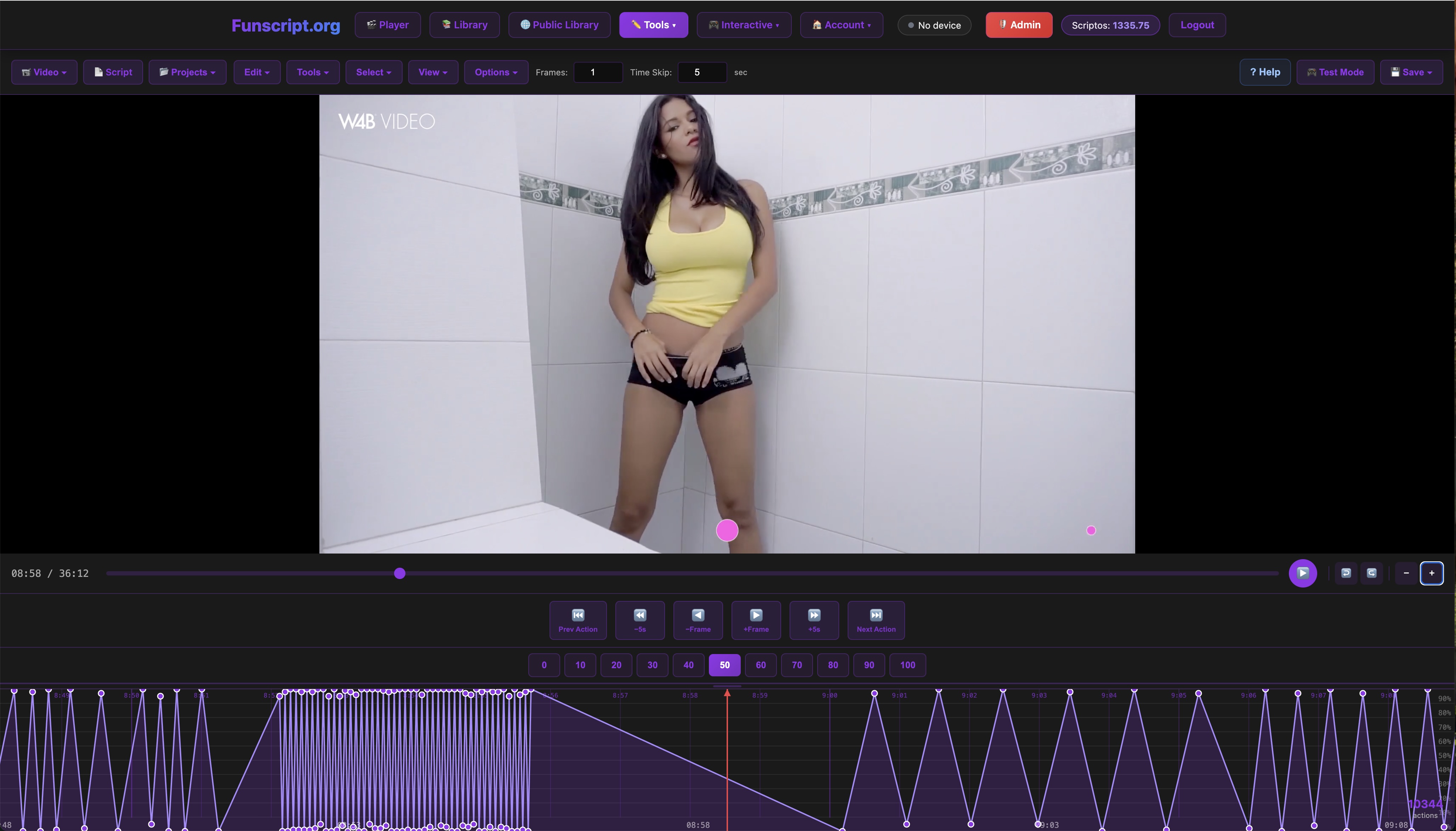
One of the standout features of Funscript.org is its Script Editor. This browser-based tool eliminates the need for additional software, allowing you to create funscripts directly within your web browser. The editor's interface is user-friendly, with a zoomable timeline for frame-by-frame action placement.
In my testing, I found the Visual Beat Generator to be particularly useful. It detects on-screen beat flashes and rhythm cues, making it easy to create scripts where the action follows visual beat markers. The Interpolate feature adds smooth transitions between actions, and the real-time device testing lets you feel the script as you create it.
For those new to scripting, the editor's guided setup walks you through the basics, offering tips and tricks for getting the most out of your scripts. This feature is invaluable for beginners, helping to bridge the gap between novice and expert scripters.
The ability to test scripts in real-time is a game-changer, allowing for instant feedback and refinement.
Testing and Publishing Funscripts
Once you've crafted your funscript, testing it is a breeze. The Script Editor lets you connect your device and test the script directly from within the platform. This seamless edit-test loop is one of Funscript.org's greatest strengths.
After perfecting your script, publishing it to the Public Library is just a click away. This feature allows creators to share their work with the community and receive feedback and tips from other users. It's a vibrant ecosystem that fosters creativity and collaboration among users.
Enhancing Your Experience with Funscript.org
Funscript.org isn't just about creating funscripts; it's about enhancing the entire interactive experience. With features like the video player, AI Control, and Cruise Control, the platform offers a comprehensive suite of tools to elevate your sessions.
Video Player and Public Library
The video player is the core of Funscript.org's experience. It allows you to load a video alongside a funscript file, syncing your device perfectly with the on-screen action. Features like dual-device support and Finish Mode provide additional customization, while the visual intensity heatmap lets you see the script's action at a glance.
Additionally, the Public Library offers a community-driven catalog of videos paired with funscripts. You can browse and filter content by intensity, duration, and more, discovering new experiences curated by the Funscript.org community. It's like having a personalized entertainment hub, powered by a passionate community of creators.
AI Control and Cruise Control
For those seeking a more interactive experience, Funscript.org's AI Control feature is a must-try. This AI companion controls your device in real-time through voice or text commands, offering a personalized and immersive session. You can customize your AI companion's personality, making each interaction unique.
On the flip side, Cruise Control offers a hands-free autopilot mode, running algorithmic patterns to keep your device in motion without the need for a video timeline. It's perfect for those looking to sit back and enjoy the ride. In my testing, both features added an exciting layer of engagement to sessions, each offering a distinct experience.
Whether you prefer hands-on control or a laid-back experience, Funscript.org has features to match your style.
Comparing Funscript.org to Alternatives
While Funscript.org offers a robust suite of features for creating and enjoying funscripts, it's worth considering how it stacks up against alternatives in the market. There are a few other platforms and tools that aim to provide similar functionalities, but they often fall short in key areas.
Alternatives and Their Limitations
Some alternative platforms do offer script creation tools, but they often require additional software downloads or have steeper learning curves. For instance, some desktop applications provide powerful scripting capabilities but lack the seamless, browser-based integration that Funscript.org excels at. They can also be resource-intensive, making them less accessible for users with lower-end hardware.
Moreover, many alternatives don't offer the community-driven features found on Funscript.org, such as the Public Library. This lack of community support means fewer shared experiences and potentially less feedback on your creations. The collaborative aspect of Funscript.org is a major draw for many users, providing a rich resource for both learning and sharing.
Why Choose Funscript.org?
In my experience, Funscript.org's biggest advantage is its all-in-one platform approach. Everything you need to create, test, and enjoy funscripts is available in one place, without the need for additional downloads or installations. The platform's intuitive design and user-friendly interface make it accessible to users of all skill levels.
Additionally, the real-time testing and community features offer an unmatched level of engagement, allowing users to refine their scripts and share them with a vibrant community. This makes it not just a tool, but a hub for anyone passionate about interactive experiences.
Funscript.org combines ease of use with powerful features, making it the go-to choice for funscript enthusiasts.
Frequently Asked Questions
What is the price range for The Handy?
The Handy is priced between $130 and $160, offering a great balance of features and affordability. It's considered a top choice for those entering the world of interactive devices, providing high-quality performance at a reasonable cost.
Handy
Can I use Funscript.org without installing an app?
Yes, Funscript.org is entirely browser-based and does not require any app installation. This makes it accessible and convenient for all users, as you can start creating and enjoying funscripts directly from your browser without any additional setup.
What features does the Funscript.org Script Editor offer?
The Script Editor includes features like beat detection, interpolation, real-time device testing, and more, making it a powerful tool for creating funscripts. These features help streamline the scripting process, allowing for detailed customization and instant feedback as you create.
Are all devices listed compatible with Funscript.org?
Yes, all devices listed in this guide are compatible with Funscript.org and support funscript synchronization, ensuring a seamless experience. This compatibility ensures that regardless of your device choice, you'll be able to fully utilize the platform's features.
How does Funscript.org enhance the interactive experience?
Funscript.org enhances the interactive experience by providing tools for creating detailed funscripts, offering real-time testing, and allowing users to share and explore content through its Public Library. The integration of AI Control and Cruise Control further personalizes and diversifies the experiences available on the platform.
In conclusion, mastering funscript generation opens up a world of possibilities for enhancing your interactive device experiences. From creating custom scripts to exploring community-driven content, Funscript.org provides all the tools you need in one convenient platform. Whether you're a seasoned scripter or a curious beginner, there's something here for everyone. So why wait? Dive in and start exploring the endless possibilities of funscript generation today!