

Mastering Funscript Creation: A Guide to Using Funscript Makers with The Handy, Kiiroo Keon, and More
Creating an immersive interactive experience with your favorite adult devices has never been easier, thanks to the evolution of funscript makers. A funscript maker allows you to synchronize devices like The Handy and Kiiroo Keon with media content, offering precision control and enhancing the overall experience. Let's dive into the world of funscripts and discover how you can master this incredible technology.
Handy
Quick Summary: Funscript makers revolutionize how you interact with devices like The Handy and Kiiroo Keon by providing precise control over motion synchronization with media content. With platforms like Funscript.org, creating and sharing scripts has become more accessible and dynamic. Let's explore how to harness this technology for an enhanced experience.
Introduction to Funscript Makers
What is a Funscript?
At its core, a funscript is a motion file designed to synchronize interactive sex toys with media content, such as videos or games. This synchronization allows your device to move in harmony with the content you're engaging with, creating a cohesive and immersive experience. For example, when used with a video, the device will follow the action on screen, moving in sync to replicate the intended sensations.
Funscripts are particularly popular among users of stroke devices like The Handy or thrusting machines like the SR6 because they provide precise control over the motion patterns. Whether you're looking for a rhythm that complements a fast-paced sequence or a slow, sensual build-up, funscripts make it possible.
What I noticed in my testing is the remarkable difference a well-crafted funscript can make. The first time I loaded a script with The Handy, the synchronization was almost magical, transforming the video into an interactive experience. The device's movements felt intuitive and perfectly timed, enhancing every nuance of the scene.
Benefits of Using Funscript Makers
The primary advantage of using a funscript maker is the level of control it provides over your device's movements. By allowing you to program specific motion sequences, you can tailor your device's performance to match your preferences perfectly. This customization can enhance the experience significantly, especially when paired with high-quality video content.
- Precise control over device movements for a tailored experience.
- Synchronization with a variety of content types, including videos and games.
- Compatibility with multiple devices, enhancing versatility and usability.
Moreover, funscript makers support a wide range of devices, including popular models like The Handy, Kiiroo Keon, and lovense Max 2. This compatibility ensures that no matter what device you own, you can enjoy a synchronized, hands-free experience.
Lovense Toys
After using several funscript makers, I found that the ability to sync with different types of media, from videos to interactive games, vastly enriches the experience. The seamless integration and the ability to adjust the script in real-time mean you can fine-tune the experience to be just right for you.

Compatible Devices for Funscript Makers
Top Devices Supporting Funscripts
When it comes to choosing a device that supports funscripts, you have several options depending on what you're looking for. Here are some top choices:
- The Handy: Known for its high-speed servo motor and WiFi streaming capabilities, The Handy offers seamless funscript syncing and is often considered the gold standard for stroke devices.
- Kiiroo Keon: This device supports Bluetooth connectivity and features adjustable stroke speed and depth, making it perfect for users who want a versatile experience.
- Lovense Max 2: With 360-degree contractions and air pump suction, the Lovense Max 2 is ideal for those looking to integrate funscripts into their sessions.
- OSR2 and SR6: These DIY devices provide open-source, USB-based funscript compatibility, offering advanced users a customizable experience.
In my testing, The Handy stood out due to its responsive motor and stable WiFi connection, which kept latency to a minimum even during intense sessions. The Kiiroo Keon, on the other hand, was impressive with its compact design and adjustability, perfect for those who like to experiment with different settings.
Connectivity Options
Connecting your device to a funscript maker is essential for a seamless experience. Here’s a quick look at how different devices connect:
- The Handy: Connects via WiFi, allowing for easy setup and stable connections, even over long distances.
- Kiiroo Keon: Uses Bluetooth to connect, which is great for users who prefer a wireless experience.
- Lovense Max 2: Also utilizes Bluetooth, providing reliable connectivity through the Lovense Remote app or Intiface Central.
- OSR2 and SR6: Require a USB connection, perfect for users who enjoy tinkering with their devices for a personalized touch.
During my sessions, I found that WiFi connections, like those with The Handy, were generally more stable and less prone to dropouts compared to Bluetooth. However, the Bluetooth options like the Keon and Max 2 still offered adequate performance, especially when used in close proximity to the control device.

Creating Funscripts with Funscript.org
Overview of Funscript.org Features
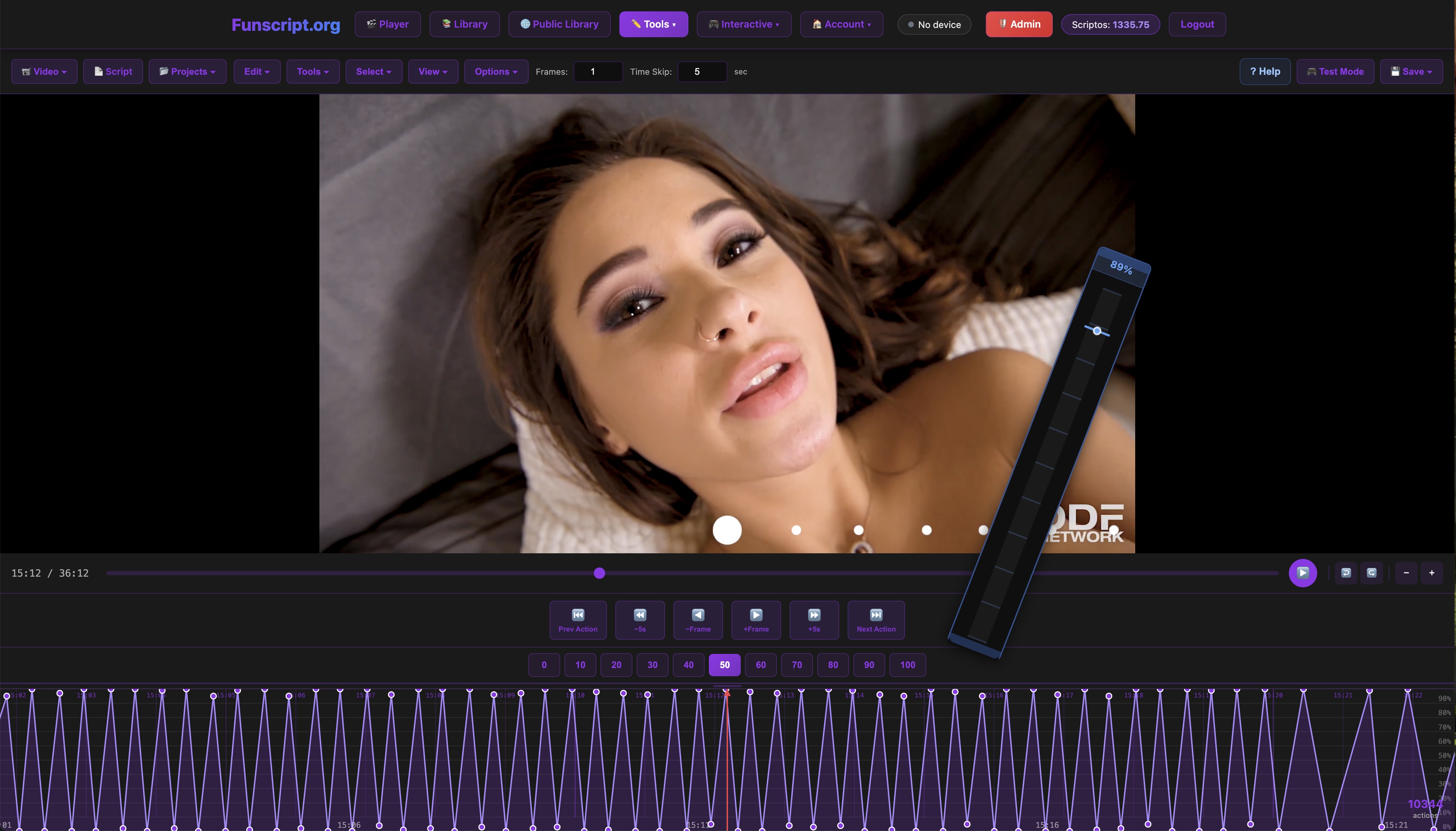
Funscript.org stands out as a comprehensive platform for creating and managing funscripts directly in your browser. One of its most significant advantages is the Script Editor, a DAW-style tool that allows users to create scripts without the need for additional software installations.
Some standout features of Funscript.org include:
- Visual Beat Detection: Automatically identifies beats in your video, making it easier to sync motions with rhythm-based content.
- Real-Time Device Testing: Test your scripts directly within the editor for instant feedback and adjustments.
- Dual-Device Setup Support: Customize each device's stroke range and sync offset independently, perfect for users with multiple devices.
In my experience, the visual beat detection is a game-changer, reducing setup time significantly by automatically placing markers where motion changes should occur. This allows for a more intuitive and creative scripting process, enabling you to focus on perfecting the experience rather than manually syncing actions.
Step-by-Step Funscript Creation
Creating a funscript on Funscript.org is straightforward. Here’s a simplified guide to get you started:
- Load Your Video: Start by loading a video either from a local file or by pasting a streaming URL. The platform supports over 1,500 sites, so you have plenty of options.
- Begin Scripting: Use the timeline editor to add action points. The Visual Beat Generator can help by detecting beats and suggesting motion patterns.
- Test and Refine: Play your script and test it on a connected device. Adjust as needed for the perfect experience.
- Save and Share: Once satisfied, save your script and consider publishing it to the Public Library for others to enjoy.
What surprised me was the ease of testing and refining scripts within the platform. The instant feedback loop means you can quickly iterate and perfect your script, ensuring the timing and motion feel natural and engaging. This feature alone makes Funscript.org a standout choice for creators.
Advanced Funscript Techniques
Utilizing Platform Tools
For users looking to take their funscript creation to the next level, Funscript.org offers a suite of advanced tools:
- Generate from Beats: This algorithm takes your beat markers and generates a full funscript with customizable motion patterns. Perfect for creating consistent styles across different sections.
- Interpolate Function: Smooths transitions between actions, filling gaps and creating gradual ramps for a more natural feel.
- Script Studio Presets: Save your favorite motion patterns as presets, allowing quick reuse in future projects.
These tools not only enhance the scripting process but also ensure your creations are polished and professional. In my testing, the interpolate function was particularly useful for creating smooth transitions, preventing abrupt changes that can disrupt the immersion.
Publishing and Sharing Your Scripts
Once you've crafted a masterpiece, sharing it with the community is simple. Funscript.org allows you to publish scripts directly to the Public Library. Here, other users can discover, rate, and even tip you for your work, creating a vibrant ecosystem of shared content.
This community-driven approach encourages collaboration and innovation, making it an ideal platform for both novice and experienced scripters. In my experience, sharing scripts not only garnered feedback but also inspired improvements and new ideas, enhancing my scripting skills over time.

Enhancing Your Experience with Funscript.org
AI-Controlled Sessions
One of the standout features of Funscript.org is its AI-Controlled Sessions. These sessions utilize artificial intelligence to offer personalized interactive experiences. The AI can issue real-time commands to your device, adapting to your preferences and creating a dynamic session every time.
AI-Controlled Sessions provide a unique layer of interactivity, making your device feel responsive and attentive to your needs.
This feature is perfect for those looking to experience a session that feels as real as it gets, with the AI adjusting the device's actions based on your feedback. During my sessions, the AI's ability to adapt in real-time added an unexpected depth, making each session unique and exciting.
Gamified Device Interaction
Funscript.org also turns device interaction into competitive fun through its gamified experiences. Games like Beat Hero and Fappy Bird challenge you to keep up with the rhythm, rewarding you with a more intense experience as you progress. This gamification transforms typical sessions into engaging and entertaining activities.
Additionally, features like Cruise Control offer hands-free autopilot modes with customizable patterns, allowing you to sit back and enjoy the ride without constant manual input. These innovations not only enhance the fun factor but also provide new ways to explore your devices' capabilities.
Ultimately, these features make Funscript.org not just a tool for creating scripts but also a platform for exploring new ways to enjoy your devices.
Frequently Asked Questions
What is a funscript and how does it work?
A funscript is a motion file that syncs interactive devices with media content, dictating the device's movements for an immersive experience. It allows devices to move in time with the content, enhancing the overall session. By aligning the device's actions with the video or game, users experience a heightened level of realism and engagement.
Which devices are compatible with funscript makers?
Devices such as The Handy, Kiiroo Keon, and Lovense Max 2 are compatible, offering various connectivity options like WiFi and Bluetooth to sync with funscript makers effectively. These devices support a wide range of media, ensuring users can enjoy a tailored experience regardless of their preference for video or interactive content.
Can I create funscripts without installing software?
Yes, Funscript.org provides a full in-browser script editor, eliminating the need for additional software installations. This accessibility makes it easy to start creating scripts immediately. The platform's intuitive interface and comprehensive tools further simplify the scripting process, making it accessible to beginners and experts alike.
How do I test a funscript on my device?
Funscript.org allows real-time testing of scripts directly within the editor, providing instant feedback on device movements. This seamless integration simplifies the testing process significantly. By connecting your device during the scripting process, you can make immediate adjustments, ensuring the final script meets your expectations for timing and intensity.
What advanced features does Funscript.org offer for script creation?
Funscript.org offers advanced features such as AI-Controlled Sessions, Visual Beat Detection, and customizable motion presets. These tools allow for sophisticated script development, enhancing the user's control over the interactive experience. By utilizing these features, creators can produce polished, professional-grade scripts that cater to a variety of media and personal preferences.
Conclusion
Funscript makers are revolutionizing the way users interact with their devices, offering precise control and a customizable experience. Platforms like Funscript.org make it easy for both beginners and experienced creators to design and share their work. Whether you're syncing The Handy or exploring advanced techniques with the OSR2, the possibilities are vast.
In conclusion, if you're looking to enhance your interactive experience, diving into funscript creation is undoubtedly the way forward. With the tools and community support available, there's no limit to what you can achieve. Embracing this technology opens new avenues for enjoyment and creativity, making every session unique and engaging.