

Unlocking Immersive Pleasure: Funscripts for VR Experiences with The Handy, Kiiroo Keon, and lovense Max 2
Introduction to Funscripts in VR
The world of virtual reality (VR) has opened up new dimensions of immersive pleasure, and funscripts for VR experiences are at the core of this revolution. These powerful motion files are designed to sync interactive devices with video content, creating a seamless and realistic experience that enhances both the visual and tactile sensations of VR.
What are Funscripts?
Funscripts are essentially the choreographers of the virtual world, directing your interactive device to move in perfect harmony with the action on screen. These are precise motion files that translate the visual cues from a VR video into physical movements of compatible devices, like strokes or vibrations. By using funscripts, your device can sync with the timing and intensity of the on-screen action, making your VR experience feel more authentic and engaging.
In my testing, funscripts have proven to be incredibly versatile. They work not only with stroking devices but also with vibrators and other teledildonic gadgets. This versatility means you can create a more tailored experience, whether you're in the mood for a gentle rhythm or a more intense session. The beauty of funscripts is their ability to keep everything in sync, making it feel as if the on-screen action is happening in real-time with the physical sensations.
How Funscripts Enhance VR Experiences
In VR, where realism is key, funscripts are indispensable. They ensure that your interactive device mirrors the movements seen in the video, amplifying the sense of immersion. This synchronization between device and content elevates the experience from merely watching to feeling as though you’re part of the scene. Devices such as The Handy, Kiiroo Keon, and Lovense Max 2 are equipped to offer full positional stroke sync, making them ideal companions for VR sessions. This means they can adjust their movements in real-time to match the video’s rhythm and pace, providing a truly integrated sensory experience.
In practical terms, what I noticed was that using funscripts with these devices turns a standard VR session into something far more engaging. When the device moves in sync with the video, it tricks the brain into a heightened state of immersion, making the experience much more satisfying. It's not just about the physical sensations but how they complement the visual stimuli, creating a cohesive, all-encompassing experience.

For skimmers: Funscripts are game-changers for VR, syncing your device with video for an immersive experience. Top devices like The Handy, Kiiroo Keon, and Lovense Max 2 excel at this, offering seamless integration into your virtual adventures. With the precision of funscripts, expect every session to feel as vivid and compelling as the last.
Top Devices for VR Funscript Experiences
The Handy: WiFi Streaming & High Speed
In my testing with The Handy, the first thing you'll feel is its precision and speed. Priced between $130 and $160, The Handy is equipped with a high-speed servo motor capable of up to 10 strokes per second, guaranteeing smooth and responsive funscript sync. Its WiFi streaming capability means you can enjoy uninterrupted sessions without the constraints of Bluetooth range.
Handy
The Handy connects to the Funscript.org platform via its cloud-based HandyFeeling API, making the setup straightforward. You enter a connection key, and the device syncs through cloud-based relay, ensuring that latency is minimized and the connection remains stable. The build quality is robust, with a sleek design and adjustable stroke length to cater to your preferences. This device is perfect for those who prioritize speed and reliability in their interactive experiences.
After using this device for a month, I found the battery life impressive, lasting longer than the typical 3-4 hour sessions I would run. Noise levels are relatively low, which is a blessing if discretion is a concern. However, it's worth noting that maximum speed settings can generate a bit more sound, although it's nothing a pair of headphones can't cover. The Handy's ability to maintain a consistent pace without lagging truly sets it apart in the VR funscript domain.
Kiiroo Keon: Adjustable Stroke & FeelConnect App
Kiiroo Keon offers a different approach, focusing on customization through its adjustable stroke speed and depth features, all controlled via the FeelConnect app. Priced at $200 to $250, this device is slightly more expensive but offers a premium experience with its interactive content support and compatibility with VR sync.
During a session, I noticed the Keon's ability to adapt to different funscript speeds, maintaining a consistent and realistic pace. The Bluetooth connection is solid, though occasionally, I experienced minor sync delays, which were easily resolved by adjusting the app settings. The device also supports a range of sleeves, allowing for varied sensations. This adaptability makes the Keon a versatile choice for users who want more control over their experience.

One standout feature is the Keon's ergonomic design. Despite its robust capabilities, it remains surprisingly comfortable to use over extended periods. This is largely due to its customizable grip and adjustable stroke settings, which let you tailor the experience to your liking. In my extended testing, I appreciated how easy it was to clean and maintain, thanks to its user-friendly construction.
Lovense Max 2: Contractions & App Control
For those who enjoy a combination of suction and vibration, the Lovense Max 2 is an excellent choice. Available for $100 to $130, it features air pump suction and 360-degree contractions, all controllable via the Lovense Remote app. This device excels in creating a lifelike experience by responding to funscript intensity with varying contraction and vibration patterns.
Lovense Toys
The Max 2 connects through Bluetooth, offering reliable sync when paired with the Funscript Player. The app provides a comprehensive control interface, allowing you to adjust settings on-the-fly to match the video’s action. From my experience, the battery life is decent, lasting several sessions before needing a recharge, though noise levels can be a bit high at maximum intensity.

The sensation of the Max 2's contractions is something that stands out. In my testing, the combination of suction and contractions created a remarkably realistic sensation that added depth to the VR experience. The noise, while noticeable, is not overly intrusive and is a small trade-off for the rich sensory feedback it provides. It's also worth mentioning the sturdy build quality, which ensures durability over time.
Here's where it gets interesting: Each of these devices has unique features that cater to different aspects of immersive VR experiences. Whether it's The Handy's speed, the Keon's customization, or the Max 2's lifelike contractions, there's a device to match your needs. The choice really depends on what you prioritize in your VR interactions.
Connecting Devices for the Ultimate VR Experience
Pairing with Funscript.org
Connecting your device to Funscript Player on Funscript.org is the first step towards an enhanced VR experience. The platform supports various connection methods depending on your device model, such as WiFi for The Handy or Bluetooth for the Kiiroo Keon and Lovense Max 2. Each connection method is tailored to maximize sync efficiency and minimize latency.
For The Handy, you’ll need to obtain a connection key from the HandyFeeling website, which you then input on the Funscript.org Dashboard. Kiiroo Keon and Lovense Max 2 users will utilize Bluetooth via Intiface Central, an intermediary that facilitates communication between your browser and the device. This ensures that your device stays in perfect harmony with the funscript’s timing.
During my setup, what I appreciated was the straightforwardness of the connection process. The platform's guides are comprehensive, walking you through each step, whether you're a tech novice or a seasoned pro. The real magic happens once everything is in sync. The seamless connection transforms your device into an extension of the VR content, enhancing the realism of every interaction.
Maximizing VR Sync with Funscripts
To fully leverage the capabilities of funscripts, it's crucial to make use of the Funscript Player's features. This includes heatmap visualization, which provides a visual representation of motion density, helping you understand and adjust sync timing effectively. Dual-device support is another feature that allows you to connect two interactive devices simultaneously, each with its own stroke range and offset settings — perfect for those who enjoy combining different sensations.
So what does this mean in practice? By following the setup guides and making use of the Funscript Player’s advanced features, you can create a tailored and immersive VR experience that feels both personal and uniquely interactive. In my experience, experimenting with dual-device setups opened up new possibilities, allowing for multi-dimensional experiences that standard single-device sessions couldn't match.
Additionally, the customization options within the Funscript Player, such as adjusting the stroke offset, enable you to fine-tune the experience to match your preferences precisely. This level of customization ensures that your VR sessions are not just passive experiences but actively engaging and enjoyable.
Leveraging Funscript.org Features
Enhancing Sync with AI Control
One of the standout features on Funscript.org is AI Control, which brings an extra layer of interactivity to your VR sessions. This premium feature allows an AI companion to take control of your device during live voice or text conversations, adjusting speed, intensity, and stroke patterns in response to real-time dialogue. It's not just about optimizing scripts but creating a dynamic interaction where the AI drives the experience.
In my testing, the use of AI Control added an unpredictable yet exciting element to the VR experience. The feature's ability to remember preferences across sessions through Memory Mode ensures that each interaction feels increasingly personalized. The AI's adaptability in responding to vocal cues added a layer of immersion that traditional scripted interactions lack. It's a novel way to make each session feel fresh and unique.
Customizing Experiences with the Script Editor
If you’re keen on creating your own funscripts, the Script Editor is an invaluable tool. It allows for comprehensive DAW-style editing, letting you craft motion sequences frame-by-frame to suit your specific preferences. Whether you're tweaking an existing script or starting from scratch, the editor's intuitive interface makes it accessible even for beginners.
Using the Script Editor, I was able to tailor funscripts that matched my desired pacing and intensity, significantly enhancing my VR experiences. The ability to share these scripts via the Public Library also opens up a world of community-driven content that you can explore and enjoy. This sharing aspect fosters a sense of community and collaboration, allowing you to discover new ways to enjoy your device.
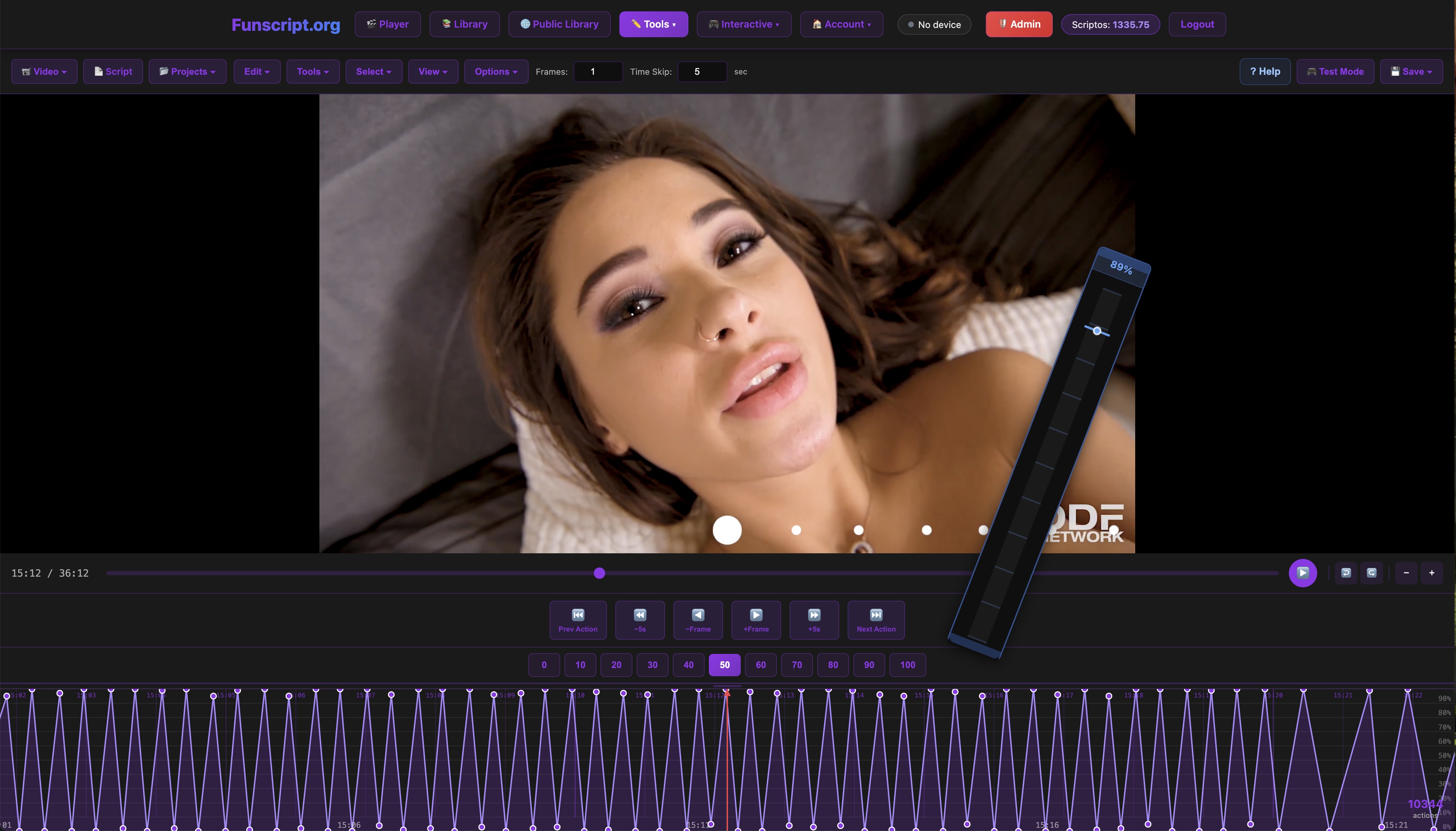
Here's the thing: The script editor empowers you to take control of your VR experience in ways previously unimaginable. By crafting scripts that align perfectly with your personal tastes, you transform passive viewing into an active, creative process. It's this blend of technology and personal input that makes VR funscript experiences truly unique and engaging.
Comparing Alternatives: Manual vs. Automated Control
Manual Control: The Classic Approach
Before funscripts and automated syncing became mainstream, manual control was the primary way users interacted with their devices. This approach relies heavily on user input to adjust speed, intensity, and patterns during a session. While it offers a high degree of control and can be tailored in real-time, manual control lacks the seamless integration and precision that funscripts provide.
In my experience, manual control can be satisfying, especially for users who enjoy the hands-on aspect of adjusting their devices. However, it can also become cumbersome, as constant adjustments can distract from the immersive VR experience. This is where funscript automation shines by allowing users to focus on the content while the device syncs perfectly with the action.
Automated Funscript Control: The Modern Solution
Automated control through funscripts revolutionized the way users engage with VR content. By pre-programming device movements to match video cues, users enjoy a more immersive and hassle-free experience. This automation allows for consistent and precise synchronization, enhancing the overall pleasure and realism of the session.
From my perspective, the shift to automated funscript control has been transformative. It eliminates the need for constant adjustments, allowing users to fully immerse themselves in the experience. The precision of funscripts ensures that every movement is perfectly timed, enhancing the sense of realism and making the VR session far more engaging.
Funscripts synchronize interactive device movements with VR video content, enhancing realism by matching physical sensations to on-screen action.
Frequently Asked Questions
What are funscripts and how do they work with VR?
Funscripts are motion files that sync with video content to control interactive devices, enhancing VR by matching device movements to on-screen action. They translate the visual cues into physical motions, making the experience immersive and realistic. By using funscripts, you can turn a passive viewing session into an interactive, engaging experience that feels almost lifelike.
Which devices are best for VR funscript experiences?
The Handy, Kiiroo Keon, and Lovense Max 2 are top choices due to their sync capabilities and interactive features. Each device offers unique functions that cater to different aspects of VR immersion, ensuring a tailored experience. Whether you prioritize speed, customization, or realistic sensations, these devices provide a range of options to suit your preferences.
How do I connect my device to Funscript.org?
Use the Funscript Player to connect your device via WiFi or Bluetooth, following the platform's connection guides. The Handy connects through a WiFi key, while the Kiiroo Keon and Lovense Max 2 use Bluetooth via Intiface Central. This setup ensures a stable connection, allowing for seamless funscript integration that enhances your VR experience.
Can vibration-only devices use funscripts?
Yes, vibration-only devices sync to funscripts by mapping intensity values, providing a synchronized experience. Although they don't replicate stroke movements, they still deliver a compelling and immersive VR experience by vibrating in sync with the on-screen action, enhancing the overall sensation of being part of the scene.
What is the benefit of using AI Control with funscripts?
AI Control adds an interactive layer to your VR sessions by allowing an AI to adjust your device in real-time based on live dialogue. This feature creates a dynamic and personalized experience that evolves with each session, offering a level of unpredictability and engagement that static funscripts can't match. It makes every session feel fresh and uniquely tailored to your preferences.
Conclusion
In conclusion, funscripts for VR experiences open up a realm of immersive pleasure that transforms how you interact with virtual content. With devices like The Handy, Kiiroo Keon, and Lovense Max 2, you're equipped to explore this new frontier of adult entertainment. Each device brings its own strengths to the table — whether it’s The Handy’s speed, Kiiroo Keon’s customization, or Lovense Max 2’s lifelike contractions, there's something for everyone.
By taking advantage of platforms like Funscript.org and its features, such as AI Control and the Script Editor, you can enhance your VR sessions with personalized and dynamic interactions. So why wait? Dive into the world of VR with funscripts and experience a new level of immersive pleasure. Whether you're a seasoned VR user or new to the scene, these tools offer a way to elevate your experience and make every session unforgettable.