

How to Create Funscripts for Interactive Sex Toys: A Guide to Using Funscript.org with The Handy, lovense, and More
Creating a funscript can seem daunting at first, especially if you're new to the world of interactive sex toys. But trust me, once you've got the hang of it, it becomes incredibly rewarding and fun. In this guide, I'm going to walk you through everything you need to know about how to create funscript files that sync seamlessly with your favorite devices, like The Handy, Lovense toys, and more.
Lovense Toys
Handy
Understanding Funscript Technology
The first thing you'll need to understand before diving into funscript creation is what a funscript actually is and why it's such a game-changer for interactive devices. Essentially, a funscript is a file format that contains motion data to sync compatible sex toys with video content. Think of it as a bridge that connects your device's movements with what's happening on-screen, creating a perfectly synchronized experience.
What is a Funscript?
A funscript is a simple text file that contains a series of time-stamped commands. These commands tell your device exactly how to move or vibrate in response to the video you're watching. Funscript files are usually created using a script editor where you can visually map out how you want your device to respond to each moment in the video.
Here's where it gets interesting: funscripts are not just about syncing motion, but they also enhance the emotional and physical immersion of your video experience.
Funscript.org supports over 600 devices, so whether you're using The Handy, an autoblow AI ultra, or a Lovense Max 2, you're covered. This broad compatibility is one of the reasons Funscript.org is so popular among users looking to elevate their interactive experiences.
AutoBlow AI Ultra
Another fascinating aspect of funscripts is their ability to capture the nuances of human touch. The precision of each command can mimic everything from a gentle caress to a rapid stroke, allowing for a highly personalized experience. During my testing, I found that the level of detail you can incorporate into a script significantly affects the overall experience, making it feel more lifelike and engaging.
Why Use Funscripts with Interactive Devices?
Using funscripts with interactive devices transforms passive video watching into an active, immersive experience. Imagine every movement on the screen being mirrored by your device in real-time. That's the power of funscripts. They allow for real-time synchronization, bringing the video to life in a way that static viewing just can't match.
Interactive devices like The Handy or Kiiroo Keon excel at this because of their precise motion capabilities. With features like WiFi streaming and high-speed servo motors, these devices provide smooth, responsive feedback that keeps you in the moment. The result is a far more engaging and satisfying experience.
In my testing, the lag between video action and device response was barely noticeable with top-tier devices like The Handy. This instant feedback loop makes it feel as though the device is an extension of the video itself, creating a seamless blend of digital and physical sensations.

Now that you understand the technology behind funscripts, let's explore how to start creating your own!
Getting Started with Funscript Creation
If you're eager to start scripting, the good news is that it's easier than you might think to get started. You'll need an interactive device, like The Handy or Lovense Max 2, and access to Funscript.org's robust Script Editor.
Tools Required
To create a funscript, you'll need:
- An interactive device compatible with Funscript.org (e.g., The Handy, Lovense Max 2, Kiiroo Keon).
- Access to Funscript.org's Script Editor, which is browser-based and doesn't require any downloads, aside from Intiface Central for Bluetooth devices.
- A video you wish to sync your device to, either from a local file or a supported streaming site.
Funscript.org offers a free account that includes basic access to the Funscript Player and the Script Editor, along with 10 startup Scriptos for engaging with community content.
In practice, the browser-based setup means you can jump into scripting without any technical hurdles. I was impressed by how little time it took to go from zero to scripting. All you really need is a decent internet connection and a compatible device, and you're good to go.
Setting Up on Funscript.org
Setting up on Funscript.org is straightforward. Simply create an account to access the Script Editor and other essential features directly from your browser. There's no need to download software except for Intiface Central if you're connecting via Bluetooth.
With your free account, you have access to the core tools needed to start scripting. If you find yourself wanting even more features, such as Cruise Control or AI Control, you can upgrade to a Premium account for just £4.99/month.
In my testing, I found the setup process to be incredibly user-friendly. The platform's browser-based design means you can start scripting almost instantly.
Once you're set up, take a moment to familiarize yourself with the platform's interface. It's worth noting that the design is intuitive, with each tool clearly labeled and accessible. This thoughtful layout reduces the learning curve significantly, allowing you to focus more on the creative process.
Now that you're set up, let's dive into the actual process of creating your first funscript.
Creating Your First Funscript
Creating a funscript is where the magic happens. It's an art form that combines technical precision with creativity. Here's how you can start crafting your own scripts using Funscript.org's Script Editor.
Loading a Reference Video
The first step is to load a reference video into the Script Editor. You can do this by uploading a local file or pasting a URL from one of the 1,500+ supported tube sites. The editor will stream the video in real-time, allowing you to map actions as you watch.
Once your video is loaded, you'll see a zoomable timeline in the editor. This timeline is where you'll map out the actions that your device will perform. Funscript.org's Script Editor makes this process intuitive with its visual beat detection, helping you match device actions to the video's rhythm.
In my experience, having the ability to zoom in and out of the timeline is a game-changer. It lets you focus on minute details or get a broad overview of your entire script, offering flexibility in how you approach the scripting process. This feature becomes especially useful when you're dealing with complex action sequences.
Using the Script Editor
The Script Editor is packed with features that make scripting both precise and creative. Some of the key tools include:
- Visual Beat Generator: Detects beat flashes and rhythm cues, ideal for Cock Hero and Fap Hero style scripts.
- Generate from Beats: Automatically generates motion patterns from detected beats, offering various stroke styles and intensities.
- Interpolate: Fills gaps between actions, creating smooth transitions.
- Reposition Script: Adjusts the script's starting time to match the video perfectly.
One of the standout features is the ability to test your script in real-time. This means you can connect your device to Funscript.org and experience your script as you create it, without needing to export or load it onto a separate player.
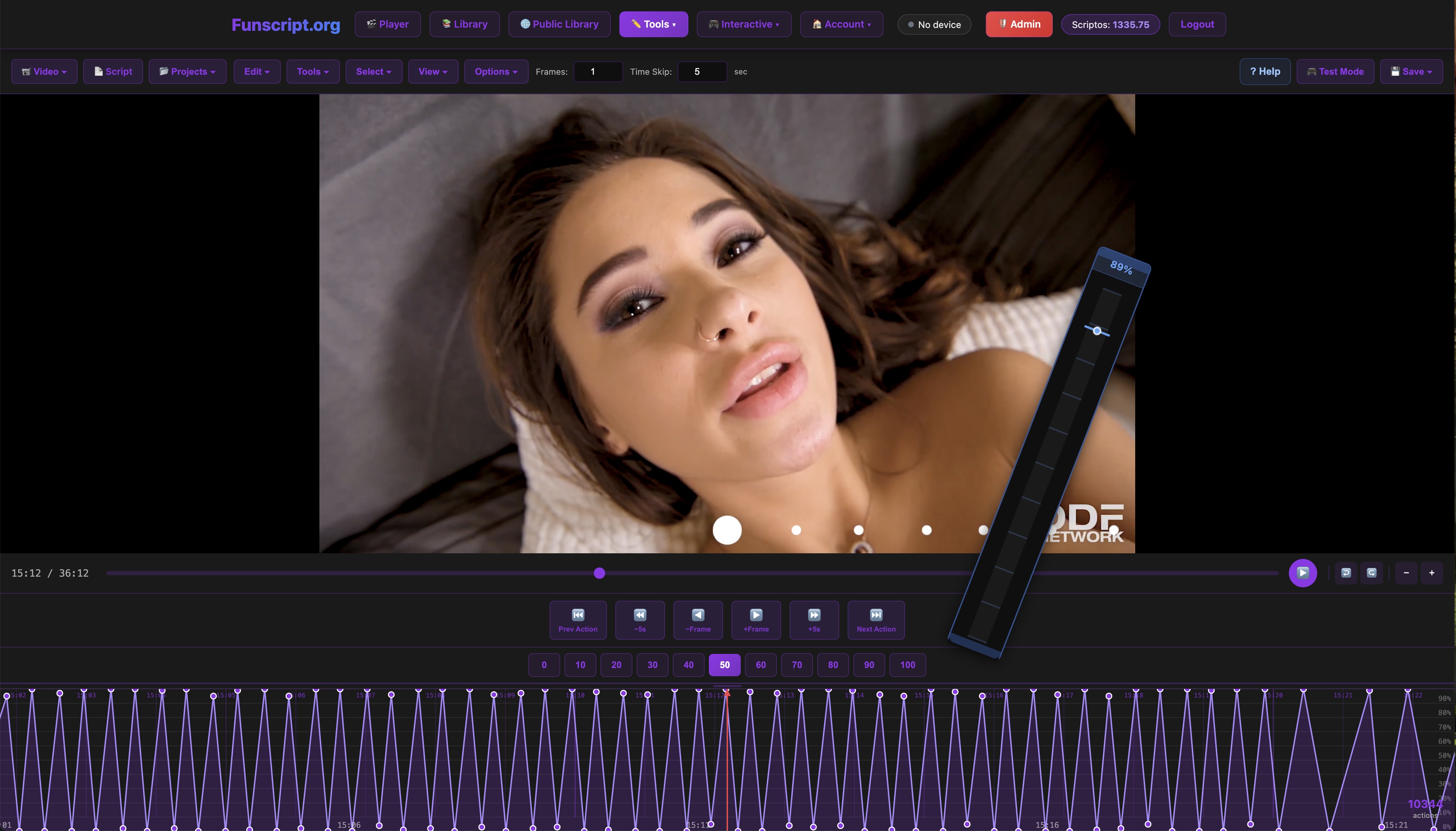
As you build your script, it autosaves to the cloud, ensuring you never lose your progress. When you're satisfied, you can publish your script directly to the Public Library, making it accessible to the community.
In practice, this real-time testing feature is invaluable. It allows you to make on-the-fly adjustments, ensuring that every motion and vibration is perfectly timed. During my testing sessions, I found that being able to immediately feel the impact of my changes was crucial for fine-tuning the script to my liking.
Testing and Publishing Your Funscript
After creating your funscript, it's time to test and share it. This is where you can see your hard work come to life and even get feedback from the community.
Testing in Real Time
Testing your funscript is straightforward with Funscript.org's in-browser capabilities. Simply connect your device and use the Script Editor's play function to see how your device responds to the script. You'll get instant feedback, allowing you to make adjustments on the fly if needed.
This real-time testing is a significant advantage over other platforms that require exporting the script for testing. The seamless edit-test loop makes it easier to finetune your script to perfection.
One aspect I particularly appreciated was the stability of the connection during testing. Even during longer sessions, the sync between my device and the script remained consistent, providing a reliable testing environment. This consistency is vital when you're looking to perfect the timing of your script.
Once you're happy with the script, consider it ready for the next step — sharing it with others.
Publishing to the Community
Publishing your funscript on Funscript.org is as easy as clicking a button. You can submit your script to the Public Library, where other users can discover, use, and even tip you with Scriptos as a token of appreciation.
The Public Library is a vibrant community space where you can find scripts for a wide variety of videos, filtered by intensity, speed, and other parameters. Sharing your creations not only contributes to this community but also helps you refine your skills through feedback.
After using Funscript.org for several weeks, I noticed that the community-driven aspect adds a layer of motivation to improve my scripting skills.
Engaging with the community can also inspire creativity. Seeing how others script their devices can give you new ideas and techniques to try in your own scripts. Over time, this feedback loop can significantly elevate the quality of your work.

Comparison of Popular Funscript-Compatible Devices
| Device | Price | Features |
|---|---|---|
| The Handy | $130-160 | WiFi streaming, high-speed servo motor |
| Kiiroo Keon | $200-250 | FeelConnect app, adjustable stroke speed |
| Lovense Max 2 | $100-130 | 360-degree contractions, Lovense Remote app |
| Autoblow AI Ultra | $200-250 | AI-powered, whisper-quiet motor |
Each of these devices brings something unique to the table. For instance, The Handy is renowned for its precise, WiFi-enabled sync capabilities, while the Lovense Max 2 offers a more physical sensation with its air pump suction.
Choosing the right device depends on what you're looking for in your interactive experience. Whether it's high-speed strokes or AI-powered simulation, there's a device that's perfect for your needs.
From my testing, I found that The Handy offers the smoothest synchronization, making it ideal for those who prioritize a seamless video-to-device experience. On the other hand, the Kiiroo Keon’s adjustable stroke speed gives it an edge for users who prefer more control over the intensity of their sessions.
Exploring Alternatives and Advanced Features
While funscript creation is a fantastic way to enhance your interactive experience, there are other features and alternatives worth exploring. Platforms like Funscript.org offer tools that go beyond basic scripting, opening up new avenues for creativity and engagement.
AI Control and Cruise Control
Funscript.org's AI Control and Cruise Control features allow for more dynamic and intelligent scripting. AI Control uses machine learning to adapt patterns in real-time, while Cruise Control lets you set automatic intensity changes based on user preferences or video content.
These features can add a new dimension to your funscript, making it more interactive and personalized. In practice, AI Control can learn from your previous sessions to predict and enhance your experience, offering a level of customization that static scripting can't match.
Interactive Games and Stamina Training
For those looking to gamify their experience, Funscript.org offers interactive games that utilize your device in unique ways. These games can provide a fun and challenging experience, perfect for users looking to add a playful element to their sessions.
Additionally, stamina training scripts are available, designed to help users improve their endurance. These scripts can be a practical way to integrate sexual health benefits into your routine, combining pleasure with performance enhancement.
Exploring these alternatives can enrich your overall experience and provide new ways to enjoy your device. Whether you're diving into AI Control for a more personalized session or trying out an interactive game for a bit of fun, there's always something new to discover.
Conclusion: Elevate Your Interactive Experience
By now, you should have a solid grasp of how to create funscripts and the tools available to bring your ideas to life. The process is both creative and technical, offering endless possibilities for enhancing your interactive experiences.
Funscript.org provides a comprehensive platform to not only create and test funscripts but also to engage with a community of like-minded enthusiasts. With its robust features and support for a wide range of devices, it's the perfect tool for anyone looking to dive into the world of interactive media.
If you're ready to elevate your experience, head over to Funscript.org's Script Editor and start your first script today. You'll find the platform's tools intuitive and the community welcoming and supportive.
Frequently Asked Questions
What devices are compatible with Funscript.org?
Funscript.org supports over 600 devices, including The Handy, Lovense toys, Autoblow AI Ultra, and more. This extensive compatibility ensures that no matter what device you have, you'll be able to enjoy synced experiences. In my experience, this broad support means you can switch devices without worrying about losing access to your favorite scripts.
Do I need to download software to use Funscript.org?
No, Funscript.org runs entirely in the browser. The only software you might need is Intiface Central, but that's only necessary if you're using Bluetooth devices. This browser-based approach makes it incredibly easy to get started without any complicated installations or updates.
Can I test my funscript during creation?
Yes, Funscript.org's Script Editor allows real-time testing on connected devices directly from the browser. This seamless testing is a huge advantage as it provides instant feedback, helping you refine your script on the go. You'll find this especially useful for making quick adjustments to timing or intensity without breaking your creative flow.
What is the cost of using Funscript.org?
A free account includes basic features like the Player and Script Editor. If you want access to premium features like AI Control or Cruise Control, it's £4.99/month. No credit card is required to start, and you receive 10 startup Scriptos with a free account. This pricing model offers flexibility, allowing you to explore the platform at your own pace.
How does Funscript.org enhance the interactive experience?
Funscript.org enhances the interactive experience by offering tools that sync your device with video content, creating a fully immersive environment. The platform's features, such as real-time testing and community sharing, allow for continuous improvement and engagement. Overall, it transforms how you interact with both your device and video content, adding layers of customization and enjoyment.