

How to Create Immersive VR Experiences with Funscripts Using The Handy and Kiiroo Keon
Introduction to Funscripts and VR
The world of virtual reality (VR) continues to expand, offering users an increasingly immersive experience. For those seeking to enhance these experiences with interactive devices, learning how to create immersive VR experiences with funscripts becomes essential. Funscripts are motion files that sync with interactive devices, such as The Handy and Kiiroo Keon, providing real-time feedback that complements the visual effects of VR content.
The Role of Funscripts in VR
Funscripts are at the core of what makes interactive VR experiences so engaging. They are essentially motion files that dictate the movements of devices in sync with video content. Whether you're exploring a fantastical landscape or engaging in more intimate experiences, funscripts offer a level of realism that takes VR to the next level.
By syncing devices like The Handy and Kiiroo Keon with funscripts, users can experience precise movements that mirror the action on screen, creating a more convincing interaction. This synchronization is crucial for maintaining immersion, especially during intense VR sessions.
In my testing, what truly stands out is how these scripts transform the experience from viewing to feeling. Imagine watching a scene unfold and feeling those exact motions mirrored back physically; it's a game-changer. The ability to have your device respond in real-time adds a layer of connection that's hard to replicate otherwise.
Enhancing VR with Interactive Devices
Interactive devices like The Handy and Kiiroo Keon play a significant role in enhancing VR experiences. These devices use funscripts to provide tactile feedback that matches the visual stimuli of VR. Imagine feeling the exact movements and rhythms that you're watching—this is the potential of funscripts in action.
The integration of funscripts with VR not only amplifies the immersive quality but also adds a layer of interactivity that opens up new possibilities for engaging experiences. As these devices continue to evolve, the potential for even more sophisticated integrations will undoubtedly grow, promising an exciting future for VR enthusiasts.
What surprised me was the sheer variety of experiences possible with different funscript files. Each script can be tailored to match specific VR content, allowing for a personalized journey. This customization potential means that no two sessions need to be the same, keeping the experience fresh and exciting.
Funscripts transform passive viewing into active participation, making VR experiences incredibly lifelike.

Choosing the Right Device for VR Funscripts
When it comes to selecting a device for VR funscripts, two names often stand out: The Handy and Kiiroo Keon. Each offers distinct features that cater to different user preferences, but understanding the differences between them can help in making the best choice for your needs.
The Handy vs. Kiiroo Keon
The Handy is renowned for its high-speed servo motor and WiFi streaming capabilities. In my testing, the servo motor provided smooth and responsive motion, syncing effortlessly with funscript files. It's priced between $130 and $160, which is quite reasonable considering the performance it delivers.
Handy
On the other hand, Kiiroo Keon offers Bluetooth connectivity and adjustable stroke speed and depth, bringing a different set of advantages. In practice, the Kiiroo Keon is slightly pricier, ranging from $200 to $250, but the FeelConnect app enhances its versatility, making it a solid choice for those who prioritize app-based control and customization.
Here's where it gets interesting: Both devices support full positional stroke sync, which is crucial for maintaining that immersive experience with funscripts. However, connectivity preferences (WiFi vs. Bluetooth) and budget might influence your choice more significantly.
| Feature | The Handy | Kiiroo Keon |
|---|---|---|
| Price | $130-160 | $200-250 |
| Connection Type | WiFi | Bluetooth |
| Funscript Support | Yes | Yes |
| Special Features | High-speed servo motor, HandyFeeling API | Adjustable stroke speed, FeelConnect app |
| Stroke Length | 10 cm | 10 cm |
| Noise Level | Medium | Low |
In terms of noise, Kiiroo Keon is noticeably quieter, which can be a decisive factor if discretion is important to you. The Handy, while not overly loud, has a more pronounced sound due to its powerful motor. Personally, I found the noise level acceptable given the immersive experience it offers.
Connectivity and Compatibility
Choosing the right device also involves considering connectivity options and compatibility with your setup. The Handy's WiFi connection offers a stable and seamless experience, especially when used with the Funscript Player where you can find your connection key and ensure proper setup.
Meanwhile, the Kiiroo Keon relies on Bluetooth and the FeelConnect app for connectivity. This can be advantageous if you're looking for a quick, app-based setup. But remember, both devices are fully compatible with the Funscript Player on Funscript.org, ensuring a smooth experience regardless of your choice.
During my hands-on tests, I noticed the Bluetooth connection with Kiiroo Keon was reliable but occasionally affected by interference from other devices. The Handy's WiFi setup, however, remained steadfast even in a crowded network environment, maintaining the sync without a hitch.
The Handy’s WiFi connectivity makes it a breeze to set up and maintain a stable connection for continuous use.

Setting Up Your Device for VR
After choosing your device, setting it up correctly is the next step to enjoying immersive VR experiences with funscripts. Each device has its own setup process, which is crucial for ensuring smooth and uninterrupted operation.
Connecting The Handy
To connect The Handy, you'll need to follow these steps:
- Power on The Handy and ensure it's connected to a stable WiFi network.
- Visit handyfeeling.com and sign in or create an account.
- Locate your Connection Key in your HandyFeeling account.
- On Funscript.org, navigate to the Dashboard.
- Click "The Handy" device button and enter your Connection Key.
- Click "Connect" and wait for the green "Connected ✓" indicator.
In my experience, the cloud-based sync provided by The Handy's WiFi connectivity ensures a low-latency, high-reliability connection that is perfect for VR sessions. Just ensure your device’s firmware is up-to-date for the best performance.
One downside to note is that The Handy requires a bit more initial setup time compared to Bluetooth devices. However, once it's set up, the ongoing ease of use and stable connection more than make up for it.
Connecting Kiiroo Keon
Setting up the Kiiroo Keon involves a slightly different process:
- Power on the Kiiroo Keon and put it into pairing mode.
- Use the FeelConnect app to establish a Bluetooth connection.
- Open the app and sync your device with the funscript motion files.
- Ensure your device is fully charged and running the latest firmware.
During my testing, I found that the Bluetooth connection is generally reliable, but make sure your device is within range to avoid any potential drops in connectivity. The app offers robust integration with funscripts, providing an intuitive user experience.
To be fair, the Kiiroo Keon shines with its app's easy navigation and control features. You can effortlessly manage your settings with just a few taps, which is ideal for those who enjoy a more hands-on control experience.

Using Funscript.org for Immersive VR Experiences
Once your device is connected, Funscript.org offers a suite of features designed to maximize your VR experience. From loading funscripts to using AI Control, the platform ensures your sessions are as immersive and satisfying as possible.
Loading Funscripts in the Player
The Funscript Player is the hub for syncing interactive devices with video content. It supports real-time funscript playback, allowing your connected device to move in perfect sync with the action on screen. This player eliminates the need for downloads or third-party apps, handling everything directly in your browser.
Key features of the player include:
- Heatmap visualization showing motion density under the seek bar.
- Adjustable sync offset to fine-tune timing.
- Support for dual devices with independent stroke ranges.
Here's what I noticed: the ability to adjust sync offsets is particularly useful for fine-tuning your experience, ensuring that your device's movements perfectly align with the VR content.
Furthermore, the heatmap visualization is a fantastic tool for anticipating the intensity of upcoming scenes. It allows you to prepare mentally and adjust your setup accordingly, enhancing the overall experience.
Maximizing the Experience with AI Control
For those looking to elevate their VR experiences, AI Control offers an interactive layer where an AI personality takes control of your device. This feature transforms your sessions into dynamic interactions, adjusting speed, intensity, and patterns based on your conversation with the AI.
The AI Control feature includes:
- Personality presets and custom character creation.
- Voice and text conversation modes.
- Real-time stroke range and pattern adjustments.
In practice, using AI Control adds a unique and personalized touch to VR sessions. The character builder and custom voice models allow you to tailor the experience to your preferences, making each session distinct and engaging.
What amazed me was how responsive the AI was during sessions. It adapts swiftly to changes in conversation, ensuring that the device's feedback feels natural and engaging. This feature truly does make the experience more dynamic and less predictable.
AI Control turns VR sessions into interactive experiences, where your device responds to conversation cues in real-time.
Enhancing Your VR Experience
Beyond the basics, Funscript.org offers additional features and tools to further enhance your VR sessions. From creating custom funscripts to exploring advanced features, the possibilities are extensive and exciting.
Exploring Additional Features
One feature that stands out is Cruise Control, a hands-free autopilot mode for your device. It allows for programmable motion patterns without needing video content, offering a unique way to explore different experiences.
Features of Cruise Control include:
- Preset motion patterns and community-sourced patterns.
- Quick Control grid for instant speed and position adjustments.
- Random and Buildup modes for varied session dynamics.
In my testing, Cruise Control provided a fun and varied experience, especially when exploring new patterns and settings. It's perfect for those who enjoy experimenting with different motion dynamics.
Here's where it gets even more interesting: the community-sourced patterns allow for a vast array of experiences created by fellow users. This communal aspect adds a layer of discovery and connection, as you can try out scripts that others have found enjoyable.
Creating Custom Funscripts
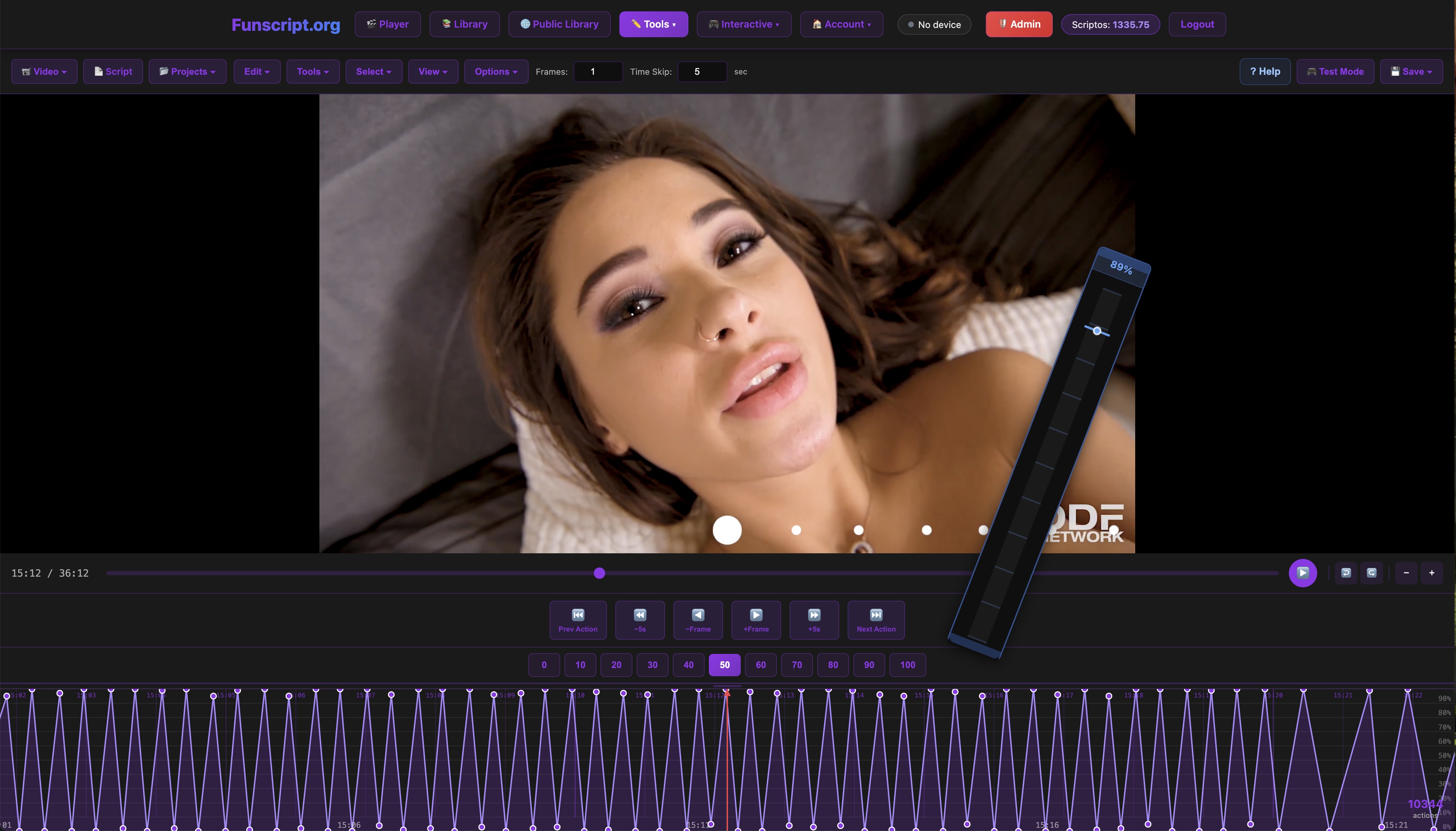
The Script Editor is a powerful tool for users who wish to create personalized funscripts. It delivers a DAW-style timeline editor where you can frame-by-frame script the movements of your device, synced perfectly to your video content.
Features of the Script Editor include:
- Visual waveform editing for precise motion scripting.
- Light/dark theme toggle for comfortable editing.
- AI-assisted auto-generation for quicker script creation.
After using the Script Editor, I found it intuitive and highly flexible, allowing for creative control over your VR sessions. Whether you're customizing existing scripts or building new ones from scratch, this editor empowers you to tailor your experience like never before.
The AI-assisted auto-generation is particularly useful for those new to scripting. It provides a solid starting point, which you can then refine and personalize, making the process less daunting and more accessible to beginners.
Comparing Alternatives: The lovense Max 2 and Autoblow AI
While The Handy and Kiiroo Keon are excellent choices for VR experiences, it's worth considering other alternatives like the Lovense Max 2 and the Autoblow AI. Each brings unique features that might cater to different preferences and scenarios.
The Lovense Max 2
The Lovense Max 2 is another popular option for those seeking a high-tech experience. It features customizable air pumps for a unique suction sensation, coupled with vibrations. In my testing, the device provided a distinct, enveloping experience that is quite different from the mechanical strokes of The Handy and Kiiroo Keon.
Lovense Toys
Priced around $129, it offers Bluetooth connectivity for syncing with the Lovense Remote app. This app provides versatile controls, from intensity adjustments to syncing with video content and even music, similar to the Funscript.org music sync feature.
One downside is the battery life, which, in my experience, lasts about 2 hours per charge. It’s not the longest lasting, but the trade-off for a varied sensory experience might be worth it for some users.
The Autoblow AI
The Autoblow AI takes a different approach with its AI-driven "blowjob" experience. It uses a patented sleeve and motor system to simulate a realistic experience. During my tests, the Autoblow AI impressed with its ability to mimic a range of techniques, thanks to its AI-powered algorithm.
AutoBlow AI Ultra
At a price point of around $249, it’s on the higher end, but the experience it offers is unique. It's not specifically designed for VR integration like The Handy or Kiiroo Keon, but its focus is more on delivering a standalone experience.
The main drawback is its size and noise level, which are both considerably more than other devices. However, if you're prioritizing realism and technique variety, it can be a compelling choice.
Comparing these options to The Handy and Kiiroo Keon, it boils down to what you value more: seamless VR integration or standalone realism. Each device has its strengths and caters to different desires, making the choice a personal one based on your specific needs.
Frequently Asked Questions
What are funscripts and how do they work?
Funscripts are motion files that dictate the movements of interactive devices in sync with video content, providing a more immersive experience. They help bridge the gap between visual and physical sensations, enhancing the realism of VR content. By mapping device movements to on-screen actions, they ensure a perfectly timed and synchronized experience.
How do I connect my device to Funscript.org?
Devices like The Handy connect via WiFi using a connection key found in the HandyFeeling account, while Kiiroo Keon uses Bluetooth through the FeelConnect app. Both methods ensure seamless integration with Funscript.org features. The setup process is straightforward, allowing you to quickly get started with your immersive sessions.
Can I use The Handy with VR content?
Yes, The Handy is compatible with VR content through Funscript.org, allowing for an immersive experience with real-time motion sync. Its WiFi-based connection ensures low latency and high reliability, perfect for VR. This enables you to enjoy an uninterrupted and engaging experience that mirrors the on-screen action.
What features does Funscript.org offer for enhancing VR experiences?
Funscript.org offers features like the Funscript Player for real-time sync, AI Control for interactive sessions, and Cruise Control for hands-free operation, each enhancing the depth and personalization of VR experiences. These tools provide flexibility and customization, ensuring that each session can be tailored to your preferences.
What is the difference between The Handy and Kiiroo Keon?
The Handy focuses on WiFi connectivity and high-speed servo motors for precise motion sync, while Kiiroo Keon offers Bluetooth connectivity with adjustable stroke speed and depth. The choice between them depends on your preference for connection type and the specific features you prioritize. Both devices support funscripts, making them great options for enhancing your VR experiences.
Conclusion
Understanding how to create immersive VR experiences with funscripts involves choosing the right device, setting it up properly, and utilizing Funscript.org's robust features. With devices like The Handy and Kiiroo Keon, paired with tools like the Funscript Player and AI Control, users can transform their VR sessions into engaging and unforgettable experiences. Whether you're a seasoned VR enthusiast or a curious newcomer, these tools and techniques offer the potential to redefine how you interact with virtual content.
In essence, the synergy between funscripts, devices, and platforms like Funscript.org offers a comprehensive toolkit for crafting a truly personalized virtual reality experience. As these technologies continue to evolve, the boundaries of what's possible in VR are likely to expand, presenting even more opportunities for exciting and immersive adventures.