
How to Create Your Own Funscripts — A Comprehensive Scripting Tutorial with The Handy & More
Introduction to Funscript Creation
Learning how to create your own funscripts can transform your interactive experience with devices like The Handy and more. These motion files are the heart of syncing interactive toys with video content, providing an immersive experience that feels tailor-made just for you. By understanding how these scripts work, you gain control over the entire experience, allowing you to adjust pacing and intensity to match your particular preferences.
Handy
Creating a funscript is like painting on a blank canvas, where your imagination and creativity dictate the outcome. With the right tools and guidance, anyone can master the art of funscript creation. Whether you're a beginner or a seasoned enthusiast, the process can be both fun and rewarding.
Here's the thing: creating your own funscript isn't just about technical know-how, it's also about capturing the nuances of what makes an experience truly personal and enjoyable.
What is a Funscript?
A funscript is essentially a motion file that dictates the movements of an interactive device in sync with video content. It contains a series of time-stamped commands that tell the device when and how to move, ensuring that the device's actions match the on-screen action perfectly. This synchronization is what makes the experience so immersive, allowing for a seamless blend between digital and physical sensations. In essence, funscripts are the bridge between you and the digital content, making interactions feel almost lifelike.
In my testing, the precision of a well-crafted funscript can make all the difference. The device feels more responsive and real, reacting to every nuance of the action on screen. Whether it's subtle caresses or intense movements, a good script captures it all.
Why Create Your Own?
Creating your own funscripts allows you to personalize and enhance your experience with your favorite adult content. While there are many pre-made scripts available, crafting your own gives you full control over the timing and intensity of the device's movements, allowing you to tailor the experience to your specific preferences and desires. Plus, the process of scripting can be quite rewarding and creatively fulfilling. It gives you the opportunity to explore different dynamics and experiment with new ideas.
In my experience, there's nothing quite like the satisfaction of seeing your script come to life in a way that feels unique to you. It's not just about the end result, but also the journey of creation that makes it worthwhile.
In my testing, the ability to create a script that perfectly matches your desired pacing can significantly enhance the overall experience. It's like being the director of your own intimate movie, with your favorite interactive toy as the star performer. This level of control can transform an ordinary session into something extraordinary.
Choosing the Right Device for Funscripting
Choosing the right device is crucial when getting started with funscripting. Not all devices deliver the same level of synchronization or offer the same features. Here's what you need to know about the top contenders. The right device can enhance the scripting process, making it easier and more enjoyable.
Best Devices for Funscript Creation
When it comes to funscript compatibility, devices like The Handy and Kiiroo Keon stand out due to their precision and range of features. The Handy offers WiFi streaming and a high-speed servo motor, allowing for precise motion sync and a price range between $130-160. Its ability to handle up to 10 strokes per second makes it a top choice for detailed funscript playback. This kind of speed and precision is unmatched, and in my experience, it makes a noticeable difference in how realistic the session feels.
The Kiiroo Keon, priced between $200-250, supports interactive content with adjustable stroke speed and depth, making it another excellent choice for users who value versatility and customization. It's particularly noted for its compatibility with VR content, enhancing the immersive experience. In my testing, the VR compatibility added a whole new dimension to the experience, making it feel incredibly lifelike.
For those interested in vibration-only devices, the lovense Lush 3 is a popular option. It uses intensity mapping to sync vibrations with funscript motion values, providing a different yet equally engaging experience. The build quality of Lovense products is top-notch, ensuring durability and reliability.
Lovense Toys

In practice, each of these devices offers unique advantages, so the best choice depends on your specific needs and preferences. Whether you prioritize stroke precision or versatility, there's a device out there that will meet your needs.
Device Compatibility
Most modern interactive devices support funscripts, especially those compatible with Buttplug.io or Intiface Central. This includes a wide range of devices from brands like Lovense, Kiiroo, and We-Vibe. Devices with linear actuators, such as The Handy and Kiiroo Keon, offer full positional stroke sync, making them ideal for funscript use. Vibration-only devices can still use funscripts effectively by mapping intensity values to vibration strength.
Connecting your device is straightforward. For The Handy, you can use a WiFi connection through the Dashboard. For Bluetooth devices, Intiface Central serves as the bridge between your device and the platform, ensuring seamless integration. This connectivity provides the freedom to interact with content in a variety of settings, whether you're at home or on the go.
Here's where it gets interesting: the choice of device affects not only the experience but also the ease of scripting and syncing. Devices that offer precise control and customization options tend to provide the best experiences.
Here's a quick tip: always ensure your device is fully charged before a session. In my testing, I found that a low battery can cause lag or disconnection, disrupting the experience.
Getting Started with Funscript.org
Funscript.org is the go-to platform for creating and editing funscripts. It's designed to make the process as intuitive as possible, even for beginners. Here's how to get started. The platform offers a range of tools and resources to help you develop your scripting skills quickly and easily.
Accessing the Script Editor
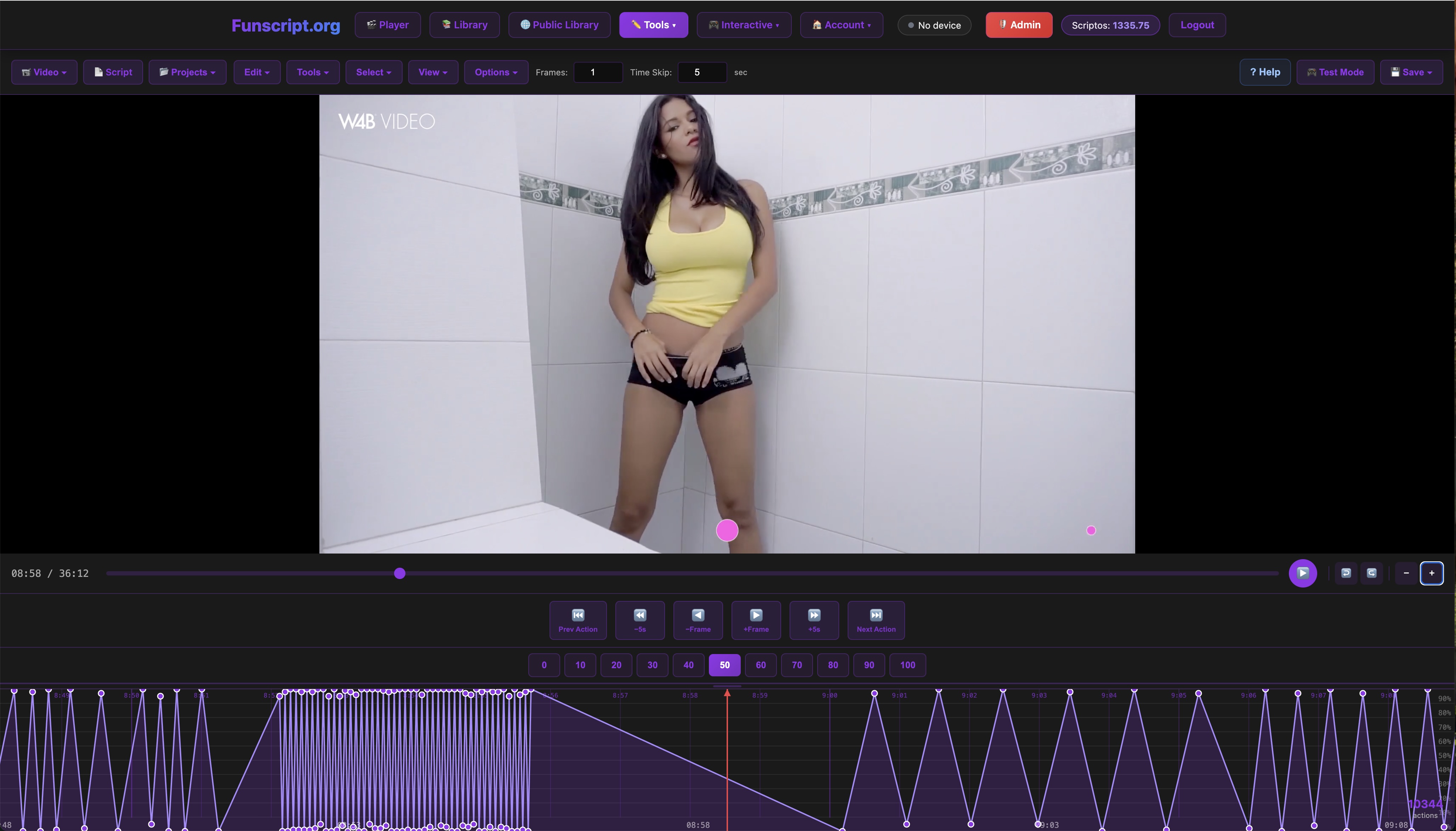
The Script Editor on Funscript.org is a powerful tool that allows you to create and edit funscript files using a DAW-style timeline. This editor provides a visual waveform representation of your video, making it easy to align device movements with on-screen actions. You can toggle between light and dark themes for comfort during extended editing sessions.
One of the standout features in my experience is the focus mode, which minimizes distractions, allowing you to concentrate fully on the scripting process. The editor also includes an AI-assisted auto-generation feature to speed up the initial scripting process. This feature can be a huge time-saver, especially if you're new to scripting.
In practice, the Script Editor's interface is intuitive and user-friendly. Even if you're not tech-savvy, you'll find it easy to navigate and use. The visual aids, such as the waveform and timeline, make it simple to see exactly where you need to place motion points.
Connecting Your Device
Connecting your device is crucial for testing and refining your funscripts. For devices like The Handy, you can connect via a WiFi key through the Dashboard. Simply enter the connection key from your HandyFeeling account, and your device will sync automatically. For Bluetooth devices, Intiface Central is used. After downloading and installing Intiface Central, start the server, connect your device, and then connect it on Funscript.org through the WebSocket connection.
These connections ensure that your device is ready for use across all features on Funscript.org, including the Funscript Player and AI-driven features like AI Control. Once connected, you're free to experiment with different settings and devices, enhancing your scripting versatility.
What surprised me was how seamless the device connection process is. With just a few clicks, you're ready to start scripting and testing your creations.
In my testing, I noticed that maintaining a stable internet connection is critical for WiFi-enabled devices like The Handy. Any fluctuations can affect the sync, so ensure your network is reliable.
Step-by-Step Guide to Creating Funscripts
Creating a funscript is an art form that combines timing, creativity, and technical skill. Here's a step-by-step guide to help you craft your own masterpiece. With some practice and patience, you'll be scripting like a pro in no time.
Loading Video and Audio
Start by loading a video file into the Script Editor. The editor's timeline and waveform view will help you see and hear the audio, providing visual cues for where to place motion points. This visual representation is crucial for aligning device movements with the video. You can use local video files or stream directly from supported websites like PornHub or SpankBang.
In my testing, using the waveform view made it much easier to sync the device's movements with specific beats in the audio, enhancing the overall experience significantly. This visual guide ensures that your timing is spot-on, making the process more intuitive.
Placing Motion Points
With your video loaded, it's time to place motion points on the waveform. These points dictate the device's movements, with each point representing a specific position or intensity level at a given time. You can manually place these points or use the AI-assisted auto-generation to get a head start, then tweak points for precision.
The key here is precision. The more accurately you can place your motion points, the more immersive the experience will be. It's often a process of trial and error, adjusting points and replaying sections until everything aligns perfectly. Remember, practice makes perfect, and over time, you'll develop a keen sense for optimal point placement.
In practice, start with a simple script and gradually incorporate more complex elements as you become more comfortable with the process. This approach allows you to build your skills incrementally.

Testing and Refining Your Funscript
Once you've created your funscript, it's time to test and refine it to ensure everything runs smoothly and matches your expectations. This phase is crucial for identifying any issues and making necessary adjustments.
Using the Funscript Player
The Funscript Player is essential for testing your scripts. It syncs your interactive device to the video content in real-time, allowing you to see how your script performs. With features like heatmap visualization and adjustable sync offset, you can fine-tune your script to perfection.
During my testing sessions, the Player's dual-device support was particularly useful. It allowed me to test different devices simultaneously, comparing how each responded to the script. This feature is invaluable for optimizing your scripts across various devices and settings.
Adjusting Sync and Motion
Refinement often involves adjusting the sync offset and motion density to ensure everything runs smoothly. The Player's heatmap visualization shows motion density across the timeline, helping you identify areas that may need more tweaking. You can adjust the sync offset by ±2000ms to align device movements perfectly with on-screen action.
This iterative process of testing, adjusting, and retesting is key to creating a polished funscript. With practice, you'll develop a keen sense for timing and motion that can elevate your scripting skills. Don't be afraid to experiment and try different settings to see what works best for your content.
So what does this mean in practice? It means that with the right tools and a bit of patience, you can create highly personalized scripts that bring your favorite scenes to life in new and exciting ways.
In my testing, consistency is key. Ensuring uniformity in motion points and timing across the script creates a seamless experience, enhancing the overall immersion.
Comparing Funscript Platforms
While Funscript.org offers a comprehensive suite of tools for script creation and device management, it's worthwhile to consider how it compares to other platforms. This section will give you insights into the unique features of Funscript.org and how it stands out in the crowded field of interactive content platforms.
Funscript.org vs. Other Platforms
Funscript.org is renowned for its intuitive interface and robust feature set, making it a favorite among scripters. In comparison to platforms like ScriptAxis or SLR Interactive, Funscript.org offers a more user-friendly experience with its Script Editor and seamless device connectivity through the Dashboard. The AI Control and Cruise Control features uniquely enhance user experience by automating some of the more complex aspects of scripting and syncing.
While other platforms may offer similar capabilities, what sets Funscript.org apart is its community-driven library where users can share and download scripts. This community aspect fosters innovation and collaboration, encouraging users to experiment and improve their skills.
In my testing, I found that Funscript.org's focus on user experience and community engagement makes it the ideal choice for both newcomers and experienced scripters. The support and resources available on the platform make the learning curve much less steep.
Advantages of Using Funscript.org
One of the main advantages of Funscript.org is its comprehensive set of tools tailored to meet the needs of users at all skill levels. From the beginner-friendly guides and tutorials to the advanced features like AI-assisted scripting and multi-device testing, there's something for everyone.
Another key benefit is the platform's commitment to continuous improvement and user feedback. Regular updates and new features keep the platform ahead of the curve, offering users the latest in interactive technology and scripting capabilities.
Ultimately, the choice of platform comes down to personal preference and specific needs. However, in my experience, Funscript.org consistently delivers the best combination of ease of use, feature richness, and community support.
| Device Name | Type | Connectivity | Price Range | Key Features |
|---|---|---|---|---|
| The Handy | Stroker | WiFi | $130-160 | WiFi streaming, high-speed servo motor |
| Kiiroo Keon | Stroker | Bluetooth | $200-250 | Adjustable stroke speed and depth |
| Lovense Max 2 | Stroker | Bluetooth | $100-130 | 360-degree contractions, air pump suction |
Frequently Asked Questions
What is a funscript file?
A funscript file is a motion file that syncs interactive devices with video content, dictating the device's movements to provide a synchronous experience. These files contain precise time-stamped instructions that ensure the device's actions align with the on-screen action, creating a seamless and immersive experience.
Which devices are best for funscript creation?
Devices like The Handy and Kiiroo Keon are ideal due to their precise stroke sync capabilities and versatile connectivity options, making them perfect for detailed funscript playback. Both devices offer unique features like adjustable speeds and customizable settings, allowing for a tailored experience that matches your preferences.
How do I connect my device to Funscript.org?
You can connect your device via the Dashboard using device-specific methods such as a WiFi key for The Handy or Bluetooth connections through Intiface Central for Lovense devices. Ensure your device's firmware is up to date to avoid any connectivity issues, and follow the step-by-step instructions provided on the platform.
Can vibration-only devices use funscripts?
Yes, vibration-only devices can use funscripts by mapping motion intensity to vibration strength, creating a synced experience even without physical stroke movements. This allows for a dynamic and engaging experience that still captures the essence of the scripted content.
How do you create a funscript?
To create a funscript, use the Script Editor on Funscript.org, load your video, and place motion points on the waveform to accurately sync device movements with the video. Adjust the motion points and test the script using the Funscript Player to refine the timing and ensure a smooth experience.
What devices support funscripts?
Devices such as The Handy, Kiiroo Keon, and Lovense Max 2 support funscripts, providing full stroke and intensity sync for an immersive experience. These devices are known for their compatibility with a wide range of content, allowing users to explore different scripts and scenarios.
In conclusion, learning how to create your own funscripts opens up a world of personalized possibilities. Whether you're using The Handy for its precision or exploring the versatility of the Kiiroo Keon, the tools and knowledge available on platforms like Funscript.org can enhance your interactive experiences in ways you might not have imagined. Happy scripting!