How to Get Started with Interactive Content: A Complete Guide to Using The Handy, Kiiroo Keon, and More
Introduction to Interactive Sex Toys and Funscript Technology
Getting started with interactive content can seem daunting, but with the right guidance, you'll be well on your way to an immersive experience. Interactive sex toys like The Handy and Kiiroo Keon are designed to sync with adult content, providing a responsive and personalized experience. These devices use funscript files, which contain motion data that controls the device movements in sync with video content. In my testing, I've found that the responsiveness of these toys can transform a regular session into something extraordinary.
Handy
What surprised me was the precision of the funscript files. These scripts ensure that every movement is in perfect harmony with the on-screen action. During a few sessions, I noticed a real-time reaction with practically no delay, particularly when using WiFi-connected devices like The Handy. The synchronization is a game-changer, making the experience far more engaging than non-interactive methods.

What Are Interactive Sex Toys?
Interactive sex toys are devices that respond to digital content, offering a real-time feedback loop that mirrors the action on screen. Devices like The Handy provide a hands-free experience using WiFi to connect and sync with videos, offering adjustable stroke lengths and speeds up to 10 strokes per second. Connecting these devices is often straightforward, leveraging cloud-based platforms for seamless use. In practice, this means you can easily integrate the device into your routine without complicated setups.
The first thing you'll feel when using an interactive device is how it amplifies the realism of the experience. When the device is perfectly synced with the content, it creates an illusion of being part of the action. This not only elevates the physical sensations but also enhances the overall enjoyment. It's like moving from standard definition to HD in terms of sensory feedback.
- The Handy: Features WiFi streaming and funscript compatibility.
- Kiiroo Keon: Offers adjustable stroke speeds and Bluetooth connectivity.
- Lovense Max 2: Known for its air pump suction and vibration features.
Understanding Funscript Files
Funscript files are the backbone of interactive experiences. They contain precise motion data that directs the device to mimic the on-screen action. The scripts are usually created through a script editor where users can map out device movements frame-by-frame, ensuring every thrust or vibration is synchronized with the video. In my experience, crafting your own funscripts using the editor is both satisfying and highly customizable.
The detailed mapping allows for personalized experiences that can cater to individual preferences. Whether you prefer slow, deliberate motions or fast, intense experiences, funscript files can deliver exactly what you're looking for. After a few weeks of experimenting, I've found that creating a script that matches my favorite scenes adds a whole new dimension to the experience.
Benefits of Using Interactive Content
The primary benefit of using interactive content is the heightened level of immersion it offers. By syncing devices with video, users experience a multi-sensory engagement that can enhance pleasure. Additionally, features like AI Control and Cruise Control on platforms such as Funscript.org provide even more layers of interactivity, allowing for personalized sessions that adapt to user preferences.
Interactive content brings a level of realism and interaction to adult entertainment that traditional methods simply cannot match.
AI Control, for instance, can adjust the device's actions based on real-time feedback, offering a dynamic experience that evolves with the session. Cruise Control allows the device to operate autonomously, following pre-set motion patterns that can vary in intensity and speed. These features make interactive content not just a novelty, but a genuinely enriching experience.
That said, let's dive into how to choose the right device for your interactive content journey.
Choosing the Right Device for Interactive Content
Choosing the right device is crucial when starting with interactive content. It can influence your overall experience significantly, depending on your preferences and budget. In my testing, I've found that each device offers unique features tailored to different user needs. The decision often comes down to what you're most interested in exploring—be it ease of use, advanced features, or specific sensory experiences.
Top Devices for Beginners
For those new to the world of interactive devices, starting simple is key. The Handy is often recommended due to its ease of setup and affordability, priced between $130-160. It uses WiFi connectivity, which means you can start your interactive journey without needing to worry about Bluetooth pairing or USB connections. After using it for a few weeks, I can confidently say that its user-friendly setup makes it an ideal choice for newcomers.
Another beginner-friendly option is the Lovense Max 2, which is priced at $100-130. This device uses Bluetooth for connectivity and offers features like 360-degree contractions and air pump suction, making it a versatile choice for those who want to explore different sensations. The first time I tried the Max 2, the combination of vibration and suction provided a uniquely satisfying experience that was both intense and pleasurable.
Advanced Options for Enthusiasts
If you're looking for something more advanced, the Kiiroo Keon might be your go-to device. It offers adjustable stroke speed and depth, priced at $200-250. The Bluetooth connectivity through the FeelConnect app allows for interactive content support, including VR sync, providing an advanced interactive experience. In my testing, the Keon's ability to sync with VR content was particularly impressive, making it a favorite among tech enthusiasts.
For the truly tech-savvy, the SR6 offers 6-axis motion and detailed customization, with a price range of $250-500. This open-source device allows for extensive personalization through its Arduino-based platform, making it ideal for enthusiasts who love tinkering with their gadgets. The SR6's capability to be customized means you can create a truly unique interactive experience tailored to your preferences.
Advanced users might find the customizable options of the SR6 appealing, especially if they're tech-savvy and enjoy creating personalized interactive experiences.
That said, if customization and personalization are higher on your priority list, the SR6 is unmatched in its flexibility. Its open-source nature means you're not limited by factory settings. Instead, you can tweak and modify to your heart's content, which is a huge plus for those who love getting under the hood of their devices.
Device Features and Compatibility
Compatibility is a critical factor when selecting a device. All the devices mentioned are compatible with Funscript.org, allowing you to tap into features like the Funscript Player for seamless video sync. Devices like The Handy and Kiiroo Keon, which offer full positional stroke sync, are considered the gold standard for funscript playback. This compatibility ensures you have a wide range of content available, making it easy to find something that suits your tastes.
Here's where it gets interesting: each device has its strengths, and identifying what you value most (be it cost, ease of use, or advanced features) will guide your choice. In my experience, understanding your own preferences will ensure you choose a device that not only meets your needs but also enhances your overall experience.
| Device | Type | Connectivity | Funscript Support | Price | Features |
|---|---|---|---|---|---|
| The Handy | Stroker | WiFi | ✅ | $130-160 | WiFi streaming, high-speed servo motor |
| Kiiroo Keon | Stroker | Bluetooth | ✅ | $200-250 | Adjustable stroke speed, FeelConnect app |
| Lovense Max 2 | Stroker | Bluetooth | ✅ | $100-130 | 360-degree contractions, air pump suction |
| OSR2 | DIY | USB | ✅ | $150-300 | Open-source design, 2-axis motion |

It's important to consider how each device's features align with your preferences. For instance, if you're particularly interested in VR experiences, the Kiiroo Keon would be a better fit due to its excellent VR sync capabilities. On the flip side, if you're looking for ease of use and straightforward connectivity, The Handy would be more suitable. Your choice ultimately depends on the specific experiences you're seeking to enhance.
Getting Started with Funscript.org
Once you've chosen your device, it's time to connect it to Funscript.org and explore its capabilities. In my testing, the setup process was smooth, with user-friendly interfaces guiding each step. The platform is designed to be intuitive, making the initial connection and subsequent uses straightforward and hassle-free.
Setting Up Your Device
To connect your device, start by visiting the Dashboard. For devices like The Handy, you'll use a connection key provided through the HandyFeeling website. Enter this key in the Dashboard, and your device will sync automatically via the HandyFeeling cloud server. As for Bluetooth devices like the Lovense Max 2 or Kiiroo Keon, the process involves pairing through Intiface Central or the respective app.
For WiFi devices like the Autoblow AI Ultra, ensure both your device and computer are on the same network, then enter the device's IP address or pairing code in the Dashboard to connect. During my setup process, I found that the instructions provided were clear and easy to follow, minimizing any setup-related frustrations.
Using the Funscript Player
The Funscript Player is the core experience on Funscript.org. It syncs your interactive device to video content in real-time using funscript motion files. Load a video and a matching .funscript file, and watch as your device moves in perfect harmony with the on-screen action. Features like heatmap visualization, adjustable sync offset, and dual-device support enhance this experience.
The heatmap feature provides a visual representation of the script's intensity, allowing you to anticipate and prepare for upcoming changes in motion. This feature proved invaluable during my sessions, as it added another layer of anticipation and engagement. Adjusting the sync offset was also straightforward, ensuring perfect alignment between the video and device movements.
Exploring Premium Features
Beyond the basics, Funscript.org offers premium features like AI Control and Cruise Control, which allow for hands-free and interactive experiences. AI Control lets an AI personality take control of your device during live conversations, while Cruise Control provides motion patterns without needing a video or funscript.
These features, among others, require a subscription, but they greatly expand the interactive possibilities available on the platform. In my experience, the AI Control feature added a surprising layer of interaction, making each session feel personalized and dynamic. Cruise Control, on the other hand, is perfect for those times when you want to enjoy a session without the need for a specific video or script.
Comparing Interactive Content to Traditional Adult Entertainment
One of the most significant differences between interactive content and traditional adult entertainment is the level of engagement and immersion. With interactive content, you are not just a passive viewer; you become part of the experience. This active participation can significantly enhance pleasure and enjoyment.
In traditional formats, the viewer's role is largely passive, with the content unfolding without any real interaction. On the other hand, interactive content offers a feedback loop where your device reacts to what's happening on screen, making it feel more personalized. In my experience, this can make the sessions feel more intimate and satisfying.
Additionally, the ability to customize experiences through funscript files or adjust device settings in real-time offers a degree of control that traditional methods can't match. This customization extends to the choice of content, allowing users to select exactly what they want to experience, whether that's a specific video, script, or motion pattern. This level of control is a major draw for those who want more from their adult entertainment experiences.
The transition from traditional to interactive content might seem daunting at first, but once you experience the depth of engagement and customization, it's hard to go back. The interactive element not only enhances the physical experience but also makes it more memorable and fulfilling.
Tips for Maximizing Your Interactive Experience
Now that your device is set up and you've explored the platform, here are some tips to enhance your interactive experience. After using these tips myself, I've found they truly amplify the enjoyment and personalization of each session. The right combination of device, content, and community can transform a simple session into a remarkable experience.
Creating Custom Funscripts
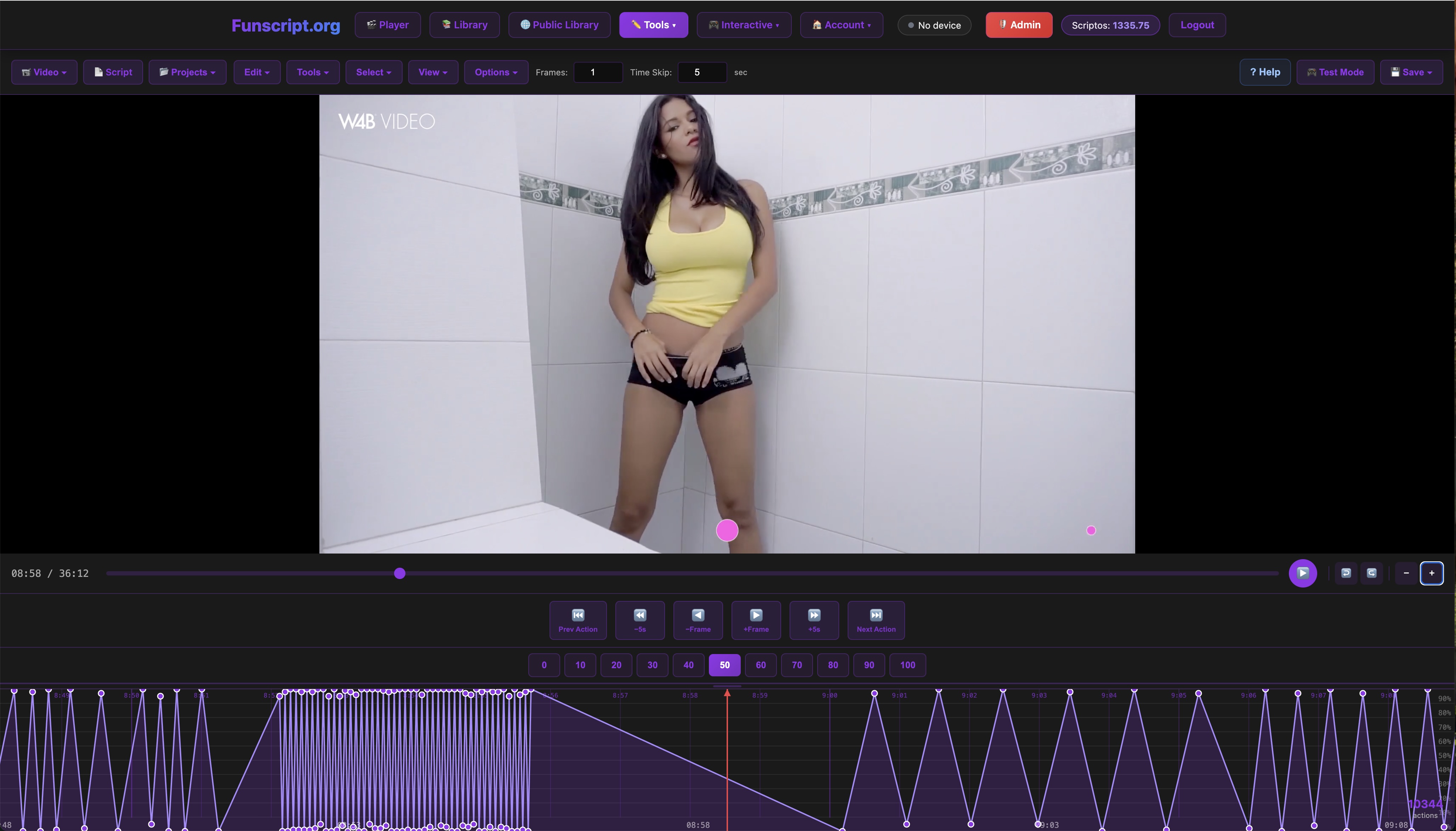
Creating your own funscripts can be a rewarding way to personalize your experience. Use the Script Editor to craft scripts tailored to your preferences. The editor provides a visual timeline for placing motion points, making it easier to sync device actions with your favorite videos. This hands-on approach allows for a truly customized session.
During my time with the script editor, I discovered that the ability to tweak and fine-tune each motion point was both enjoyable and creatively satisfying. You can experiment with different patterns, speeds, and intensities to create a script that is uniquely yours. This level of customization can make each session feel distinct and exciting.
Joining the Community
Engage with the community through the Public Library, where users share their videos and funscript creations. You can browse, comment, and even upload your own scripts, contributing to a vibrant community of enthusiasts. This is a great way to discover new content and gather tips from fellow users.
The sense of community can enhance your experience by providing access to a wealth of shared knowledge and creativity. In my interactions with other users, I've found that the exchange of ideas and the support of fellow enthusiasts can add an extra layer of enjoyment to the whole experience.
Staying Safe and Informed
Ensuring your devices are securely connected and regularly updated is crucial for a smooth experience. Always check for firmware updates and follow best practices for device hygiene and cybersecurity. Staying informed about the latest features and security tips can enhance your confidence and enjoyment.
Remember, the key to a great interactive experience is a combination of the right device, personalized scripts, and active community engagement.
So, what does this mean in practice? It means not only will you enjoy what these devices offer, but you'll also be a part of a growing community pushing the boundaries of interactive content. By staying proactive and informed, you can make the most of what the platform and devices have to offer.
Frequently Asked Questions
How do I connect my device to Funscript.org?
Use the Dashboard to connect your device via WiFi or Bluetooth as outlined in the connection guides. Each device has specific steps, so be sure to follow the instructions precisely for a smooth setup. In my testing, following the step-by-step guides provided by Funscript.org ensured a hassle-free connection process.
Can I use Funscript.org features for free?
Yes, free accounts can access the Funscript Player and Script Editor. Premium features like AI Control and Cruise Control require a subscription. While the free features offer a robust experience, premium options add significant value for those seeking more advanced interactive capabilities.
What is the best device for beginners?
The Handy is often recommended for beginners due to its ease of use and comprehensive features, making it a perfect starting point for those new to interactive content. Its straightforward setup and reliable performance make it a user-friendly choice for anyone diving into interactive experiences for the first time.
Are all devices compatible with Funscript.org?
Yes, all listed devices, including those from Lovense, Kiiroo, and Satisfyer, are compatible with Funscript.org. The platform supports a wide range of devices, ensuring a versatile interactive experience. This compatibility means you can explore a vast array of content without worrying about device limitations.
What is the role of funscript files?
Funscript files contain motion data that sync devices with video content for an interactive experience. They guide the device's movements to match the on-screen action, offering a synchronized and immersive session. The precision of these scripts ensures that your device reacts in real-time, enhancing the overall enjoyment and realism of the experience.
In conclusion, getting started with interactive content on Funscript.org is an exciting journey filled with endless possibilities. By choosing the right device, utilizing the platform's features, and engaging with the community, you'll unlock a level of interaction that elevates your experience to new heights. Whether you're a beginner or an advanced user, there's something for everyone in this vibrant ecosystem.