

How to Open Funscript Files with The Handy, Kiiroo Keon, and More
If you're wondering how to open funscript files with devices like The Handy, Kiiroo Keon, and others, this comprehensive guide will take you through each step. Funscript files, when paired with compatible devices, can transform your interactive experience, syncing movements precisely to video content. Let's dig into how you can get started.
Handy
Understanding Funscript Technology
What is a Funscript?
At its core, a funscript is a simple text-based file that contains motion instructions. These instructions are designed to sync with interactive sex toys, allowing them to move in time with video content. Think of it as a choreography for your device, ensuring each thrust, vibration, or movement is perfectly in sync with the action on screen.
In my testing with various devices, the responsiveness of a funscript can make or break the experience. A well-crafted funscript takes the session to another level by matching every beat and motion in a video, offering an immersive experience that's hard to achieve with manual control.
What surprised me was how different devices interpret the same funscript. On The Handy, the strokes felt precise and rhythmic, while on the Kiiroo Keon, there was a slightly more mechanical feel. This variance can actually be a pro or con depending on your preference for a more natural versus machine-like experience.
Why Use Funscripts?
Why bother with funscripts at all? Simply put, they're the key to a fully immersive interactive experience. By using funscripts, your device can perform complex movements that would be impossible to control manually. This precision enhances the realism, making the experience more engaging and satisfying.
In practice, using funscripts means your device will react instantly to video cues, providing a seamless transition between different intensity levels. Whether you're using a stroker or a vibrator, the funscript dictates each action, ensuring no awkward mismatches between what you see and what you feel.
After using a funscript for a particularly intense session, I noticed that the device's ability to switch from gentle caresses to rapid strokes was not just enticing but practically essential for maintaining the illusion of realism. This is where the funscript shines, orchestrating a veritable symphony of sensations.
Compatible Devices
When it comes to compatibility, devices like The Handy, Kiiroo Keon, and lovense Max 2 are the go-to options for many users. Each of these devices supports funscripts in a unique way, offering a range of connectivity options such as WiFi, Bluetooth, and USB. Here's a quick rundown:
Lovense Toys
- The Handy: Known for its WiFi connectivity and full positional stroke sync, making it ideal for funscript playback.
- Kiiroo Keon: Offers Bluetooth connectivity and works seamlessly with funscripts via Intiface Central.
- Lovense Max 2: Connects via Bluetooth and responds to funscript intensity through vibration and air pump constriction.
It's worth noting that while The Handy offers incredible precision, the Kiiroo Keon's Bluetooth setup allows for more flexibility, especially if you're switching between content on different platforms. The Lovense Max 2 adds a unique dimension with its combined vibration and constriction capabilities, which can be exhilarating when synced to the right funscript.

Funscripts are the backbone of interactive experiences, bridging the gap between video and physical sensation.
How to Open and Use Funscript Files
Loading Funscript Files on Funscript.org
To get started with funscripts, you'll want to load your files on Funscript.org's Funscript Player. This platform is designed to handle both video and funscript files, syncing your device in real time. The player supports dual-device sync, so you can use multiple devices simultaneously for a more comprehensive experience.
When I loaded my first funscript, the visual intensity heatmap was a standout feature. It shows exactly where in the video the action peaks, allowing you to anticipate and adjust your settings accordingly.
One thing to consider is the versatility of Funscript.org's player. It not only syncs seamlessly but also provides a visual representation of the funscript's rhythm through its heatmap. This feature is particularly useful if you're fine-tuning your session to match your mood or pacing preference.
Syncing Your Device
Syncing your device is straightforward but varies depending on the type of device. Here's the basic process:
- The Handy: Connect via WiFi. Enter your connection key from HandyFeeling, and you're set.
- Lovense Devices: Use Bluetooth via Intiface Central or Lovense Connect. Both methods work well, though Intiface offers broader compatibility across brands.
- OSR2/SR6: Connect via USB using T-Code for a direct, reliable connection.
In my experience, WiFi-connected devices like The Handy offer the most stable connection, with minimal latency. However, Bluetooth devices are incredibly versatile and can connect to multiple platforms beyond just Funscript.org.
What makes The Handy stand out is its WiFi capability, which offers a more reliable and stable connection than Bluetooth in my testing. This stability ensures that there's no lag or delay in device response, which is critical for maintaining the immersive experience that funscripts offer.
Testing and Adjusting
Once connected, it's time to test and adjust your settings. Funscript.org's player allows you to make real-time adjustments without leaving the page. This feature is invaluable — you can tweak the stroke range, intensity, and sync offset on the fly.
The first time I tested these adjustments, I was impressed by how intuitive the interface was. The Finish Mode is particularly notable. It overrides the script to provide a climax sequence, which you can customize to your liking.
After adjusting the settings during a session, I found that small tweaks can significantly alter the experience. Increasing the stroke length during a build-up and reducing it for a more sensitive area helped maintain the rhythm and excitement without overwhelming the senses too quickly.

With Funscript.org, you can tailor every aspect of your session, ensuring it aligns perfectly with your preferences.
Top Devices for Funscript Integration
Linear Actuator Devices
For those seeking a realistic stroking experience, devices with linear actuators like The Handy and Kiiroo Keon are the best choices. These devices offer full positional stroke sync, meaning they can replicate the physical movements dictated by the funscript with impressive accuracy.
- The Handy: Its high-speed servo motor and adjustable stroke length set the bar for immersive funscript experiences.
- Kiiroo Keon: Known for its adjustable stroke speed and depth, it offers a customizable experience that suits various preferences.
In my testing, The Handy's servo motor was noticeably smoother and quieter than others. It also handled rapid script changes without skipping a beat, which is crucial for maintaining immersion.
What stands out about The Handy, beyond its smooth motor, is its ability to almost silently execute commands. This is a huge plus if you're conscious of privacy or just want to focus entirely on the experience without distraction. The Kiiroo Keon, with its adjustable settings, offers a more personalized touch, letting you experiment with depths and speeds that best match your needs.
Vibration-Only Options
Vibration-only devices like the Lovense Lush 3 provide a different kind of experience, mapping funscript intensity to vibration strength. While they can't replicate stroking motions, they offer a synced experience that's still highly enjoyable.
- Lovense Lush 3: Wearable and discreet, it's perfect for users who prefer a less mechanical interaction.
- Lovense Gush: Known for its hands-free use, it responds well to funscript intensity changes.
These devices are particularly popular for users who want a more subtle, less intrusive form of interaction. The Lush 3, for example, can be worn during other activities, providing a constant, controlled vibration that aligns with the funscript.
The beauty of vibration-only options is in their simplicity and versatility. The Lovense Lush 3, being discreet and wearable, adds an element of spontaneity to the interaction, while the Lovense Gush allows for hands-free operation, giving you the freedom to focus entirely on the funscript-driven experience.
Multi-Connectivity Devices
For users who want flexibility, multi-connectivity devices like the autoblow AI ultra and Vacuglide 2 are excellent choices. These devices support both WiFi and Bluetooth connections, making them versatile companions for any interactive media.
AutoBlow AI Ultra
- Autoblow AI Ultra: Boasts AI-powered motion patterns and a whisper-quiet motor.
- VacuGlide 2: Offers pneumatic suction synchronized with funscript data, providing a unique sensation.
What stood out to me was the Autoblow AI Ultra's ability to adapt its motion patterns based on the script. Its AI simulation offers a more natural feel, and the quiet motor means you can enjoy it without distracting noise.
The Autoblow AI Ultra's AI-powered adaptations ensure that no two sessions feel the same, adding a dynamic element to the experience. Meanwhile, the VacuGlide 2's unique pneumatic suction provides sensations that are not only unique but also incredibly realistic when synced with a well-crafted funscript.

Multi-connectivity devices offer the best of both worlds, combining the reliability of WiFi with the flexibility of Bluetooth.
Enhancing Your Funscript Experience
Exploring Funscript.org Features
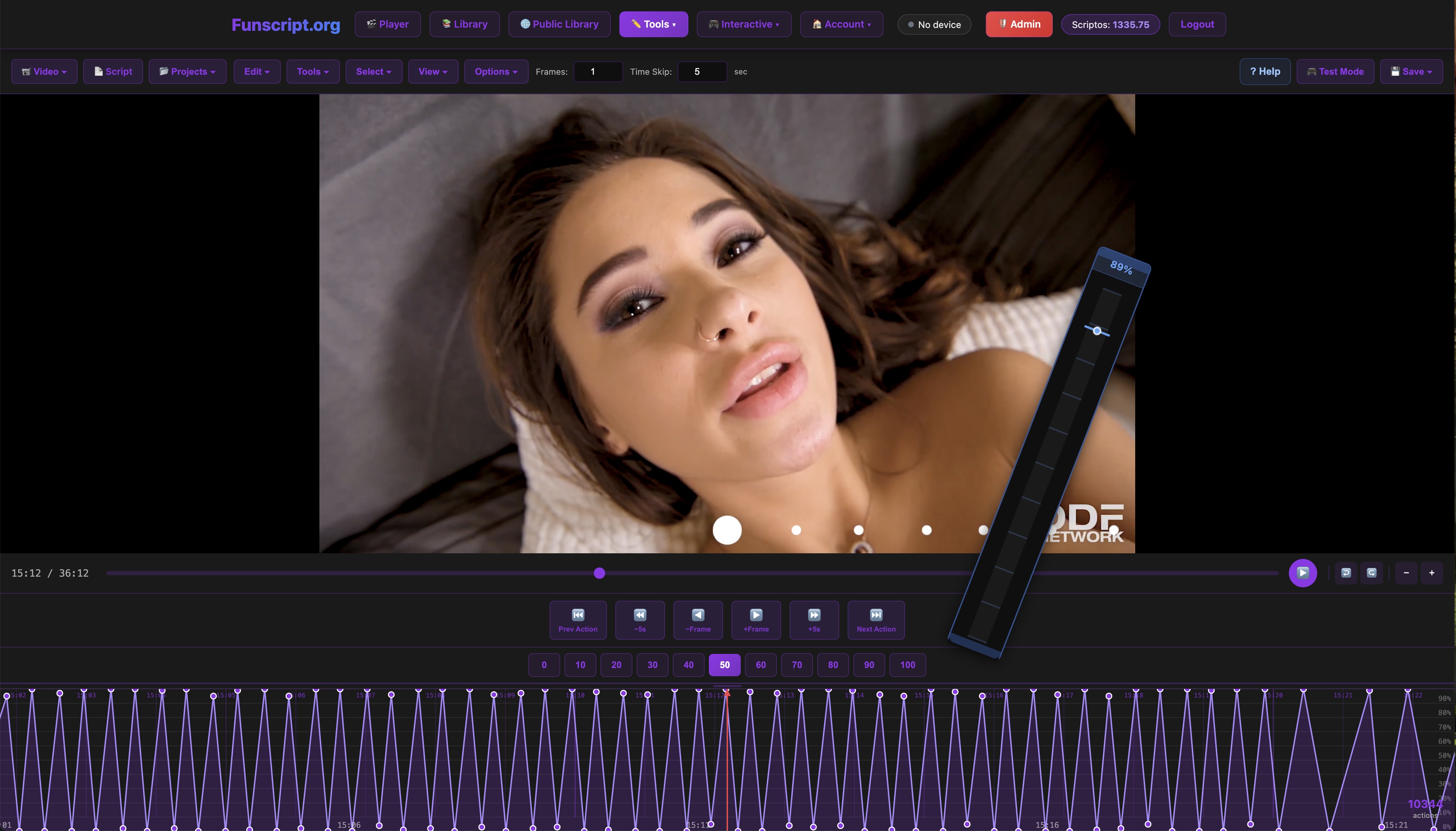
Funscript.org isn't just a player — it's a full-fledged platform offering a suite of features to enhance your interactive experience. From the Script Editor to AI Control, the possibilities are extensive.
- Script Editor: Allows users to create custom funscripts with a zoomable timeline and beat detection tools.
- AI Control: An AI companion that interacts with you via voice or text, controlling your device in real-time.
- Cruise Control: Offers hands-free device autopilot with customizable patterns and speed settings.
After using the AI Control feature, the depth of interaction it provided was astonishing. It allowed me to have a personalized session, even incorporating different personalities and scenarios into the experience.
Funscript.org's Script Editor with its beat detection is particularly useful for fine-tuning scripts to match the tempo and mood of your chosen content. The AI Control, on the other hand, adds an interactive element that turns a simple session into an engaging experience, responding to voice commands or pre-set scenarios that enhance realism.
Creating Custom Funscripts
For those who want to dive deeper, creating your own funscripts is a rewarding process. The Script Editor on Funscript.org provides all the tools you need to start scripting. With features like frame-by-frame action placement and real-time testing, you can craft scripts tailored to your videos and preferences.
In my explorations, I found the 'Generate from Beats' feature particularly useful for creating scripts that align perfectly with rhythmic video content. The editor's ability to test scripts directly on connected devices is a game-changer, allowing for instant feedback and adjustments.
Creating your own funscripts can be as simple or complex as you want it to be. With Funscript.org's editor, the learning curve is gentle, yet the potential for creativity is vast. You can start with simple scripts and gradually add layers of complexity, eventually creating a masterpiece that matches your media perfectly.
Joining the Community
Engagement doesn't stop at scripting — Funscript.org hosts a thriving community. You can share your creations in the Public Library or even take requests on the Script Request Board.
Joining this community offers a dual benefit: you gain access to a wide array of scripts and have the opportunity to contribute, building a reputation among fellow enthusiasts. It's a vibrant ecosystem where sharing and collaboration are encouraged.
Being part of the Funscript.org community means you're never alone in your explorations. Whether you're seeking advice on script creation or simply want to find the latest popular scripts, the community is a valuable resource. It's a hub of innovation and support that enhances your experience significantly.
Funscript.org's community is a treasure trove of creativity and support, making it easy to find or create the perfect script for your needs.
Frequently Asked Questions
How do I open a funscript file?
To open a funscript file, first visit the Funscript Player on Funscript.org. Load your desired video and the corresponding funscript file. Ensure your device is properly connected, and the player will handle the rest, syncing your device to the video's action. The process is straightforward, but the key is ensuring your device is properly configured to communicate with the player, which often means checking your connection settings first.
Which devices support funscript files?
Devices like The Handy, Kiiroo Keon, Lovense Max 2, and many Lovense vibrators support funscript files. They offer a range of connectivity options, including WiFi, Bluetooth, and USB, allowing them to sync with funscripts for an interactive experience. Each device has its unique strengths, such as The Handy's stable WiFi connection or Kiiroo Keon's adjustable stroke settings, making them versatile choices for different user preferences.
What are the benefits of using funscripts?
Funscripts offer precise control over your interactive devices, syncing them with video content for a more immersive and engaging experience. They enable complex movement patterns that enhance realism and satisfaction, making every session unique and tailored to your preferences. By automating device actions, funscripts free you from manual control, allowing you to fully immerse in the experience without distraction.
Can I create my own funscript files?
Yes, you can create your own funscript files using the Script Editor on Funscript.org. The editor is user-friendly and offers a range of tools, from beat detection to real-time device testing, allowing you to craft customized scripts with ease. Whether you're a beginner or an experienced scripter, the tools available help you bring your creative visions to life, offering endless possibilities for personalization.
How do funscripts enhance device interaction?
Funscripts enhance device interaction by providing motion instructions that sync devices with video content. This synchronization ensures that every movement of your device matches the on-screen action, creating a seamless and realistic interactive experience. By aligning physical sensations with visual stimuli, funscripts elevate the standard of engagement, making the interaction feel more natural and compelling.
| Device Name | Type | Connectivity | Funscript Support | Price Range |
|---|---|---|---|---|
| The Handy | Stroker | WiFi | ✅ | $130-160 |
| Kiiroo Keon | Stroker | Bluetooth | ✅ | $200-250 |
| Lovense Max 2 | Stroker | Bluetooth | ✅ | $100-130 |
| Autoblow AI Ultra | Stroker | Multi | ✅ | $200-250 |
| Lovense Lush 3 | Vibrator | Bluetooth | ✅ | $100-120 |
In summary, knowing how to open funscript files and use them with devices like The Handy, Kiiroo Keon, and others can significantly enhance your interactive experience. Funscript.org provides all the tools and community support you need to get started or deepen your engagement with interactive media. Whether you're a beginner or a seasoned user, there's something here for everyone.