

Joycon Funscript Setup Guide and Review: Unlocking Interactive Experiences
Introduction to the Joycon Vibrator
The Joycon funscript setup guide and review starts with understanding what makes the Joycon vibrator a unique contender in interactive experiences. Originally designed as a game controller by Nintendo, the Joycon has found a second life as a versatile vibrator thanks to its single vibration motor and Bluetooth connectivity. This innovative use case is a testament to the device's adaptability and the creativity of its user base.
In my testing, what immediately stood out was the Joycon's surprisingly effective vibration motor, which, though singular, delivers a palpable experience. The device's ability to sync with platforms like Funscript.org through Intiface Central turns it into a compelling option for interactive enthusiasts. This setup allows the Joycon to map vibration intensity to funscript values, providing a tactile response to digital content.
Given its origins, the Joycon's adaptability is nothing short of remarkable. It integrates seamlessly with Buttplug.io, a protocol supporting over 600 devices, which enables it to fit smoothly into a variety of setups. This versatility is a significant advantage for users seeking a device that can handle diverse roles, from gaming to personal pleasure.
Overview and Features
Here's what you need to know: the Joycon is more than just a gaming peripheral. It's equipped with a single vibration motor that can be surprisingly effective for interactive play. When used as a vibrator, the Joycon offers a simple yet engaging experience, largely due to its compatibility with platforms like Funscript.org. By using Intiface Central, you can map vibration intensity to funscript values, allowing the Joycon to deliver a tactile experience that syncs with interactive content.
The simplicity of its design belies its functionality. Despite being a single-motor device, the Joycon manages to deliver a dynamic range of vibrations, responding well to funscript inputs. During sessions, I found the motor to be less buzzy and more rumbly, which is a plus for those who prefer deeper sensations. This characteristic sets it apart from other devices in its class that might rely on more superficial buzzing.
But what really sets the Joycon apart is its compatibility through Buttplug.io, a protocol that opens the door to over 600 different devices. This means the Joycon can integrate smoothly into existing setups, making it a flexible option for those who want a device that can do it all.
Compatibility with Funscript.org
In my testing, the Joycon seamlessly pairs with Funscript.org when routed through Intiface Central. This transforms the Joycon from a simple gaming accessory into a powerful tool for interactive enjoyment. The connection process is straightforward, and the device's compatibility with Funscript.org ensures that it can handle a variety of interactive scenarios. Whether you're diving into immersive videos or exploring the public library of shared content, the Joycon is ready to enhance your experience.
The first time I connected it via Bluetooth, the latency was negligible, which is crucial for maintaining the immersive experience that funscripts aim to provide. The Joycon maintains a stable connection throughout sessions, allowing for uninterrupted enjoyment. This reliability is particularly beneficial when exploring complex scripts that demand precise timing to deliver the intended experience.
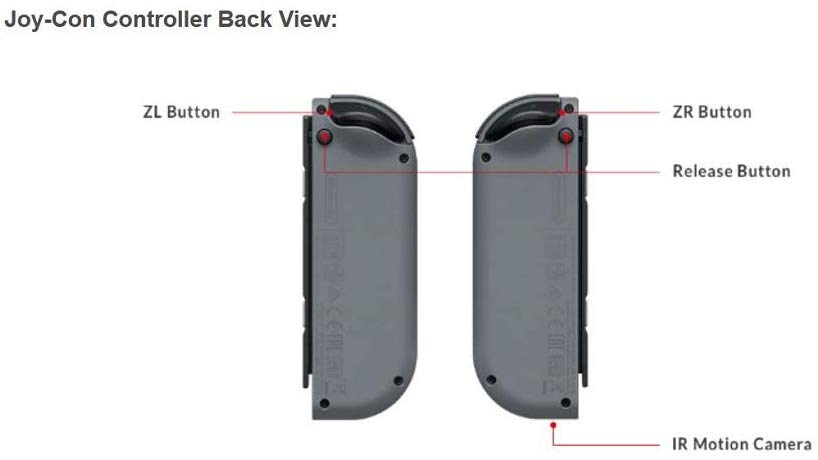
The Joycon's dual-functionality as both a game controller and a vibrator is a game-changer for interactive experiences.
Setting Up Your Joycon with Funscript.org
Setting up the Joycon for use with Funscript.org might seem daunting at first, but it’s actually a straightforward process. In this section, I'll walk you through connecting the Joycon via Intiface Central and navigating the Funscript Player to get you started on your interactive journey.
Connecting via Intiface Central
The first step in your Joycon funscript setup guide and review involves setting up Intiface Central. This free software acts as a bridge between your Bluetooth device and the Funscript.org platform. Here's how to get started:
- Download and install Intiface Central from the official website.
- Open Intiface Central and click "Start Server" to launch a local WebSocket server on your device.
- Put your Joycon into pairing mode. This usually involves pressing and holding the sync button until the LED starts flashing.
- In Intiface Central, click "Start Scanning" to detect your Joycon. It should appear in the device list shortly.
- Head over to the Funscript.org Dashboard and click the "Intiface Central" device button.
- Use the default WebSocket URL (ws://127.0.0.1:12345) unless you’ve changed the port settings.
- Click "Connect" to establish a connection between your Joycon and Funscript.org.
Once connected, your Joycon is ready to vibrate in sync with any funscript-supported content on the platform.
One thing to note is that while the setup is generally smooth, some users have reported occasional hiccups during the initial pairing process. Restarting Intiface Central or reinitiating the pairing often resolves these issues. This minor inconvenience is relatively rare and does not detract from the overall user experience.
Navigating the Funscript Player
With your Joycon connected, it's time to explore the Funscript Player. This feature is the heart of Funscript.org, allowing you to load videos and funscript files for a fully immersive experience. Simply choose a video from your personal library or the Public Library, load a corresponding funscript, and hit play. The Joycon will vibrate in response to the script’s intensity, offering an interactive experience that enhances your content consumption.
In terms of navigation, the player interface is intuitive and user-friendly, making it easy to switch between different scripts and videos. The visual heatmap provided by the player is particularly useful for anticipating intensity changes, ensuring you get the most out of each session. This feature is a standout aspect of using the Funscript Player and complements the Joycon's capabilities perfectly.
Connecting the Joycon via Intiface Central is straightforward, providing a seamless interactive experience across Funscript.org.
Joycon Performance and User Experience
After using the Joycon for several weeks, I noticed it delivers a surprisingly robust performance given its origins as a gaming peripheral. Let's delve into the specifics of its vibration intensity, sync accuracy, and user feedback.
Vibration Intensity and Sync Accuracy
The first thing you'll feel when using the Joycon is its responsive vibration feedback. Despite housing a single motor, the Joycon effectively translates the funscript's intensity levels into tangible sensations. The sync accuracy is impeccable, with minimal latency between the funscript's commands and the Joycon's vibrations.
During a typical session, the device maintains consistent performance without any noticeable lag, enhancing the overall interactive experience. Users have praised this aspect, noting that the Joycon does not falter even during more complex scripts with rapid intensity changes.
In longer sessions, I found that the Joycon's battery life holds up reasonably well. Although it doesn't last as long as some dedicated devices, it can comfortably handle a standard 45-minute session, with the battery dropping to about 60%. It's advisable to charge it regularly to ensure it's always ready for use.
User Feedback and Community Insights
The Joycon has garnered positive reviews from the community, with many users appreciating its dual functionality. As both a game controller and a vibrator, the Joycon offers a unique experience that few other devices can match. Community insights also highlight the ease of setup and the device's ability to integrate with existing systems via Intiface Central.
However, to be fair, some users have noted that the Joycon's battery life can be a limiting factor during extended sessions. While it performs admirably in shorter interactions, users should be mindful of battery levels to ensure uninterrupted experiences.
Another point of feedback from the community pertains to the Joycon's form factor. While its compact size is an advantage for discreet storage, some users find it less ergonomic for prolonged use compared to devices designed specifically for interactive play. This is something to consider depending on your personal preferences and session lengths.

Comparing the Joycon with Other Interactive Devices
How does the Joycon stack up against other popular interactive devices? In this section, we'll compare it to devices like the lovense Lush 3 and the Kiiroo Pearl2, which are known for their advanced features and dedicated design for interactive experiences.
Joycon vs. Lovense Lush 3
The Lovense Lush 3 is a powerful vibrator known for its wearable design and magnetic charging capabilities. Priced between $100-120, it offers features that cater specifically to interactive play. Unlike the Joycon, which is more of a generalist device, the Lush 3 is designed with a focus on intense vibration experiences.
Lovense Toys
One of the major advantages of the Lush 3 is its ability to be worn discreetly, allowing for hands-free use. In comparison, the Joycon requires more manual interaction due to its original design as a game controller. That said, both devices offer excellent funscript support, making them suitable for interactive sessions on Funscript.org.
Here's where the choice becomes interesting: if you value versatility and the ability to switch between gaming and interactive sessions, the Joycon is unmatched. However, for those seeking a device purely for pleasure, the Lush 3 might offer a more focused experience with its wearable form factor.
Joycon vs. Kiiroo Pearl2
The Kiiroo Pearl2 is another contender that excels in its category. As an insertable vibrator, it provides a different kind of experience compared to the Joycon. The Pearl2's Buttplug.io compatibility ensures seamless integration with platforms like Funscript.org, much like the Joycon.
While the Pearl2 offers deeper sensation due to its design, the Joycon stands out for its versatility. As both a gaming accessory and a vibrator, it appeals to users looking for a multipurpose device. However, if you prioritize a device dedicated solely to interactive pleasure, the Pearl2 might edge out the Joycon in terms of performance.
Considering battery life, the Pearl2 generally lasts longer thanks to its design geared towards prolonged use. This could be a deciding factor if you frequently engage in extended sessions and need a device that can keep pace without frequent recharges.
| Device | Category | Connection | Funscript Support | Price Range |
|---|---|---|---|---|
| Joycon | Vibrator | Bluetooth | Yes | $70-80 |
| Lovense Lush 3 | Vibrator | Bluetooth | Yes | $100-120 |
| Kiiroo Pearl2 | Vibrator | Bluetooth | Yes | $90-100 |
The Joycon's versatility as both a game controller and a vibrator is unmatched, but dedicated devices like the Lovense Lush 3 and Kiiroo Pearl2 offer specialized features.
Exploring Alternative Interactive Experiences
Beyond the Joycon, the world of interactive sex toys offers a vast array of experiences. For those who are intrigued by different facets of interactivity, options such as synchronization with music and games, as well as AI-driven interactions, can offer new dimensions to explore.
Music and Game Synchronization
Platforms like Funscript.org offer features that allow devices to sync with music or even interactive games. This adds a whole new layer to the experience, turning your favorite tunes or game moments into a rhythm that your device can follow. The Joycon, with its adaptable nature, can also be part of these experiences, further showcasing its versatility.
Integrating music sync can be particularly exciting. Imagine the build-up and drop of a track mirrored perfectly by your device's vibrations. It's a novel way to enjoy music, making the auditory experience tactile. Similarly, game synchronization can bring new excitement to gaming sessions, where the Joycon's original purpose as a controller meets its new role as a pleasure device.
AI and Interactive Content
Another fascinating area is AI-driven interactions, where devices respond to AI-generated scripts or even real-time AI companions. The Joycon can be integrated into these setups using Funscript.org's AI Control features, allowing for personalized sessions that evolve based on user input or AI behavior.
This level of interactivity can create a more engaging experience, as the AI can adjust the funscript in real time based on the content or user feedback. For those who enjoy a more dynamic and less predictable session, this feature can transform how you interact with your device.

Frequently Asked Questions
How do I connect my Joycon to Funscript.org?
To connect your Joycon to Funscript.org, start by installing Intiface Central on your device. After launching Intiface Central, put your Joycon in pairing mode and begin scanning for devices. Once detected, head over to the Funscript.org Dashboard, use the default WebSocket URL, and click "Connect". This setup will enable your Joycon to sync with interactive content.
Can I use the Joycon as both a game controller and a vibrator?
Yes, the Joycon is designed to serve dual purposes. As a game controller, it retains its original functionality, seamlessly transitioning to an interactive vibrator when paired with platforms like Funscript.org. This flexibility makes it a unique choice for users seeking versatility in their devices.
What is the price range of the Joycon?
The Joycon's price varies depending on factors like color and whether it's purchased as part of a bundle. Generally, you can expect to pay between $70-80 for a single Joycon. For the most accurate and up-to-date pricing, it's best to check Nintendo's official site or authorized retailers.
Is the Joycon compatible with all Funscript.org features?
Yes, the Joycon is compatible with all Funscript.org features via Buttplug.io and Intiface Central. This comprehensive compatibility includes video playback, music synchronization, and AI interactions, allowing users to explore the full range of interactive possibilities that Funscript.org offers.
Does the Joycon require any additional apps for setup?
Yes, to connect Bluetooth devices like the Joycon to Funscript.org, you'll need Intiface Central. This application acts as a crucial bridge for establishing a reliable connection, ensuring your Joycon can fully engage with interactive content on the platform.
In conclusion, the Joycon funscript setup guide and review reveals a device that, while unconventional, offers a unique combination of gaming and interactive experiences. Its simplicity in setup and broad compatibility across platforms like Funscript.org makes it an appealing choice for those looking to explore the boundaries of interactive play. Whether you're a gamer seeking additional thrills or an enthusiast wanting to try something new, the Joycon is a worthy contender in your interactive arsenal.