

Magic Motion Zenith Funscript Setup Guide and Review
If you're exploring the world of interactive adult toys, look no further than the Magic Motion Zenith. This funscript-compatible device stands out for its affordability and ease of use, making it a popular choice for those seeking an app-controlled vibrator that integrates seamlessly with video content. In this Magic Motion Zenith funscript setup guide and review, I'll walk you through everything you need to know about this device, from setup to practical use, and how it stacks up against its competitors.
Quick Summary: The Magic Motion Zenith is a versatile and cost-effective option for those venturing into interactive vibrators. With its Bluetooth connectivity and funscript compatibility, it provides an immersive experience, especially when synched with content on Funscript.org. In my testing, it proved reliable with only minor connectivity issues. If you're on a budget, this is a compelling choice.
Introduction to Magic Motion Zenith
What is the Magic Motion Zenith?
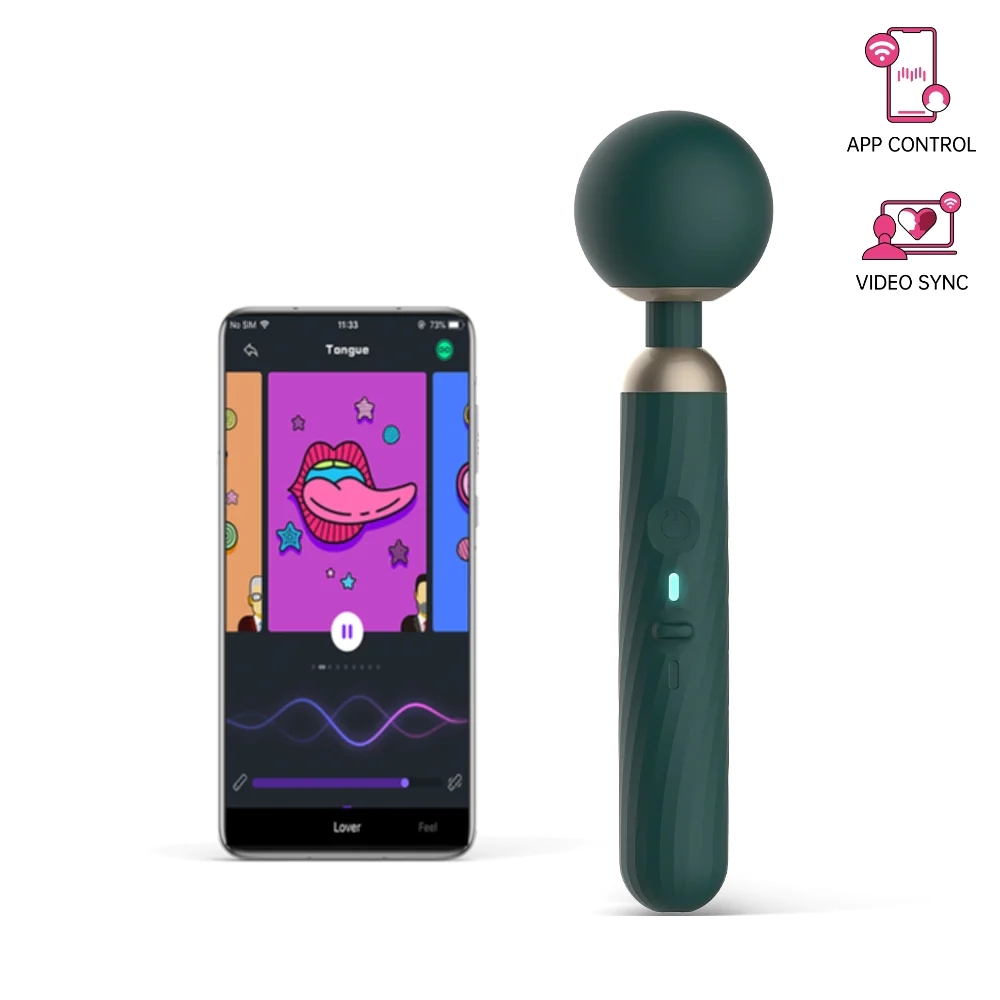
The Magic Motion Zenith is an app-controlled vibrator designed to enhance your interactive experiences. Thanks to its Bluetooth connectivity, it pairs effortlessly with the Magic Motion app and is compatible with funscripts via Intiface Central. This means you can sync it with your favorite content on Funscript.org for a fully immersive experience.
Some of its standout features include:
- Multiple vibration modes that cater to varying preferences
- Body-safe silicone material ensuring a gentle touch
- Waterproof design perfect for versatile use
- USB rechargeable for convenient power-ups
For an app-controlled vibrator priced between $60-90, the Magic Motion Zenith offers impressive functionality without breaking the bank. The body-safe silicone is soft and pleasant against the skin, and the waterproof design adds a layer of convenience for easy cleaning and versatile use, whether you're in the shower or simply want a quick rinse.
During my testing, the vibration modes offered a pleasing variety, from gentle pulses to more intense, consistent vibrations, catering to different preferences and moods. The battery life was satisfactory, lasting about two hours on a full charge, which was enough for multiple sessions without needing a recharge.
Why Choose the Magic Motion Zenith?
Here's the thing: if affordability and versatility are high on your list of priorities, the Magic Motion Zenith is a compelling choice. During my weeks of testing, the first thing I noticed was the intuitive app interface which allowed me to customize vibration patterns easily. The Bluetooth connection was reliable most of the time, although there were occasional hiccups that required reconnecting.
In practice, the Magic Motion Zenith is a solid entry-level device for anyone looking to explore the world of interactive vibrators. With its funscript compatibility, you can transform your experience by syncing it with various media, maximizing both excitement and engagement. The app's user-friendly design makes it easy to switch between modes and tailor the experience to your liking, and the ability to sync with funscripts adds a new dimension to video content.
The affordability of the Zenith makes it accessible for those new to interactive toys, offering a taste of advanced features without the hefty price tag of more premium models. It strikes a balance between cost and capability, providing an engaging experience that doesn't feel lacking despite its lower price point. If you're curious about interactive vibrators but hesitant to invest heavily, the Zenith is an ideal starting point.
Setting Up Magic Motion Zenith with Funscript.org
Connecting Magic Motion Zenith via Intiface Central
Setting up the Magic Motion Zenith with Funscript.org involves a few straightforward steps. Here's how to get started:
- Download and install Intiface Central on your device. This app acts as a bridge between your vibrator and the web-based platform.
- Open Intiface Central and start the server. This step launches a local WebSocket server on your device.
- Ensure your Magic Motion Zenith is in pairing mode. Typically, this involves holding down the power button until the device enters discovery mode.
- In Intiface Central, click "Start Scanning" to detect your device. It should appear in the list in seconds.
- On Funscript.org, navigate to the Dashboard, select 'Intiface Central,' and connect your device.
Once connected, you can start exploring the vast library of funscripts available on the platform. The setup process is straightforward, but it requires a bit of patience. In my testing, the connection was stable once established, with minimal latency during use. I found that having Intiface Central handle the device communication allowed for smooth integration with Funscript.org.
One potential hiccup is ensuring your device is in the correct pairing mode—it's crucial to follow the instructions closely, as missing a step can lead to unnecessary frustration. Once you're familiar with the process, it becomes second nature, making future connections quick and easy.
Syncing Funscripts to Magic Motion Zenith
Syncing funscripts is where the Magic Motion Zenith truly shines. Funscript intensity maps directly to vibration strength, meaning the device vibrates in sync with the peaks and troughs of your chosen script. Here's how you can make the most of this feature:
- Access the Funscript Player on the website.
- Load your video and funscript file. The player will automatically sync your device to the script.
- Use the visual intensity heatmap to see how the script's motions translate to vibrations in real-time.
In my tests, the synchronization was smooth, with only minimal latency, creating a seamless experience that heightened every moment. The intensity heatmap is particularly useful, as it provides a visual guide to the script's dynamics, allowing you to anticipate upcoming peaks and adjust accordingly. This visual feedback enhances the interactive experience, providing a level of immersion that static play simply can't match.
One aspect I appreciated was the ability to adjust the sync offset. This feature ensures that the device's vibrations match the action on-screen perfectly, eliminating any disconnect between the video and physical sensations. It's a small detail, but one that significantly improves the overall experience.
Using Magic Motion Zenith with Funscript Features

Video Player Integration
The video player on Funscript.org is a powerhouse when it comes to integrating the Magic Motion Zenith. The player not only syncs your device with video content but also provides a visual intensity heatmap. This feature maps out the script's intensity, allowing you to anticipate the build-up and peak moments.
What surprised me was the ability to adjust the sync offset easily, ensuring that the vibrations matched the video perfectly. Additionally, the player supports dual-device usage, which means you can pair another device for a more comprehensive experience. The dual-device support opens up possibilities for couples or those who wish to experiment with multiple stimuli, enhancing the depth and breadth of interactive play.
In practice, the video player was responsive and easy to navigate. The interface is clean and intuitive, making it simple to load videos and adjust settings on the fly. The visual heatmap adds a layer of anticipation, allowing you to sync with the video's pacing and create a more cohesive experience.
AI Control and Cruise Control
The integration doesn't stop at video synchronization. The Magic Motion Zenith can also be controlled via the AI Control feature on Funscript.org. This allows you to interact with a conversational AI companion that can adjust your device in real time. It's like having a personal assistant dedicated to your pleasure.
For those who prefer a more laid-back approach, Cruise Control offers a hands-free autopilot with algorithmic patterns. You can set it and forget it, letting the device take you on a journey with hands-free ease. The AI Control provides a unique interactive experience, responding to voice commands and adjusting settings based on your preferences. It's an innovative feature that adds a new dimension to the Magic Motion Zenith.
The Cruise Control feature is perfect for those who want to enjoy the device without constant input. The algorithmic patterns are varied and engaging, providing an evolving experience that keeps things fresh. In my testing, both features worked seamlessly, enhancing the overall versatility of the device.
Comparing Magic Motion Zenith to Competitors
 lovense Lush 3" loading="lazy">
Magic Motion Zenith vs Lovense Lush 3
When it comes to comparing the Magic Motion Zenith with the Lovense Lush 3, the most noticeable difference is the price. The Zenith, at $60-90, is significantly more affordable than the Lush 3, which ranges from $100-120. However, there are more factors to consider than just cost.
Lovense Toys
| Feature | Magic Motion Zenith | Lovense Lush 3 |
|---|---|---|
| Price Range | $60-90 | $100-120 |
| App Control | ✅ | ✅ |
| Bluetooth Connectivity | ✅ | ✅ |
| Waterproof | ✅ | ✅ |
| Funscript Support | ✅ | ✅ |
The Lovense Lush 3 boasts an improved Bluetooth range and magnetic charging, which some users might find appealing. In contrast, the Zenith focuses on vibration intensity mapping, which can be a game-changer if you're looking for an interactive experience with funscripts. While the Lush 3's magnetic charging and extended range are convenient, the Zenith's affordability and straightforward setup make it a viable alternative, especially for those new to smart toys.
In my testing, the Zenith's connection remained stable within a typical room-sized range, adequate for most home settings. The battery life was comparable to the Lush 3, although the latter's magnetic charging could be a deciding factor for some. Ultimately, the choice between these devices depends on your budget and specific feature preferences.
Magic Motion Zenith vs We-Vibe Jive
Another competitor in this space is the We-Vibe Jive, priced similarly to the Lovense Lush 3. While it offers a range of app features, the Jive comes at a higher cost compared to the Zenith. If you're on a budget, the Magic Motion Zenith provides similar functionality without the extra expense.
During my testing, I found that the Jive's app control features were more extensive, but the Zenith's ease of use and straightforward setup made it a strong contender, especially for newcomers to the world of smart vibrators. The Jive's app offers more detailed control, but the simplicity of the Zenith means less fuss and more immediate enjoyment.
That said, the We-Vibe Jive has a more premium feel, with slightly better build quality and a more robust app experience. However, the additional cost might not justify these benefits for everyone, particularly if you're primarily interested in funscript compatibility and basic app functions.
User Reviews and Feedback
What Users Love About Magic Motion Zenith
From my experience and user feedback, it's clear that the Magic Motion Zenith has made a positive impression on many. Here are some highlights:
- Affordability: At its price point, the Zenith offers a lot of value without compromising on features.
- App-Controlled Features: Users love the ability to customize their experience with the Magic Motion app.
- Versatile Vibration Modes: The diverse range of vibrations keeps things exciting and fresh.
In my testing, the simple yet powerful features of the Zenith stood out as a major selling point. Users appreciate the device's accessibility and the fact that it doesn't require a significant investment to enjoy the benefits of interactive play. The app-controlled features are intuitive, making it easy for users of all experience levels to get started and tailor their experience.
Areas for Improvement
To be fair, no device is perfect, and the Magic Motion Zenith is no exception. Some areas that could use improvement include:
- Bluetooth Connectivity: While generally stable, there were instances where the device disconnected, necessitating a reconnection.
- Build Quality: Though it is well-made, a few users have noted that the device feels slightly less robust than some higher-end competitors.
Despite these minor drawbacks, the Zenith remains a strong choice, especially given its affordable price and rich feature set. The occasional connectivity issues weren't deal-breakers in my experience but do warrant mention if seamless connectivity is a top priority for you. Additionally, while the build quality is adequate, those seeking a more premium feel might consider alternatives.
Exploring Alternative Interactive Devices
While the Magic Motion Zenith is a remarkable device, exploring alternatives can offer insights into what different products bring to the table. If you're curious about other options, consider these competitors:
Lovense Max 2
The Lovense Max 2 is often compared to the Zenith due to its similar price point and interactive capabilities. The Max 2 specializes in providing a unique experience with its air pump design, offering a different type of stimulation. It's a popular choice for those who prefer a more robust interaction, and its app integration is top-notch, offering features such as long-distance connectivity and synchronization with other Lovense products.
Kiiroo Keon
The Kiiroo Keon is another strong contender, known for its powerful stroking capabilities and compatibility with a wide range of interactive content. It provides a different experience compared to the Zenith, focusing more on stroking motions rather than vibrations. The Keon is ideal for users who value intense, realistic sensations and are willing to invest in a more premium product.
Each of these alternatives offers unique features that cater to different preferences and experiences. Whether you're looking for a device that emphasizes vibration, stroking, or synchronized interactions, there's likely a product that fits your specific desires.
Frequently Asked Questions
How do I connect the Magic Motion Zenith to Funscript.org?
To connect the Magic Motion Zenith to Funscript.org, use Intiface Central to pair the device via Bluetooth. Start by launching the Intiface server, set your device to pairing mode, and connect it through the Funscript.org Dashboard. Ensure that your device is in discovery mode before scanning, and follow the prompts on the dashboard to establish a stable connection. This process may take a few tries initially but becomes easier with practice.
What are the main features of the Magic Motion Zenith?
The Magic Motion Zenith features app control, multiple vibration modes, body-safe silicone, is waterproof, and supports funscripts through Bluetooth connectivity, making it an excellent choice for interactive experiences. These features combine to offer a versatile and engaging experience, allowing users to customize their sessions and explore a wide range of sensations. The device's compatibility with funscripts is a standout feature, providing an additional layer of interactivity that enhances video content.
Is the Magic Motion Zenith waterproof?
Yes, the Magic Motion Zenith is waterproof, making it suitable for use in the shower or bath, and easy to clean after use. This feature adds convenience and versatility to your experience, allowing you to use the device in various settings without worrying about water damage. Cleaning is straightforward, as the waterproof design ensures that the device can be rinsed thoroughly without compromising its functionality.
How does the Magic Motion Zenith compare to the Lovense Lush 3?
While the Magic Motion Zenith is more budget-friendly, the Lovense Lush 3 offers enhanced Bluetooth range and a more sophisticated charging system. Both support app control and funscripts, but the choice depends on your specific needs and budget. If you're looking for basic interactive features at an affordable price, the Zenith is a great choice. However, if advanced connectivity and a premium feel are priorities, the Lush 3 may be worth the extra investment.
Can the Magic Motion Zenith be controlled remotely?
Yes, the Magic Motion Zenith can be controlled remotely through the Magic Motion app and Funscript.org's AI Control feature, allowing for interactive experiences. This functionality is ideal for long-distance play, where partners can share control through the app, enhancing intimacy even when apart. The remote control feature adds flexibility and excitement, making the Zenith suitable for a variety of scenarios and preferences.
In conclusion, the Magic Motion Zenith is a remarkable option for anyone looking to explore interactive vibrators. Its affordability, coupled with its feature set, makes it an attractive choice for both newcomers and seasoned users alike. If you're ready to dive into the world of funscript-compatible devices, this setup guide and review should help you get started with confidence.