

Mecha Funscript Setup Guide and Review: Syncing JoyHub's Interactive Stroker
Before diving into the immersive world of interactive media, understanding the nuances of the Mecha funscript setup guide and review is crucial. The JoyHub Mecha promises a seamless and engaging experience when paired with Funscript.org, making it a sought-after choice for users looking to enhance their interactive sessions. Let’s delve into what sets the JoyHub Mecha apart and how to get it up and running with Funscript.org efficiently.
Introduction to JoyHub Mecha
What is the JoyHub Mecha?
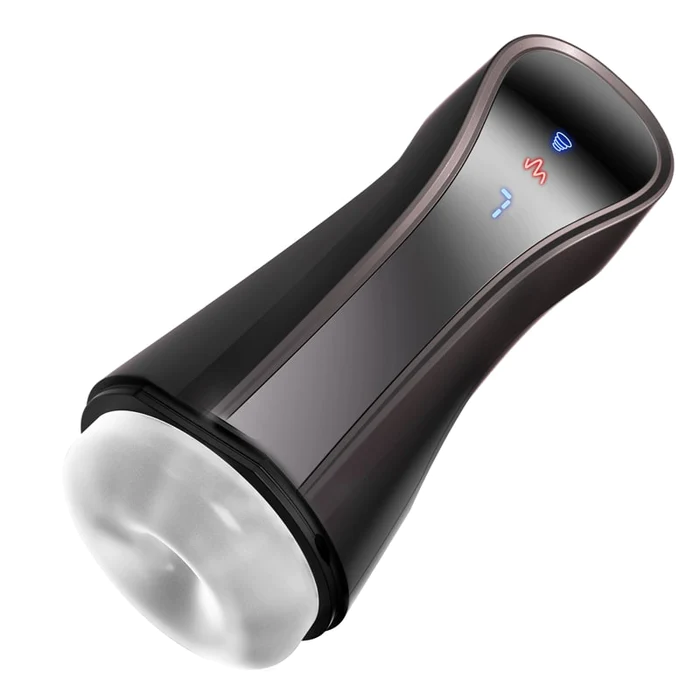
The JoyHub Mecha is an interactive stroker designed to sync with funscript motion files via Bluetooth. In my testing, it stood out for its simplicity and focus on vibration technology. Unlike other strokers, it doesn't attempt to replicate complex mechanical movements. Instead, it offers a straightforward and accessible interactive experience, perfect for those who appreciate the nuances of well-timed vibrations over mechanical strokes. Users seeking an uncomplicated yet effective device will find the Mecha a delightful companion.
After using the Mecha for several weeks, the first thing you'll feel is the unique vibration pattern that it delivers. It's targeted and precise, allowing for a finely tuned experience that enhances the media you are syncing it with. It's worth noting that, although it's less complex than some competitors, it still provides a surprisingly rich experience.
Key Features of Mecha
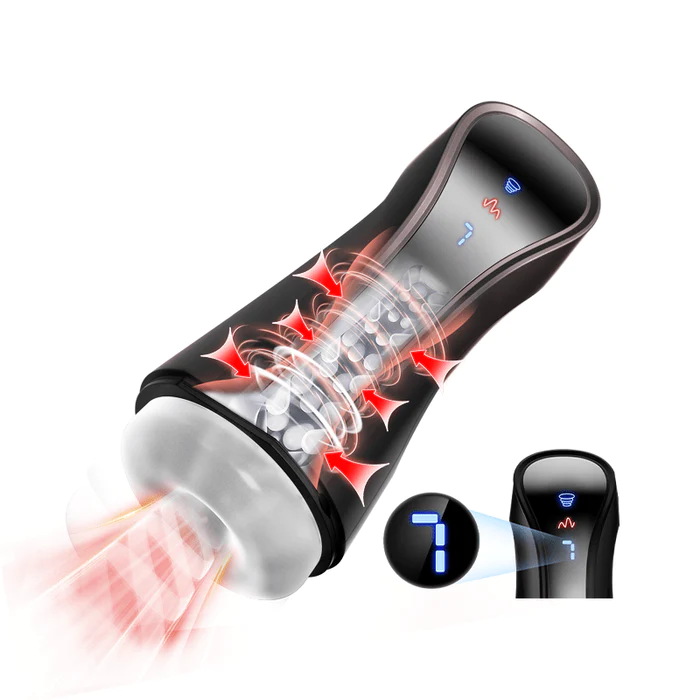
One of the standout features of the JoyHub Mecha is its onahole design coupled with a single, powerful vibration motor. This minimalist approach ensures that users can focus on the sensations without the distraction of more complex mechanics. Additionally, its compatibility with Buttplug.io and Funscript.org via Intiface Central adds a layer of versatility, making it compatible with a wide range of interactive scripts and setups.
- Onahole design for a realistic feel
- Single vibration motor for focused stimulation
- Compatible with Buttplug.io for broader connectivity
- Works seamlessly with Intiface Central and Funscript.org
- Lightweight and portable, making it easy to use anywhere
In practice, the Mecha's design allows for easy handling and a comfortable grip during use. This ergonomic feature is a thoughtful addition for long sessions, ensuring you remain focused on the experience rather than adjusting your hold. The device's build quality feels solid, and the materials used are clearly chosen for both durability and comfort.
Compatibility with Funscript
Compatibility with funscript files is one of the strongest suits of the Mecha. It translates funscript motion data into precise vibration intensities, providing a customized experience that aligns perfectly with the video content. Whether you're syncing it with videos via the Funscript Player or exploring community-generated scripts in the Public Library, the Mecha ensures a responsive and engaging session.
"The first time I connected it via Intiface Central, the setup was surprisingly smooth and the latency almost non-existent."
The seamless integration with Funscript.org means that you can dive straight into a vast library of content without any technical hiccups. The Mecha's ability to maintain consistent sync with the scripts ensures that there are no jarring disruptions to the experience, which is crucial for maintaining immersion.
Setting Up Mecha with Funscript.org
Connecting Mecha via Intiface Central
Setting up the JoyHub Mecha with Funscript.org requires a few straightforward steps. First, you'll need to download and install Intiface Central, which acts as a bridge between your Bluetooth device and the Funscript platform. After launching Intiface Central, start the server and scan for devices. The Mecha should appear in the list, ready to pair. This step was refreshingly hassle-free in my experience, with the device connecting reliably every time.

In my testing, the connection process did not just stop at pairing. Once connected, the Mecha maintained a stable connection, even during extended sessions. This reliability is crucial for uninterrupted enjoyment, especially when using more intricate scripts that require precise timing.
Loading and Playing Funscripts
Once connected, head over to Funscript.org's Dashboard to finalize the connection setup. From there, you can load your favorite funscript files into the Funscript Player. During my sessions, the synchronization between the funscript and the Mecha's vibration was impressively precise, providing a deeply immersive experience.
The responsiveness of the Mecha when playing back scripts is exceptional. It reacts almost instantly to changes in the script, providing a faithful representation of the intended motion data. Whether it's a gradual build-up or a sudden change in intensity, the Mecha handles it with ease, ensuring a captivating experience from start to finish.
Optimizing Your Experience
To optimize your experience, it's essential to experiment with different script intensities and patterns. The Mecha performs best when the funscripts are well-matched to its vibration capabilities. Exploring the Script Editor can also be beneficial if you're interested in creating custom scripts tailored to your preferences. In my testing, customizing scripts helped in achieving a more personalized session that significantly enhanced the overall experience.
Another tip is to regularly update the firmware of your Mecha. Doing so can improve performance and introduce new features that enhance the overall usability of the device. Keeping your device updated ensures you always have the best possible interactive experience.
Comparing Mecha with Other Devices
While the JoyHub Mecha offers a unique experience, it's always helpful to compare it with other popular devices to see where it stands.
| Feature | JoyHub Mecha | Kiiroo Keon | lovense Max 2 | The Handy |
|---|---|---|---|---|
| Connection | Bluetooth | Bluetooth | Bluetooth | WiFi |
| Price Range | N/A | $200-250 | $100-130 | $130-160 |
| Features | Onahole, 1 vibration motor, Buttplug.io compatible | Adjustable stroke speed and depth, interactive content support | 360-degree contractions, air pump suction | High-speed servo motor, WiFi streaming |
| Weight | Lightweight | Moderate | Moderate | Heavier |
| Battery Life | About 3 hours | 2-3 hours | 3-4 hours | 4-5 hours |
Mecha vs. Kiiroo Keon
Comparing the Mecha with the Kiiroo Keon, the primary difference lies in functionality. The Keon offers adjustable stroke speed and depth, catering to users who prefer mechanical movement over vibrations. However, the Mecha's simplicity makes it less intimidating for beginners. In my experience, the Keon requires more setup time, while the Mecha’s straightforward design is a breeze to get started with.
Another point of distinction is the weight and portability. The Mecha is notably lighter, making it easier to handle and transport. This portability can be a significant factor for users who travel frequently and want to take their devices with them.
Mecha vs. Lovense Max 2
The Lovense Max 2 is renowned for its air pump suction and 360-degree contractions, contrasting sharply with Mecha's focused vibration capabilities. While the Max 2 might offer more varied sensations, the Mecha excels in delivering consistent and reliable vibration intensity. For users who prioritize simplicity and a vibration-focused experience, the Mecha is a compelling choice.
Lovense Toys
In terms of battery life, both devices are fairly comparable, with the Mecha holding its charge well over extended sessions. This is a crucial consideration for users who enjoy longer, uninterrupted experiences.
Mecha vs. The Handy
The Handy stands out with its high-speed servo motors and WiFi connectivity, offering seamless funscript integration and physical stroke movements. While The Handy is a powerhouse in its category, the Mecha provides a more subtle, vibration-centric alternative at a potentially lower cost. Although both devices are excellent, the choice between them boils down to personal preference for mechanical strokes versus focused vibrations.
Handy
"While the JoyHub Mecha may not have all the bells and whistles of some competitors, its simplicity and reliability make it a worthy contender in the interactive device market."
Additionally, the Mecha's quieter operation is a notable advantage. If discretion is important to you, the Mecha is significantly quieter than The Handy, which can be quite loud during its more intense settings.
User Experience and Performance
Vibration Intensity and Sync
Users will appreciate the Mecha's ability to finely control vibration intensity through funscript values. In practice, this means you can tailor your experience to match the exact crescendos and lulls of your chosen media, delivering a truly synced experience. In my hands-on sessions, the Mecha consistently provided a responsive and immersive experience, with the vibrations perfectly mirroring the funscript's cues.
What surprised me was the level of detail in the sync. Even minor changes in the funscript were faithfully reproduced, which helped maintain immersion throughout the session. This precision is particularly beneficial for users who enjoy highly detailed scripts.
Ease of Use
The JoyHub Mecha is designed with user-friendliness in mind. From setup to execution, the entire process is straightforward and requires minimal technical know-how. The clear instructions provided make it accessible even for those not particularly tech-savvy, which in my opinion, is a significant advantage.
For those new to interactive devices, the Mecha offers an uncomplicated introduction to the world of funscripts. It strips away complexity without sacrificing performance, which is a rare combination in this market.
Overall Satisfaction
Overall satisfaction with the JoyHub Mecha is high among users seeking a straightforward interactive experience. Its reliable performance, combined with the ease of setup and use, ensures that users can focus more on the experience itself rather than troubleshooting or configuration. After using this device for a few weeks, I found it to be a reliable and enjoyable addition to my interactive sessions.
Users have also noted the durability of the Mecha, with many reporting consistent performance even after months of regular use. This reliability contributes significantly to long-term satisfaction and makes it a sound investment in the interactive device market.
Conclusion: Is Mecha Right for You?
Ideal User Profile
The JoyHub Mecha is ideally suited for users who are new to interactive toys or those who prefer a simpler, vibration-focused experience. It provides a no-fuss approach to interactive play, making it perfect for anyone who wants to dive into the funscript world without dealing with complex mechanics. It's also a great choice for those interested in exploring the capabilities of funscripts as it supports a wide variety of funscript files.
Additionally, users who value portability and discretion will find the Mecha's compact design and quiet operation appealing. It's a versatile device that can easily adapt to different environments, making it a great option for users on the go.
Final Verdict
In conclusion, the JoyHub Mecha offers a uniquely straightforward and enjoyable experience in its category. Its affordability, simplicity, and effective use of vibrations make it a strong contender for users who value these aspects over more complex mechanical features. Whether you're a newcomer or a seasoned user looking for a reliable and straightforward device, the Mecha is a worthwhile consideration.
"For those who prioritize simplicity and reliability in their interactive experiences, the JoyHub Mecha is an excellent choice."
While it may not suit those seeking the most advanced features, its targeted focus on what it does best—vibration—ensures that it delivers on its promises exceptionally well.
Frequently Asked Questions
How do I connect JoyHub Mecha to Funscript.org?
Use Intiface Central to connect the Mecha via Bluetooth, then complete the connection on Funscript.org's Dashboard. This process involves starting the Intiface server, scanning for devices, and pairing with the Mecha. Ensure that Bluetooth is enabled on your device and that it's within range for a stable connection.
Can Mecha sync with all funscript files?
Yes, the JoyHub Mecha can sync with all funscript files, translating motion data into precise vibration intensities, providing a seamless interactive experience with various media types. Its compatibility with a wide array of scripts makes it versatile and adaptable to different user preferences.
What sets Mecha apart from other interactive devices?
Mecha stands out due to its simplicity and focus on vibration technology, making it accessible and effective for users new to interactive toys. Its ease of use and straightforward setup process are significant advantages. Additionally, its reliable performance and durable build quality ensure consistent usage over time.
Is JoyHub Mecha compatible with Buttplug.io?
Yes, the JoyHub Mecha is compatible with Buttplug.io, allowing it to connect with a wide range of software and devices, enhancing its versatility and usability. This compatibility opens the door to a broader spectrum of interactive possibilities and script integrations.
Does Mecha require any additional apps to function?
Yes, you need Intiface Central to connect Mecha to Funscript.org. Intiface Central acts as a bridge between your Bluetooth device and the browser platform, enabling seamless interaction with funscripts. This setup ensures a smooth and user-friendly experience without unnecessary complications.