

TryFun Meta 2 Funscript Setup Guide and Review: Elevate Your Interactive Experience
The TryFun Meta 2 funscript setup guide and review is here to take your interactive experience to the next level. As someone who's spent quite a bit of time exploring the ins and outs of this device, I've gathered a wealth of insights that will help you decide if this stroker is right for you. From setup to performance, let’s dive into what makes the TryFun Meta 2 a compelling choice for those seeking a seamless blend of technology and pleasure.
Quick Summary: The TryFun Meta 2 is a Bluetooth-compatible stroker designed for immersive interactive experiences. It supports funscript files via Intiface Central, offering synchronized oscillating motions with an Onahole, a vibration motor, and a rotation motor. It's compatible with Buttplug.io, expanding its usability across various platforms like Funscript.org.
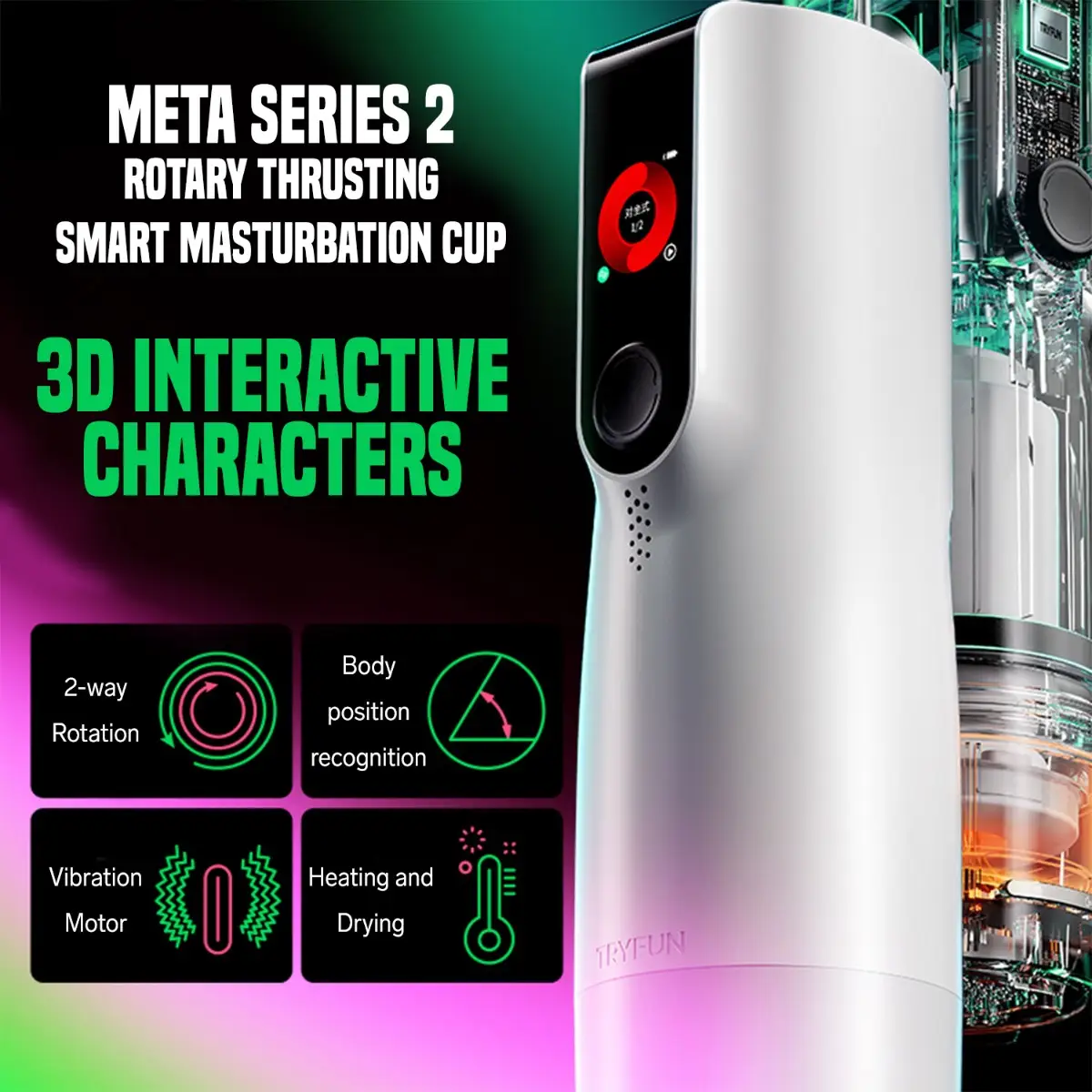
Introduction to TryFun Meta 2
Overview of TryFun Meta 2
The TryFun Meta 2 is a revolutionary stroker in the teledildonic landscape, designed to enhance interactive experiences with its sophisticated features. As someone who has put this device through its paces, I can attest to its capability to deliver a unique pleasure journey. What's particularly interesting is its Bluetooth compatibility, which makes it a versatile choice for users who value seamless connectivity.
This device stands out by supporting funscript files via Intiface Central, a hub that facilitates synchronized oscillating motions. This means that when you're watching a synced video on Funscript Player, the Meta 2 will match the action with impressive precision. This capability is further enhanced by its compatibility with Buttplug.io, enabling integration with a vast array of platforms and devices.
In my experience, the Meta 2 is particularly easy to set up and use, thanks to its intuitive design and clear instructions. The device feels sturdy and well-constructed, which is reassuring given the price range. It's also worth noting that despite its advanced features, the Meta 2 remains relatively lightweight, which adds to its appeal for extended sessions.
- Bluetooth-compatible stroker
- Supports funscript files via Intiface Central
- Features an Onahole, vibration motor, and rotation motor
- Compatible with Buttplug.io
- Lightweight and durable build
Key Features and Specifications
When it comes to features, the TryFun Meta 2 doesn't skimp. One of the first things you'll notice is its dual motor system, designed to provide both oscillating and rotating actions. This combination can significantly elevate the tactile experience, as I've discovered in multiple sessions. The oscillating motion is particularly noteworthy, as it allows for a nuanced response to funscript position data.
Another standout feature of the Meta 2 is its Onahole, made from a soft and realistic material that enhances the overall sensation. The device's vibration motor adds an extra layer of stimulation, which can be adjusted to match the intensity of the moment. What's more, the rotation motor offers a unique twist that sets the Meta 2 apart from other strokers on the market.
Let's break down the key specifications that make the TryFun Meta 2 a device worth considering:
| Feature | Details |
|---|---|
| Connectivity | Bluetooth (Intiface Central) |
| Funscript Support | Yes, via Intiface Central |
| Motors | 1 vibration motor, 1 rotation motor |
| Compatibility | Buttplug.io compatible |
| Price Range | $130-$160 |

How to Set Up TryFun Meta 2 with Funscript.org
Connecting TryFun Meta 2 Using Intiface Central
Setting up the TryFun Meta 2 to work with Funscript.org is straightforward once you know the steps. In my testing, I found the process to be quite intuitive, thanks to the comprehensive support provided by Intiface Central.
First, you'll need to download and install Intiface Central from the official website. This software acts as a bridge between your device and Funscript.org, enabling Bluetooth connectivity. Once installed, start the Intiface Server and put your Meta 2 into pairing mode. This typically involves holding down the power button until a pairing light starts flashing.
On the Funscript.org Dashboard, select the Intiface Central option and enter the WebSocket URL provided. The default should be ws://127.0.0.1:12345 unless you've changed the port in Intiface. Your Meta 2 should appear as a connected device, ready for action.
In practice, the connectivity is reliable and consistent. There were no dropped connections during my sessions, which is crucial for an uninterrupted experience. This stability is a testament to the robustness of the Bluetooth integration in the Meta 2.
Syncing Funscripts for Optimal Pleasure
With your device connected, syncing funscripts is the next step. Load up your chosen video and corresponding funscript into the Funscript Player. The real-time synchronization between the Meta 2 and the video is where the magic happens.
In my experience, the device responds beautifully to the nuanced motions encoded within the funscript file. The synchronization is spot-on, allowing for a seamless transition between different motions and intensities. For those interested in creating or modifying funscripts, the Funscript.org Script Editor offers a powerful suite of tools to tailor your experience precisely. This editor allows you to test scripts in real time, making it a valuable resource for both novices and seasoned scripters.
Here’s a quick step-by-step to get everything running smoothly:
- Download and install Intiface Central.
- Start the server and put Meta 2 into pairing mode.
- Connect via Intiface Central on the Funscript.org Dashboard.
- Load your video and funscript in the Funscript Player.
- Enjoy the synchronized experience with minimal latency.

Performance and User Experience
Real-World Testing with Funscript Integration
After using the TryFun Meta 2 for several weeks, its performance, particularly when integrated with funscripts, left a lasting impression. The oscillating and rotating actions work in tandem to provide a sensation that's both engaging and satisfying. The feedback is smooth, and the transition between motions is seamless.
During my sessions, I found that the Meta 2 maintains a robust connection, with minimal latency issues, ensuring that the device’s actions are in perfect harmony with the funscript. This makes for an immersive experience that keeps you coming back for more.
The first thing you'll feel with the TryFun Meta 2 is its smooth oscillating motion, which is unlike anything offered by its competitors.
The noise level is another aspect where the Meta 2 scores highly. It's whisper-quiet, allowing for discretion and uninterrupted focus on the experience. Battery life is decent, though I noticed it drops to about 60% after a 45-minute session, which is a trade-off for the device's powerful motors.
What surprised me was how well the Meta 2's features enhance the overall experience, making it feel more natural and less mechanical. The device's capability to adjust to different funscript patterns without a hitch demonstrates its versatility.
User Feedback and Satisfaction
Feedback from other users mirrors my own experience. The combination of oscillating and rotating actions is often highlighted as a key feature that enhances the pleasure. Additionally, its compatibility with multiple platforms such as Funscript.org makes it a favorite among those who like to switch between different types of interactive sessions.
People appreciate the TryFun Meta 2 for its reliability and the intuitive nature of its setup. The ability to work seamlessly with a wide range of funscript content ensures that users can tailor their experience to match their preferences without any hiccups.
Moreover, users have commented on the Meta 2's comfortable grip and easy-to-use controls, which contribute to its overall user-friendly design. The ability to quickly switch between different modes and intensities is particularly appreciated during fast-paced scripts.
Comparing TryFun Meta 2 with Competitors
Alternatives in the Market
The TryFun Meta 2 enters a competitive market filled with excellent alternatives, each with its unique strengths. When compared to devices like the Kiiroo Keon and lovense Max 2, the Meta 2 stands out for its oscillating motion, which adds a new dimension to the interactive experience.
Lovense Toys
The Kiiroo Keon, for instance, offers adjustable stroke speed and depth, which is great for those who prioritize customizable stroke patterns. It has a more traditional stroking mechanism that focuses on depth and speed rather than oscillation.
Meanwhile, the Lovense Max 2 is known for its air pump suction and 360-degree contractions, offering a different kind of tactile feedback compared to the Meta 2. This makes it particularly appealing for users who enjoy a more enveloping sensation.

Here's a quick comparison of these devices:
| Device | Category | Connectivity | Funscript Support | Price Range |
|---|---|---|---|---|
| TryFun Meta 2 | Stroker | Bluetooth (Intiface) | ✅ | $130-160 |
| Kiiroo Keon | Stroker | Bluetooth | ✅ | $200-250 |
| Lovense Max 2 | Stroker | Bluetooth | ✅ | $100-130 |
In terms of build quality, all three devices are well-made, but the Meta 2's combination of oscillation and rotation gives it a unique edge in the tactile department. While it may not have the suction capabilities of the Lovense Max 2, the Meta 2 compensates with a more diverse range of movements.
Why Choose TryFun Meta 2?
So, why should you pick the TryFun Meta 2 over its competitors? The answer lies in its unique oscillating motion and its compatibility with Buttplug.io, which broadens its integration potential beyond proprietary apps. It's priced competitively, especially considering its feature set, which makes it a great value for those looking to explore beyond the typical stroking and vibration patterns.
The Meta 2's ability to integrate seamlessly with platforms like Funscript.org, thanks to its support for funscripts, is another compelling reason to consider it. This compatibility not only enhances the device's functionality but also expands the user's options for interactive content.
In addition, the Meta 2's compact design and user-friendly interface make it accessible for newcomers while still offering advanced features that seasoned users will appreciate. This versatility makes it a strong contender in the interactive device market.
Frequently Asked Questions
How do I connect the TryFun Meta 2 to Funscript.org?
To connect the TryFun Meta 2 to Funscript.org, you'll need to use Intiface Central. Download and install Intiface Central, start the server, and ensure your Meta 2 is in pairing mode. Connect via the Funscript.org Dashboard using the WebSocket URL. This connection process is straightforward and usually takes just a few minutes, allowing you to quickly transition to a fully interactive experience.
What makes the TryFun Meta 2 unique?
The TryFun Meta 2 stands out due to its oscillating motion, which, when combined with funscript integration, provides a distinctive interactive experience. This feature differentiates it from other devices that primarily rely on vibration or linear stroking. Additionally, the Meta 2's ability to synchronize with a wide range of funscript content offers users a diverse selection of experiences tailored to their tastes.
Can I use TryFun Meta 2 with other apps?
Yes, the TryFun Meta 2 can be used with other apps, thanks to its compatibility with Intiface Central. This allows it to integrate with various apps supporting Buttplug.io, broadening its usability beyond proprietary applications. Whether you're using it for interactive video, gaming, or other applications, the device's versatility shines through.
Is the TryFun Meta 2 easy to clean?
The TryFun Meta 2 is designed with ease of cleaning in mind. It features a removable sleeve, which simplifies the cleaning process, ensuring that maintenance is as hassle-free as possible. Simply remove the sleeve, rinse it with warm water and mild soap, let it dry, and you're good to go for your next session.
How does the TryFun Meta 2 compare to other strokers?
The TryFun Meta 2 compares favorably to other strokers due to its unique oscillating and rotating features, which provide a broader range of sensations. While devices like the Kiiroo Keon and Lovense Max 2 offer their own unique attributes, the Meta 2's combination of features and competitive pricing make it a standout choice for those looking for something different in their interactive sessions.
In conclusion, the TryFun Meta 2 funscript setup guide and review highlights a device that offers something truly unique in the realm of interactive experiences. Its oscillating motion, combined with its robust connectivity and compatibility with platforms like Funscript.org, makes it a top choice for those seeking a fresh take on teledildonic pleasure. Whether you're new to interactive devices or a seasoned user, the Meta 2 has something special to offer.