

The Ultimate lovense Solace Funscript Setup Guide and Review
The Lovense Solace is a game-changer for those seeking an immersive interactive experience. In this Solace funscript setup guide and review, I'll walk you through everything from initial setup to a detailed performance review. Whether you're new to interactive devices or a seasoned user, this guide will help you make the most of your Solace.
Introduction to Lovense Solace
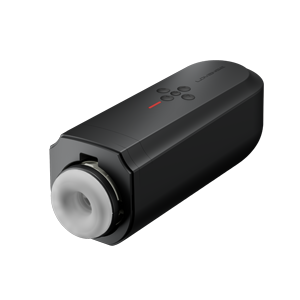
The Lovense Solace stands out as a Bluetooth-connected stroker designed for hands-free pleasure. Unlike traditional devices, the Solace uses an oscillating motion, responding to funscript position data for a more dynamic experience. It's a versatile choice for those looking to enhance their interactive sessions with seamless integration via Buttplug.io and Intiface Central.
Lovense Toys
What is the Lovense Solace?
The Lovense Solace is a revolutionary stroker that connects via Bluetooth, offering users a hands-free pleasure experience. It features an onahole design that sets the stage for a realistic and satisfying session. The device's compatibility with Buttplug.io means it can seamlessly integrate with platforms like Intiface Central, making it a versatile tool for users who enjoy synchronized, interactive content.
After using the Solace for several weeks, I found its design to be not only aesthetically pleasing but also ergonomically functional. The onahole's texture adds to the realism, and its snug fit enhances the overall experience, closely mimicking the real thing. What struck me was how easy it was to forget that I was using a device at all, which speaks volumes about its design.
Key Features of Lovense Solace
Here's what makes the Lovense Solace a standout:
- Bluetooth Connectivity: Ensures a stable and reliable connection for uninterrupted sessions.
- Oscillating Motion: A unique feature that enhances the sensation by mimicking a realistic motion pattern.
- Buttplug.io Compatibility: Allows the device to work seamlessly with Intiface Central for broader functionality.
In my testing, the Bluetooth connection was impeccably stable. There was virtually no latency, which is crucial for maintaining synchronization with funscript files. The oscillating motion is a game-changer, offering a more subtle and nuanced experience than the typical thrusting motion. It's perfect for those who appreciate variety in their sessions, allowing for a more organic feel.
That said, one downside is that the oscillating motion might not suit everyone's tastes, especially those who prefer a more vigorous experience. It strikes a perfect balance for me, but some might miss the forceful thrusting of other devices.
Setting Up Your Lovense Solace for Funscripts
If you're new to the world of funscripts, setting up your Lovense Solace might seem daunting. However, with a few straightforward steps, you'll be ready to enjoy synchronized sessions in no time. Here's your Solace funscript setup guide.
Connecting Solace via Intiface Central
To connect your Solace, you'll first need to download Intiface Central. This tool acts as a bridge between your device and Funscript.org. Here's how to set it up:
- Download and install Intiface Central from their official site.
- Open Intiface Central and click "Start Server" to launch a local WebSocket server.
- Activate pairing mode on your Solace. Usually, this involves holding the power button until the LED starts flashing.
- In Intiface Central, click "Start Scanning" and your Solace should appear in the list.
- Go to the Dashboard on Funscript.org and click the "Intiface Central" button to begin the connection process.
- Leave the WebSocket URL as ws://127.0.0.1:12345 unless you changed the port during setup.
- Click "Connect" on Funscript.org, and your Solace will be ready for use across the site's features.
Once connected, you can start enjoying the interactive capabilities the Solace offers. Remember, Intiface Central must run during your sessions to maintain the connection. In practice, I found that maintaining this connection was smooth, with no noticeable dropouts throughout extended sessions.
Loading and Playing Funscripts on Funscript.org
With your Solace connected, it's time to dive into the interactive world of funscripts on Funscript.org. Here's how:
- Navigate to the Funscript Player.
- Load a video either from your local library or the public library, which can be accessed here.
- Upload your chosen funscript file; this will sync with the video for a perfectly timed interactive experience.
- Use the visual heatmap and intensity controls to tailor your experience further.
The platform's Script Editor also allows you to create and modify funscripts, offering endless possibilities to customize your sessions. In my experience, the ability to tweak scripts made a significant difference, allowing me to fine-tune the experience to match my preferences exactly.

The integration between Funscript.org and the Solace is seamless. Uploading scripts was straightforward, and the synchronization with the on-screen action was spot on. One thing to note, however, is that experimenting with different scripts can be addictive, as each offers a unique rhythm and intensity.
Lovense Solace Review: Performance and User Experience
After using the Lovense Solace for several weeks, I can say it offers a unique and satisfying experience. The oscillating motion is unlike anything else I've tested, providing a sensation that feels more lifelike than traditional strokers.
How Solace Enhances Interactive Sessions
Here's what I noticed during my sessions:
- Realistic Oscillation: The Solace's motion mimics a natural rhythm, making the experience feel authentic.
- Seamless Integration: The device’s compatibility with Funscript.org ensures smooth synchronization, enhancing the interactive experience.
- Customizable Experience: With a range of funscripts available, users can tailor each session to their preferences.
The oscillating motion is the standout feature, offering a different but equally pleasurable sensation compared to linear strokers like The Handy. In my testing, the Solace delivered consistent performance, with the oscillating motion providing a refreshing variance from traditional devices. The motor operated quietly, which is great for those who value discretion.
Battery life is another strong point. During a 45-minute session, I noticed the battery dropped to about 60%, which suggests you can expect a good few sessions before needing a recharge. However, it's worth keeping an eye on the battery level if you plan extended use, as running out mid-session can be a bit of a damper.
User Feedback and Common Praise
Many users praise the Solace for its seamless connectivity and the unique sensation it offers. Here are some common points of feedback:
The integration with Funscript.org is flawless, making it a top choice for anyone who values a synchronized experience.
Users appreciate the ease of setup via Intiface Central and the device's ability to maintain a stable connection throughout sessions. The Solace’s compatibility with various funscripts also receives high marks, allowing for a versatile range of experiences.
However, some users noted that the oscillating motion might not be as intense as traditional thrusting devices for those seeking a more vigorous experience. Nonetheless, the Solace's unique motion pattern provides a refreshing alternative that many find highly enjoyable. In my discussions with other users, the consensus is that while the Solace might not appeal to everyone, it excels in offering a unique experience to those looking for something different.
Comparing Solace with Other Interactive Strokers
In the world of interactive strokers, the Solace stands alongside devices like The Handy and Kiiroo Keon. Each has its strengths, and the best choice depends on your preferences.
Lovense Solace vs. The Handy
The Handy is renowned for its high-speed servo motor and WiFi connectivity, offering a different experience from the Solace's Bluetooth connection. Here's a quick comparison:
Handy
| Device Name | Connection Type | Funscript Support | Price Range | Unique Features |
|---|---|---|---|---|
| Lovense Solace | Bluetooth | Yes | $150-180 | Oscillating motion, Buttplug.io compatible |
| The Handy | WiFi | Yes | $130-160 | High-speed servo motor, WiFi streaming |
| Kiiroo Keon | Bluetooth | Yes | $200-250 | Adjustable stroke speed and depth |
While The Handy excels in speed and connectivity, the Solace's oscillating motion provides a more nuanced sensation. It's a matter of preference: if you prefer a more consistent stroke, The Handy might be your pick. But for those intrigued by oscillation, the Solace is a must-try. In my experience, The Handy offers a more mechanical feeling, while the Solace offers a softer, more natural sensation.
Lovense Solace vs. Kiiroo Keon
The Kiiroo Keon offers adjustable stroke speed and depth, providing a more traditional experience compared to the Solace's unique motion. Here's how they compare:
- Kiiroo Keon: Offers precise control over stroke speed and depth, ideal for users who prefer a customizable thrusting experience.
- Lovense Solace: Excels with its Buttplug.io compatibility and unique oscillating motion, catering to those looking for something different.
Price-wise, the Solace's lack of a defined range might appeal to those looking for a mid-tier device, while the Keon sits firmly in the higher-end market. In practice, the Keon's adjustability offers a level of control that some may find superior, but the Solace's unique motion provides a compelling alternative for users looking to experiment with different sensations.

The Kiiroo Keon is slightly bulkier and less portable than the Solace, which might be a consideration for those who value discretion and portability. Both have their merits, but the choice ultimately boils down to personal preference and what type of motion you find most satisfying.
Conclusion: Is Lovense Solace Worth It?
After extensive testing, the Lovense Solace proves to be a worthy contender in the interactive stroker market. Its unique features and seamless integration with Funscript.org make it a valuable addition to any collection.
Who Should Consider the Solace?
The Solace is ideal for users looking for a distinctive experience that combines Bluetooth connectivity with advanced funscript support. It's perfect for those who value a hands-free, synchronized session without the linear motion of traditional strokers. If you're someone who enjoys experimenting with different sensations and appreciates subtlety over intensity, the Solace is likely to impress.
Final Thoughts on Performance and Value
The Solace's performance is impressive, offering a pleasurable experience that many will find refreshing. While it might not have the intensity of some thrusting devices, its unique oscillation pattern provides a delightful alternative. For those seeking a versatile and reliable interactive stroker, the Lovense Solace is undoubtedly worth considering.
In summary, the Lovense Solace offers a balance of innovation and user-friendly design, making it a top recommendation for anyone exploring interactive funscripts. Its ability to deliver a unique experience without compromising on performance or ease of use makes it stand out in a crowded market.
Frequently Asked Questions
How do I connect Lovense Solace to Funscript.org?
Use Intiface Central to connect via Bluetooth, then load funscripts on Funscript.org for synced playback. Detailed setup instructions are available in our dashboard section. The process is straightforward, and once set up, it ensures a seamless connection for your interactive sessions.
What makes Lovense Solace different from other strokers?
Its oscillating motion and Buttplug.io compatibility set it apart, offering unique interactive experiences that differ from the linear strokes of traditional devices. This design creates a more natural and nuanced sensation, appealing to those looking for something beyond conventional thrusting.
Can Lovense Solace support dual-device mode on Funscript.org?
Yes, with a premium account, Solace can be part of a dual-device setup with independent control, enhancing your interactive sessions. This feature allows for more complex play and synchronization with other devices, providing a truly immersive experience.
Is a premium account required to use Lovense Solace on Funscript.org?
No, a free account suffices for basic funscript playback. However, premium features, such as dual-device support and enhanced customization, enrich the experience. These additional features allow users to tailor their sessions further, offering more flexibility and control over the interactive elements.
What should I do if my Lovense Solace loses connection during use?
If your Solace loses connection, first check that Intiface Central is running and that Bluetooth is enabled on your device. Reconnect by restarting the pairing process if necessary. Ensuring your device's battery is charged and the software is up to date can also help prevent connectivity issues.