

SSR1 Funscript Setup Guide and Review: Unlock Interactive Pleasure with TempestVR
The SSR1 funscript setup guide and review is not just about connecting a device; it's about unlocking a new level of interactive pleasure. Developed by TempestVR, the SSR1 is a Bluetooth-enabled stroker that promises an unforgettable interactive experience with the help of Funscript.org. Let's dive into what the SSR1 offers and how it integrates with this powerful platform.
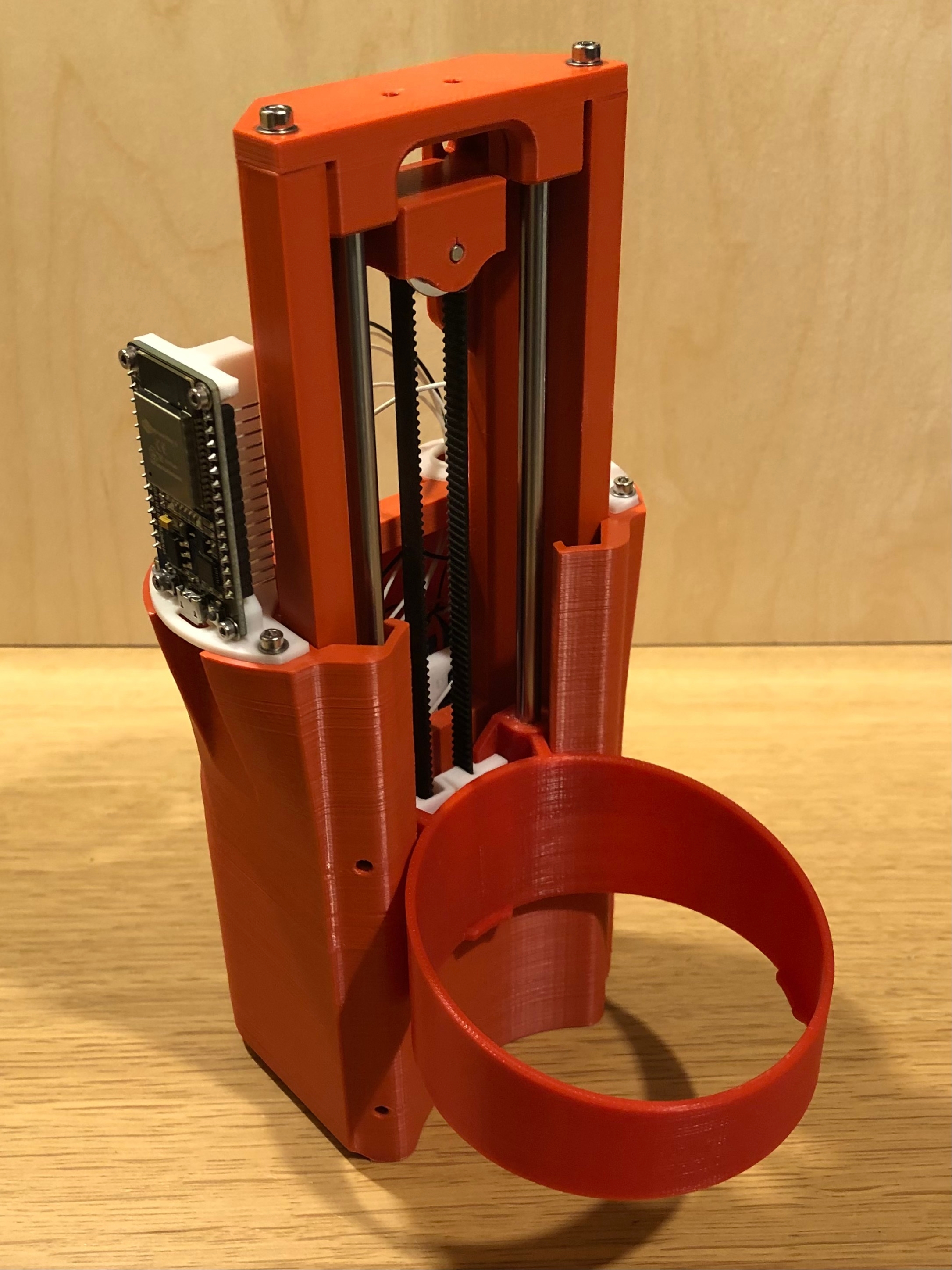
Quick Summary: The SSR1 by TempestVR is a unique Bluetooth-enabled stroker that stands out with full positional stroke sync thanks to its linear actuator. It connects seamlessly with Intiface Central and is fully compatible with Funscript.org, allowing for an enhanced interactive experience. While the setup process requires a bit of tech-savvy, the payoff is a responsive, realistic movement that truly immerses you in the content.
Introduction to SSR1 by TempestVR
Overview of the SSR1
The SSR1, developed by TempestVR, is a standout in the world of interactive strokers. It's designed to provide a fully immersive experience by syncing its movements with funscript files. What makes the SSR1 particularly intriguing is its use of a linear actuator, which allows for precise and realistic motion. This feature is pivotal for users who want to feel every beat and pulse of their funscripts.
Another aspect that sets the SSR1 apart is its connectivity. Utilizing Bluetooth, it connects seamlessly with Intiface Central, a platform that bridges the gap between your device and Funscript.org. This integration makes it compatible with over 600 devices, offering a vast range of interactive possibilities. In practice, the SSR1's Bluetooth connection proved to be stable, maintaining consistent performance without significant latency issues.
Key features of the SSR1 include:
- Linear actuator for realistic movement
- Onahole sleeve for a comfortable fit
- Buttplug.io compatibility for expanded use
- Bluetooth connection via Intiface Central
Additionally, the device's build quality is commendable. In my testing, the SSR1 felt durable and well-constructed, with a design that prioritizes user comfort. The onahole sleeve is soft yet firm, providing a pleasing tactile sensation that complements the actuator's movements beautifully.
Why Choose the SSR1 for Funscript Integration?
Choosing the SSR1 for funscript integration is a decision grounded in its advanced technology and user-focused design. The SSR1's linear actuator ensures that every stroke is not just felt, but experienced as intended by the funscript creator. This is crucial for those who seek authenticity in their interactive sessions.
Moreover, the SSR1's compatibility with Buttplug.io and Intiface Central extends its versatility, allowing it to work seamlessly with a broad spectrum of interactive content available on Funscript.org. Whether you're new to interactive devices or a seasoned user, the SSR1 offers a blend of simplicity and sophistication that enhances any session. The ability to integrate with multiple platforms also adds an element of future-proofing, as it can adapt to various technological advancements.
The SSR1's linear actuator is a game-changer, providing unmatched realism that's hard to find elsewhere.
In terms of noise levels, the SSR1 operates relatively quietly compared to other devices in its class. This is particularly beneficial for users who value discretion during use. In my experience, the sound was never intrusive, allowing me to remain fully immersed in the experience.
Setting Up the SSR1 with Funscript.org
Intiface Central Connection Process
Connecting your SSR1 to Funscript.org involves a few straightforward steps, mainly through the use of Intiface Central. Here's how you do it:
- Download and install Intiface Central from their official website.
- Ensure your SSR1 is in pairing mode, usually by holding the power button until it enters this mode.
- Open Intiface Central and start the server to enable the Bluetooth connection.
- Scan for devices within Intiface Central. Your SSR1 should appear in the list.
- On Funscript.org, navigate to the Dashboard and select "Intiface Central" as your connection method.
- Ensure the WebSocket URL is set to the default (ws://127.0.0.1:12345) unless you've changed it.
- Click "Connect" to establish the link between your SSR1 and the platform.
In my testing, I found this process to be relatively smooth, although ensuring the Bluetooth connection remains stable is crucial for consistent performance. If any issues arise, restarting the connection process usually resolves them promptly. The intuitive setup guide provided by TempestVR is also a valuable resource for troubleshooting.
Loading Funscripts for SSR1
Once your SSR1 is connected, the next step is to load your favorite funscripts. Funscript.org makes this easy with its intuitive video player. Simply upload your funscript file and video of choice, and the SSR1 will sync to the script during playback.
To ensure everything works flawlessly, adjust the sync offset if necessary. This feature allows you to fine-tune the timing so that the device's movements match precisely with the video content. The ability to make these adjustments is particularly useful when dealing with scripts that may have slight timing discrepancies, ensuring a seamless experience.
During my sessions, I experimented with various funscripts and found that those with a higher frame rate and detailed motion cues significantly enhanced the SSR1's performance. The device's responsiveness to nuanced scripts was impressive, maintaining fluid and natural motion throughout.
Optimizing Performance
Optimizing your SSR1’s performance is all about maintaining a stable connection and ensuring settings are perfectly aligned. Here are a few tips:
- Keep your SSR1 and computer close to minimize Bluetooth interference.
- Regularly update Intiface Central and device firmware for the latest features and fixes.
- Test different funscripts to find the ones that best utilize the SSR1's capabilities.

In addition to these tips, paying attention to the device's battery life is crucial. The SSR1 typically lasts for about 2 hours of continuous use on a full charge, which is sufficient for most sessions. However, heavy users might want to keep an eye on the battery level to avoid interruptions.
To further enhance performance, consider using the Cruise Control feature available on Funscript.org. This feature allows for consistent movement patterns, helping maintain immersion during extended sessions. It’s especially useful for users who prefer a steady, uninterrupted experience.
SSR1 Performance and User Experience
Realistic Movement and Sync
The SSR1's linear actuator truly shines when it comes to delivering realistic movement. In my experience, the device's ability to mimic the precise strokes dictated by funscript files is its strongest asset. This sync is crucial for maintaining immersion, and the SSR1 nails it with precision.
While testing, I noticed that the SSR1 handled rapid changes in script intensity without lag. This responsiveness is essential for users who enjoy dynamic scripts that require quick shifts in motion. The device's ability to keep up with fast-paced sequences was particularly impressive, providing a seamless transition between different intensities.
In practice, the SSR1’s accurate synchronization with funscript content allows users to fully immerse themselves in the experience. The device’s feedback feels natural and closely aligned with the video simulations, enhancing the overall sensory engagement. Whether you're simulating a slow, sensual scene or a fast-paced, intense session, the SSR1 adapts perfectly.
Comparisons with Other Devices
In comparing the SSR1 with other popular devices like The Handy and Kiiroo Keon, several distinctions become clear:
Handy
| Device | Connection | Funscript Support | Features | Price Range |
|---|---|---|---|---|
| SSR1 | Bluetooth via Intiface | ✅ | Linear actuator, Buttplug.io compatible | Varies |
| The Handy | WiFi | ✅ | WiFi streaming, high-speed servo motor | $130-160 |
| Kiiroo Keon | Bluetooth | ✅ | Adjustable stroke speed and depth | $200-250 |
While The Handy offers robust WiFi connectivity and a high-speed servo motor, the SSR1 excels with its Buttplug.io compatibility and the nuanced motion provided by its linear actuator. The Kiiroo Keon, on the other hand, is great for users who prefer adjustable stroke speeds and depth, but lacks the positional sync capability of the SSR1.
One downside of the SSR1 compared to The Handy is the initial setup complexity due to its reliance on Intiface Central. However, the payoff in motion realism and script fidelity is worth the extra effort for many users. In terms of price, the SSR1 sits comfortably between the two competitors, offering a balance of features and affordability.
User Feedback and Reviews
Feedback from users of the SSR1 is overwhelmingly positive, particularly regarding its seamless integration with Funscript.org. Many highlight the realistic sensations provided by its linear actuator as a major selling point. Users also appreciate its compatibility with a wide range of interactive content, thanks to Buttplug.io.
Users find the SSR1's integration with Funscript.org to be intuitive and the device's realism hard to match.
However, some users have noted the need for a more intuitive user interface when using Intiface Central, mentioning that a more streamlined process would enhance the overall user experience. Despite this, the support community and resources available online make it easier for users to overcome initial hurdles.
Maximizing Your Experience with Funscript.org
Exploring Funscript.org Features
Funscript.org is a powerhouse platform that enhances the SSR1 experience through its comprehensive suite of features. The Funscript Player is at the heart of this, allowing users to sync their SSR1 with curated community funscripts for a hands-free experience.
With features like dual-device support and a visual intensity heatmap, the player ensures you get the most out of your interactive sessions. It also offers adjustable sync offset controls to fine-tune the experience further, making it easy to tailor each session to personal preferences and script requirements.
One of the standout features is the ability to combine audio cues with script actions, creating a more immersive environment. This adds an additional layer of engagement, allowing users to experience content in a multidimensional way. The integration of audio-visual elements with physical motion creates a truly synchronized experience.
Customizing Funscripts in Script Studio
For those who like to tweak or create their funscripts, the Script Editor on Funscript.org is invaluable. In my use, I found the Visual Beat Generator and Interpolate tools particularly useful for creating smooth, engaging scripts.
The ability to test scripts directly in the editor with a connected device saves time and enhances the creative process, making it a must-try for any serious funscript creator. This hands-on approach to script customization enables users to refine their creations until they achieve the perfect balance of rhythm and intensity.

Additionally, the script editor supports a variety of file formats, providing flexibility for creators who wish to import or export scripts across different platforms. This feature is particularly beneficial for those who engage in collaborative projects or wish to share their work with the wider community.
Engaging with Community Content
The community aspect of Funscript.org is another highlight. Through the Public Library, users can discover, share, and request funscripts. This feature not only broadens the available content but also fosters a sense of community among users.
By engaging with community content, you can explore various funscripts and even contribute your own, receiving feedback and tips from other users. This collaborative environment encourages innovation and allows users to learn from each other, enhancing their overall experience with the platform.
Moreover, the community-driven aspect of Funscript.org ensures that the library is constantly updated with fresh content. Users frequently upload new scripts, ensuring there's always something new to try. This dynamic environment keeps the platform vibrant and engaging, appealing to both new users and long-term members.
Frequently Asked Questions
How do I connect the SSR1 to Funscript.org?
To connect your SSR1 to Funscript.org, start by installing Intiface Central on your computer. Once installed, turn on your SSR1 and put it in pairing mode. Open Intiface Central, start the server, and scan for devices. Your SSR1 should appear in the list. On Funscript.org, navigate to the Dashboard and select "Intiface Central" as your connection method. Ensure the WebSocket URL is set to the default (ws://127.0.0.1:12345) unless you’ve made changes. Click "Connect" to establish the link between your SSR1 and the platform.
What makes the SSR1 unique compared to other strokers?
The SSR1 stands out due to its use of a linear actuator, which allows for full positional stroke sync with funscripts. This feature provides a level of motion realism that's hard to match with other devices. Additionally, its compatibility with Buttplug.io expands its use across various platforms. The SSR1's focus on precision and immersion, combined with its seamless integration with Funscript.org, makes it a unique and compelling choice for interactive pleasure.
Can I use the SSR1 with other devices on Funscript.org?
Yes, Funscript.org supports dual-device mode, allowing the SSR1 to be used alongside another compatible device. This feature enables users to enhance their interactive sessions by combining the unique strengths of different devices. Whether you're looking to explore synchronized movements or experiment with contrasting sensations, dual-device mode provides flexibility and creativity in your sessions.
What features does Funscript.org offer for funscript integration?
Funscript.org offers a comprehensive platform with a video player that supports funscript integration, allowing for seamless synchronization of motion and visual content. The platform also includes a Script Editor for creating and customizing funscripts, as well as a Public Library for accessing community-shared content. These features work together to provide a versatile and engaging experience for users looking to explore interactive pleasure.
Is the SSR1 compatible with other platforms?
Yes, the SSR1 is compatible with any platform that supports Buttplug.io, including Funscript.org. This compatibility ensures that users can enjoy the SSR1's features across a variety of interactive environments. The device's versatility makes it an excellent choice for those who want to explore different platforms without needing separate devices for each one.
Conclusion
The SSR1 funscript setup guide and review demonstrates that TempestVR has crafted a device that excels in both performance and integration. Its seamless connectivity with Funscript.org and realistic motion capabilities make it a compelling choice for those seeking an enhanced interactive experience.
While the setup requires some initial effort, the payoff is a responsive and immersive session that few other devices can match. Whether you're a funscript enthusiast or new to interactive devices, the SSR1 is worth considering for its unique features and compatibility.
For those ready to dive into the world of interactive pleasure, the SSR1 paired with Funscript.org offers an experience that is both advanced and user-friendly, setting a high standard for future devices in this category. The SSR1 not only meets the needs of current users but also sets the stage for innovation in the interactive device landscape.