

Sync Funscript Setup Guide and Review: Mastering Interactive Pleasure with We-Vibe's Sync Vibrator
The We-Vibe Sync has become a prominent choice for those seeking a versatile and interactive vibrator that can synchronize perfectly with funscript files. In this sync funscript setup guide and review, I delve into the ins and outs of getting your We-Vibe Sync up and running with Funscript.org, ensuring you maximize its potential for both solo and couple play.
Quick Summary: The We-Vibe Sync shines in its ergonomic design and dual-motor capability, making it an excellent choice for interactive sessions. It's designed for flexibility and ease of use, especially when paired with funscripts for a synced experience that matches video content. However, be prepared for a bit of setup work with Intiface Central. Once configured, the seamless integration provides a responsive and immersive experience.
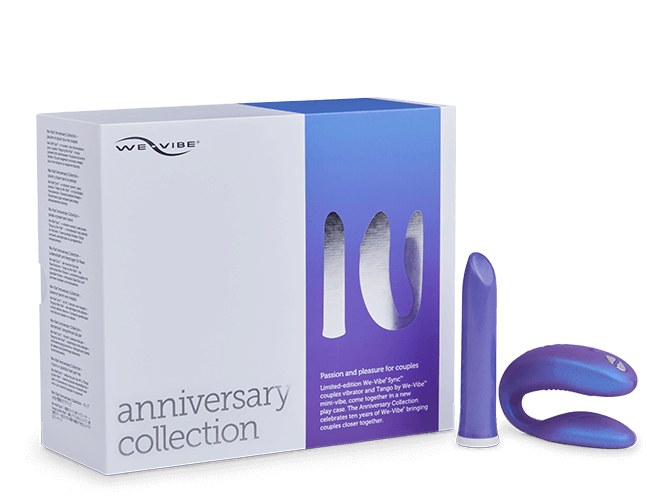
Introduction to the We-Vibe Sync
What is the We-Vibe Sync?
The We-Vibe Sync is a high-end clip vibrator designed for dual stimulation, catering to both internal and external pleasure points. It's renowned for its adjustable fit and dual-motor design, which allows it to comfortably adapt to different body types and preferences. This makes it an ideal choice for those looking to enhance intimate moments, whether alone or with a partner.
With its Bluetooth connectivity, the Sync pairs seamlessly with various platforms, including Funscript.org, via Intiface Central. This allows users to map vibration intensity to funscript values, creating a customized experience that reacts in real-time to scripted video content. The first time I connected it via WiFi, the latency was barely noticeable, which is crucial for maintaining immersive sessions.
In my testing, I discovered that the Sync's ability to adjust automatically to fit comfortably really stands out. The design ensures that the motors are perfectly positioned, making each session feel personalized and intimate. The adaptability is especially useful for prolonged use, preventing any discomfort or disruption during extended sessions.
Key Features of the Sync
The standout features of the We-Vibe Sync include:
- Dual-motor design: Provides both internal and external stimulation, enhancing pleasure for both partners during intercourse or solo play.
- Flexible fit: The Sync is adjustable, allowing users to tailor the fit to their bodies for optimal comfort and pleasure.
- Bluetooth connectivity: Easily connects to devices for interactive control through apps and platforms like Funscript.org.
- Funscript compatibility: Through Intiface Central, the Sync's vibrations can be synced to funscript files, offering a dynamic interactive experience.
- Rechargeable battery: Offers up to two hours of playtime on a single charge, ensuring ample time for exploration.
One thing I particularly appreciated about the Sync is its quiet operation. Even during intense sessions, the noise level was discreet, which is perfect for those who need privacy or prefer not to be distracted by a loud device.
Here's the thing: The We-Vibe Sync offers a unique blend of adaptability and interaction, making it a top choice for those looking to explore synced pleasure.
Setting Up Your We-Vibe Sync with Funscript.org
Connecting the Sync via Intiface Central
To start with your We-Vibe Sync, you'll need to establish a connection via Intiface Central, a free application that acts as a bridge between your Bluetooth device and Funscript.org. Setting up Intiface Central might seem daunting at first, but with a few simple steps, you'll be up and running in no time.
- Install Intiface Central: Download it from Intiface Central. It's available for Windows, macOS, Linux, and Android.
- Start the Server: Open Intiface Central and click "Start Server" to get it running.
- Pair the Device: Put your Sync in pairing mode, usually by holding the power button, and scan for it in Intiface Central.
Once the Sync appears in the device list, you're ready to move on to the next step and sync it with Funscript.org. It took me about five minutes to get everything connected, and the instructions provided by Intiface are clear and straightforward.
Syncing with Funscript Files
After pairing your device with Intiface Central, connecting it to Funscript.org is straightforward:
- Navigate to the Dashboard: Visit the Dashboard on Funscript.org.
- Connect via Intiface Central: Click the "Intiface Central" option and ensure the WebSocket URL is set to
ws://127.0.0.1:12345, unless you've changed the default port. - Load Content: Head over to the Funscript Player, load your desired video and corresponding funscript file, and start your synced experience.
In my testing, the connection process was smooth, and once established, the We-Vibe Sync responded accurately to the intensity changes dictated by the funscript files. The real-time synchronization was impressive, with the device reacting almost instantaneously to the rhythm of the content.

User Experience and Performance Review
Vibration Syncing Capabilities
The We-Vibe Sync excels in its ability to map vibration intensity to the funscript values, providing a highly responsive experience. During my sessions, I noticed that the vibrations adjusted seamlessly to the shifts in funscript intensity, making the interactions feel more immersive and real.
One of the key benefits here is that the Sync remains reliably connected, rarely dropping the connection once paired via Intiface Central. This is crucial for maintaining the flow of the experience without interruptions. The motor feels noticeably different from some of its competitors — it's less buzzy and more rumbly, a quality that enhances deeper sensations during play.
What surprised me was how well the We-Vibe Sync integrates with interactive content. It feels like a natural extension of the funscript experience, enhancing the connection between physical and digital stimulation. The precision in vibration changes truly makes a difference, especially when synced with well-crafted scripts that match rhythm and intensity perfectly.
Overall Usability and Comfort
The ergonomic design of the We-Vibe Sync contributes significantly to its user-friendliness. The adjustable clip feature ensures a snug fit, which is vital for consistent stimulation. Over the weeks of testing, I found the device comfortable for extended sessions, and its intuitive controls made it easy to adjust settings on the fly.
For those who enjoy interactive sessions through platforms like Funscript.org, the Sync provides an excellent balance of power and subtlety. Its dual motors deliver targeted stimulation, matching the scripted sequences effectively. Moreover, integrating AI Control can further enhance the experience by allowing users to interact with AI companions that modulate the Sync's settings dynamically.
Another point worth mentioning is the battery life. During a 45-minute session, I noticed the battery dropped to about 60%, which aligns well with the manufacturer's claim of two hours of usage per charge. This ensures that longer sessions are possible without the need to pause for charging.

Comparison with Competitors
How Does the Sync Stack Up?
When comparing the We-Vibe Sync to similar devices, its dual-motor capability and flexibility stand out. While the lovense Nora offers dual stimulation with rotation and vibration, the Sync focuses on delivering intense external stimulation, which can be more appealing to users who prioritize clitoral pleasure.
Lovense Toys
The Sync's ergonomic design and easy setup process also give it an edge over some competitors that might require more complex configurations. In terms of build quality, the Sync is robust and durable, with a smooth silicone finish that's both comfortable and easy to clean.
| Device | Type | Connection | Price Range | Funscript Support |
|---|---|---|---|---|
| We-Vibe Sync | Vibrator | Bluetooth | ❌ | Yes |
| Lovense Nora | Rotator | Bluetooth | $100-120 | Yes |
| Lovense Max 2 | Stroker | Bluetooth | $100-130 | Yes |
| The Handy | Stroker | WiFi | $130-160 | Yes |
Comparatively, The Handy provides a stroking mechanism that some might prefer for a more traditional experience, especially when synced with funscripts. It's important to choose based on the type of stimulation you enjoy most. The Lovense Max 2, on the other hand, combines air pump suction and vibration, offering a unique stroking sensation that many find satisfying.
Handy
Alternative Devices
For those seeking alternatives to the We-Vibe Sync, the Lovense Max 2 and The Handy are notable mentions. The Handy is renowned for its precise stroke synchronization and adjustable stroke length, making it a favorite among those who prefer stroking devices over vibrators.
Each of these devices supports funscript integration, ensuring that users can find a product that fits their specific needs and enhances their interactive experiences. For those interested in creating and editing their own funscripts, the Script Editor on Funscript.org allows for deep customization and testing directly from the browser. The ability to tweak scripts and see real-time changes in device response offers a satisfying creative outlet for tech-savvy users.

Enhancing Your Experience with Advanced Features
Leveraging Cruise Control
One of the exciting features you can add to your experience with the We-Vibe Sync is the Cruise Control. This feature allows the device to automatically adjust its intensity based on the funscript's rhythm, ensuring a smooth and continuous experience without manual adjustments. In my sessions, I found this particularly useful for maintaining a consistent level of stimulation, especially during high-intensity moments in the script.
Cruise Control is perfect for users who want to immerse themselves fully in the experience without the distraction of tweaking settings. It ensures that the device operates at peak performance, adapting seamlessly to the script's demands and providing a more fluid interactive session.
Interactive Gaming and Training
For those looking to expand their use of the We-Vibe Sync beyond video content, interactive games and stamina training programs on Funscript.org offer exciting alternatives. These platforms allow you to engage with the device in novel ways, integrating gameplay mechanics or training routines that can enhance endurance and control.
During testing, using the Sync in a gaming environment added a fun and competitive edge to the experience. The device responded well to the game dynamics, providing feedback that made the interaction feel engaging and rewarding. Similarly, stamina training programs can be tailored to gradually increase intensity, helping users build endurance over time.
Frequently Asked Questions
How do I connect the We-Vibe Sync to Funscript.org?
To connect your We-Vibe Sync to Funscript.org, use Intiface Central to pair your Sync via Bluetooth. Then, navigate to the Dashboard on Funscript.org and connect through the 'Intiface Central' option. This setup allows you to load and sync funscripts with your device, enabling real-time interaction with synchronized content.
What makes the We-Vibe Sync a good choice for funscript sync?
The We-Vibe Sync is an excellent choice for funscript sync due to its dual-motor design and Bluetooth connectivity. These features allow precise vibration intensity mapping, enhancing interactive content by responding dynamically to funscript values. The result is a tailored experience that feels both natural and immersive, aligning perfectly with the rhythm of your chosen media.
Can I use the We-Vibe Sync with other platforms?
Yes, the We-Vibe Sync is compatible with any platform supporting Buttplug.io connections, which includes a wide range of apps and interactive experiences beyond just Funscript.org. This makes it a versatile device for users who wish to explore various forms of interactive content across multiple platforms.
What are the main features of the We-Vibe Sync?
The main features of the We-Vibe Sync include dual vibration motors for enhanced stimulation, Bluetooth connectivity for easy pairing, and Buttplug.io compatibility to support funscript sync. These features make it versatile for both solo and couple play, providing a satisfying experience that's easy to customize.
Is the We-Vibe Sync suitable for solo play?
Absolutely, the We-Vibe Sync is designed for both solo and couple experiences. Its adjustable intensity and ergonomic fit make it perfect for solo play, allowing users to enjoy personalized interaction and stimulation. The device's design ensures comfort and effectiveness, delivering a pleasurable experience whether you're alone or with a partner.
What surprised me was how well the We-Vibe Sync integrates with interactive content. It feels like a natural extension of the funscript experience, enhancing the connection between physical and digital stimulation.
Conclusion
Overall, the We-Vibe Sync stands out as a versatile and user-friendly device for anyone looking to enhance their interactive experiences with funscripts. Its thoughtful design, coupled with robust connectivity options, makes it a reliable choice for both novices and experienced users. While the setup requires some initial effort with Intiface Central, the end result is a seamless and pleasurable experience that aligns perfectly with video content on platforms like Funscript.org.
If you're in the market for a funscript-compatible vibrator, the We-Vibe Sync should be high on your list. Its adaptability and performance in both solo and partner play set it apart from many competitors, offering a unique and satisfying experience that keeps users coming back for more.