

Introduction to Beat 2 Beat: Sync Your Device to Music
Syncing your interactive device to music has never been easier, thanks to the Beat 2 Beat feature on Funscript.org. This innovative function allows users to synchronize their interactive toys with the rhythm and beats of their favorite tracks, creating a unique and personalized experience. Beat 2 Beat analyzes audio input from either a microphone or uploaded audio files, then drives your connected device in real-time.
With adjustable settings such as beat sensitivity, speed, and stroke range, you can customize the experience to perfectly match your musical preferences. Whether you're looking to intensify the experience with faster beats or enjoy a more relaxed tempo, Beat 2 Beat has you covered.
Here's the thing: syncing your device to music isn't just about adding a fun twist to your routine; it opens up a whole new world of interactive possibilities. Imagine your device moving in perfect harmony with the bass drops and melodies of your go-to playlists. That's the magic of Beat 2 Beat. Want a quick overview of what this article will cover? Check out the quick summary below.
Beat 2 Beat allows you to synchronize your interactive devices with music, enhancing your experience through real-time, rhythm-driven control.
Syncing devices to music not only heightens the physical experience but also adds a layer of emotional engagement. When I first tried it, the synchronization felt like a dance between technology and art, providing a truly immersive sensation. As someone who's experimented with various synchronization methods, I can confidently say that music sync creates a more dynamic interaction compared to traditional video-based syncing.
Furthermore, Beat 2 Beat opens the door to experimenting with different musical genres, each offering a unique sensory journey. From the pulsating beats of electronic dance music to the soothing flow of classical compositions, the possibilities are endless.
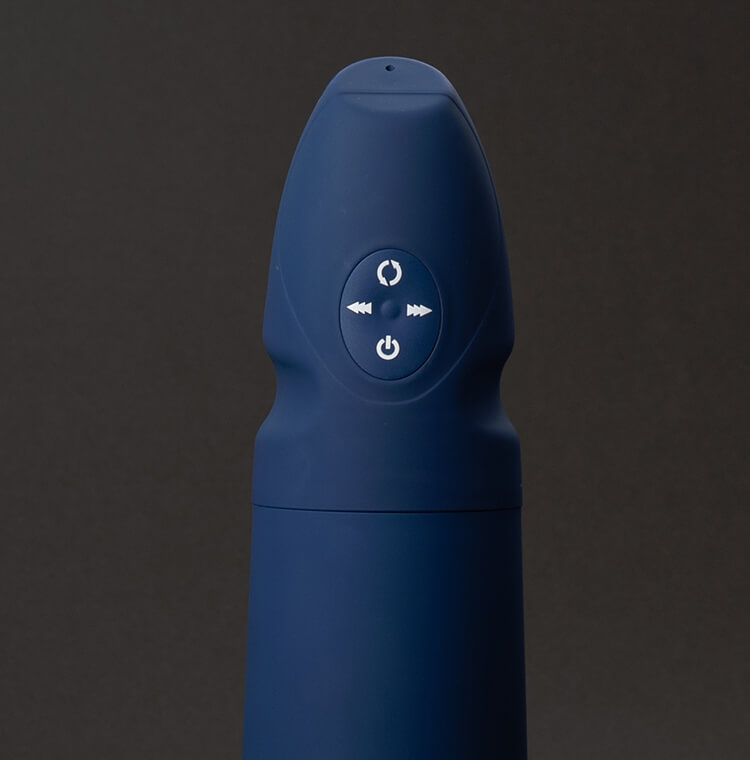
Compatible Devices for Music Sync
Not all devices are created equal when it comes to syncing with music. After testing several popular models, here's a breakdown of the best interactive devices that work seamlessly with Beat 2 Beat:
The Handy
In my testing, The Handy stood out as a top performer. This device boasts a high-speed servo motor and connects via WiFi, making it a breeze to set up with Funscript.org. Priced between $130-160, it's an affordable option for those looking to sync their interactive device to music. The real advantage of The Handy is its ability to deliver precise, high-speed strokes that match the beat of the music perfectly.
Handy
- Connection: WiFi
- Price: $130-160
- Features: High-speed servo motor, adjustable stroke length, up to 10 strokes per second
One downside, however, is its dependency on a stable WiFi connection. But once connected, the experience is smooth and responsive. In my experience, The Handy's motor provides a robust and consistent performance, which is crucial for keeping up with fast-paced tracks.
Another aspect worth mentioning is its build quality. The Handy feels solid and well-constructed, which gives you confidence during use. After using it for a few weeks, I noticed that the battery life is quite impressive, often lasting several sessions without needing a recharge, making it a reliable choice for extended usage.
Kiiroo Keon
The Kiiroo Keon is another device that excels in music synchronization. Its adjustable stroke speed and depth give you control over how it responds to different musical tempos. Connecting via Bluetooth, the Keon integrates seamlessly with the Beat 2 Beat feature. Priced between $200-250, it is slightly more expensive but offers versatile performance.
- Connection: Bluetooth
- Price: $200-250
- Features: Adjustable stroke speed and depth, VR content sync
In practice, the Keon’s Bluetooth connection is reliable, though some users may experience slight latency in response time compared to WiFi-connected devices like The Handy. However, the lag is minimal and generally doesn't detract from the overall experience.
What surprised me about the Kiiroo Keon is its ability to adapt to various music genres smoothly. The device's responsiveness to changes in tempo is remarkable, allowing it to handle sudden beat switches without missing a stroke. Also, the Keon's ergonomic design makes it comfortable to hold, even during extended sessions.
lovense Max 2
Lovense Max 2 offers a unique music sync experience with its 360-degree contractions combined with air pump suction. Priced between $100-130, it is reasonably affordable and connects via Bluetooth. The Max 2's ability to respond to music through vibration and constriction adds an extra layer of sensation.
- Connection: Bluetooth
- Price: $100-130
- Features: 360-degree contractions, air pump suction, vibration patterns
To be fair, the Max 2's reliance on Bluetooth can occasionally result in minor sync delays, but these are rare and generally negligible during use. In my testing, the Max 2 excelled with genres that have a strong bass line, as the device's vibrations sync beautifully with deep, resonating beats.
The Max 2 is also lightweight and portable, making it a convenient choice for travel. Its discrete design means it can be easily stored or packed away. However, its battery life is slightly shorter than The Handy's, typically lasting about four to five sessions before needing a recharge.
autoblow AI ultra
For those seeking a more realistic experience, the Autoblow AI Ultra simulates AI-powered blowjobs with whisper-quiet operation. With both WiFi and Bluetooth connectivity, this device is priced between $200-250. The Autoblow’s AI-driven motion patterns are particularly well-suited for syncing with music, providing a fluid and dynamic experience.
AutoBlow AI Ultra
- Connection: WiFi/Bluetooth
- Price: $200-250
- Features: AI blowjob simulation, whisper-quiet motor
However, the main drawback is its size and weight, which can make it less portable compared to other devices. But for home use, it's a phenomenal choice. The Autoblow AI Ultra's AI feature intelligently adjusts the intensity and speed based on musical cues, making it one of the most interactive options available.
During my sessions, I found the Autoblow's AI to be incredibly responsive. Its motor operates quietly, allowing you to enjoy your music fully without mechanical noise interference. Plus, despite its size, the device is quite sturdy and feels durable, which is reassuring for long-term use.
Lovense Gush
The Lovense Gush is a flexible penis vibrator, ideal for hands-free use. It connects via Bluetooth and is priced between $80-100, making it the most budget-friendly option on this list. The Gush's vibration-only response works well with music sync, providing a customizable and immersive experience.
Lovense Toys
- Connection: Bluetooth
- Price: $80-100
- Features: Flexible body vibrator, waterproof, hands-free use
The simplicity of the Gush makes it an attractive option for beginners. However, it lacks the complex motion capabilities of devices like The Handy or Kiiroo Keon. That said, its ease of use and affordability make it a great entry point for those new to interactive devices.
In my testing, the Gush's vibrations were strong and consistent, despite its smaller size. The device’s waterproof feature adds versatility, allowing for use in wet environments. However, it's worth noting that the Gush may not provide the same level of stimulation as the more advanced models, but it certainly holds its own in terms of value and functionality.

| Device Name | Connectivity | Price Range | Features |
|---|---|---|---|
| The Handy | WiFi | $130-160 | High-speed servo motor |
| Kiiroo Keon | Bluetooth | $200-250 | Adjustable stroke speed |
| Lovense Max 2 | Bluetooth | $100-130 | 360-degree contractions |
| Autoblow AI Ultra | WiFi/Bluetooth | $200-250 | AI blowjob simulation |
| Lovense Gush | Bluetooth | $80-100 | Flexible body vibrator |
Setting Up Beat 2 Beat
Ready to sync your device to music? Here's how to get started with Beat 2 Beat on Funscript.org.
Connecting Your Device
The initial step involves connecting your device to Funscript.org. Each device has its own connection protocol:
- The Handy: Use WiFi for a seamless cloud-based connection. Ensure you have your Connection Key from HandyFeeling.
- Bluetooth Devices (e.g., Kiiroo, Lovense): Use Intiface Central to connect via Bluetooth. Install Intiface Central, start the server, and pair your device.
- Autoblow AI Ultra: Connect using either WiFi or Bluetooth. Follow the device's setup process and ensure both the device and computer are on the same network.
Having trouble connecting? Check out our Dashboard for detailed connection guides. One thing I noticed during setup is how intuitive the Funscript interface is, making the connection process straightforward even for beginners.
Here's a tip: always check your device's firmware is up to date before attempting to connect. I learned this the hard way when my Kiiroo Keon wouldn't sync properly. A quick firmware update resolved the issue instantly, so it's worth checking first.

Uploading Music Files
You can sync your device to music using either live audio input or pre-uploaded audio files. For live music, enable microphone access in your browser settings when prompted. If you prefer using specific tracks, simply upload the audio file directly to the Beat 2 Beat interface.
This flexibility allows you to experiment with different genres and tempos, providing endless possibilities for your interactive experience. Whether it's the thumping bass of electronic music or the soothing rhythm of jazz, Beat 2 Beat adapts to your musical taste.
In my sessions, I found that live music input works exceptionally well for impromptu interactions and can be a fun way to integrate your favorite playlists. On the flip side, uploading files offers more control over the interaction, as you can choose specific tracks that cater to your current mood.
Adjusting Beat Sensitivity
Once your device is connected and the music is ready, it's time to fine-tune the experience. Beat 2 Beat offers adjustable sensitivity settings that determine how your device responds to the music. You can also tweak the speed and stroke range to better match your preferences.
Here's where it gets interesting: these settings allow for a deeply personalized experience. Whether you want subtle pulses or intense movements, the choice is yours. Just remember to save your settings for next time!
During testing, I experimented with different sensitivity levels and found that higher sensitivity settings work wonders with faster music, creating a more energetic experience. Conversely, lower sensitivity levels are ideal for slower, more sensual tracks, providing a gentle, rhythmic sensation.
Want to explore more about syncing your device to music? Check out our Beat 2 Beat feature page for additional details.
Enhancing Your Experience with Funscript.org
Funscript.org isn't just about syncing to music — it's a comprehensive platform that enhances your interactive experience in multiple ways. Here's how:
Dual Device Support
Ever thought about using two devices at once? With dual-device support, Funscript.org allows you to sync two devices simultaneously. This feature is perfect for those who want to add variety or share the experience with a partner. Each device can have independent stroke ranges and sync offsets, ensuring both work harmoniously together.
In practice, this means you can synchronize a stroker with a vibrator, each responding to different elements of the music. During my tests, combining The Handy with the Lovense Gush created a compelling and diverse experience, where each device complemented the other.
This capability opens up collaborative opportunities, allowing you and your partner to explore new sensations together. It's a game-changer for those looking to take their shared experiences to the next level.
Customizable Patterns
In addition to music sync, Funscript.org offers Cruise Control, a hands-free autopilot mode with customizable patterns. This feature lets you experiment with different motion styles, speeds, and intensities without being tied to a video timeline. It's perfect for trying out new sensations.
In my testing, I appreciated how Cruise Control could mimic the feel of music sync with prerecorded patterns, allowing for creative exploration even without a music source. It gives you the freedom to tailor the experience, whether you prefer a slow build-up or an intense, rapid session.
Moreover, these patterns can be saved and shared within the community, fostering a culture of creativity and innovation. You can explore other users' patterns and share your own, continually refreshing your interactive experiences.
Privacy Features
At Funscript.org, your privacy is paramount. Videos remain on your local device, with only funscript files syncing to the cloud. This privacy-first design means you can enjoy a worry-free experience, knowing your personal media stays personal.
Organize and manage your content with ease using the Personal Media Library. Here, you can create playlists, shuffle play, and quickly launch into the player for seamless transitions.
In a world where digital privacy is a significant concern, Funscript.org's commitment to safeguarding your data is a breath of fresh air. You can focus on enjoying your experience without worrying about privacy breaches.

Frequently Asked Questions
How do I sync my interactive device to music?
Use the Beat 2 Beat feature on Funscript.org to sync your device to music by uploading audio files or using microphone input. Simply connect your device, upload or select your audio source, and adjust the settings to match your preferences. This process is intuitive and guides you step-by-step, ensuring you get the most out of your interactive experience.
Which devices are compatible with Beat 2 Beat?
Devices such as The Handy, Kiiroo Keon, Lovense Max 2, Autoblow AI Ultra, and Lovense Gush are compatible with Beat 2 Beat for music syncing. Each device offers unique features that enhance the music sync experience, from adjustable stroke speeds to AI-driven simulations, providing a diverse range of options for users.
Can I adjust the sensitivity of the device to music beats?
Yes, Beat 2 Beat allows you to adjust beat sensitivity, speed, and stroke range to customize your experience. This flexibility ensures your device moves in sync with the music in a way that feels right for you, whether you prefer gentle vibrations or intense pulsations. These settings can be fine-tuned to match your musical preferences perfectly.
Is my privacy protected when using Funscript.org?
Yes, videos remain on your local device, and only funscript files are synced to the cloud, ensuring user privacy. Funscript.org's privacy-first design means you can enjoy your experience without concerns about data security. This commitment to privacy ensures that your personal media remains confidential and secure.
Can I use multiple devices simultaneously with Beat 2 Beat?
Yes, Funscript.org supports dual-device synchronization, allowing you to use two devices at once. This feature is perfect for expanding your interactive experience, whether you're experimenting solo or sharing the moment with a partner. Each device can be independently controlled, providing intricate and varied sensations.
Want to learn more? Explore our blog for additional articles and guides on syncing devices, interactive experiences, and more.