

The Ultimate Tani Funscript Setup Guide and Review
The Tani funscript setup guide and review is here to unravel everything you need to know about utilizing the ManNuo Tani with Funscript.org. If you’re eager to dive into the world of interactive experiences with this device, you’re in the right place. In my testing, I found the Tani to be a fascinating gadget, offering unique features that enhance adult play in ways you may not have imagined.
Here's the thing: The ManNuo Tani is an external vibrator that's designed for interactive experiences and comes packed with features that make it stand out in the teledildonics world.
Quick Summary: The ManNuo Tani is a budget-friendly, interactive external vibrator that connects via Bluetooth using Intiface Central. Its primary feature is a single vibrating motor that syncs intensity with funscript values, creating a dynamic experience across various adult content. It’s compatible with Buttplug.io, making it versatile for different platforms, including Funscript.org. While it might not provide the depth of experience that multi-motor devices offer, its simplicity and affordability make it an excellent choice for beginners.
Introduction to ManNuo Tani
What is the ManNuo Tani?
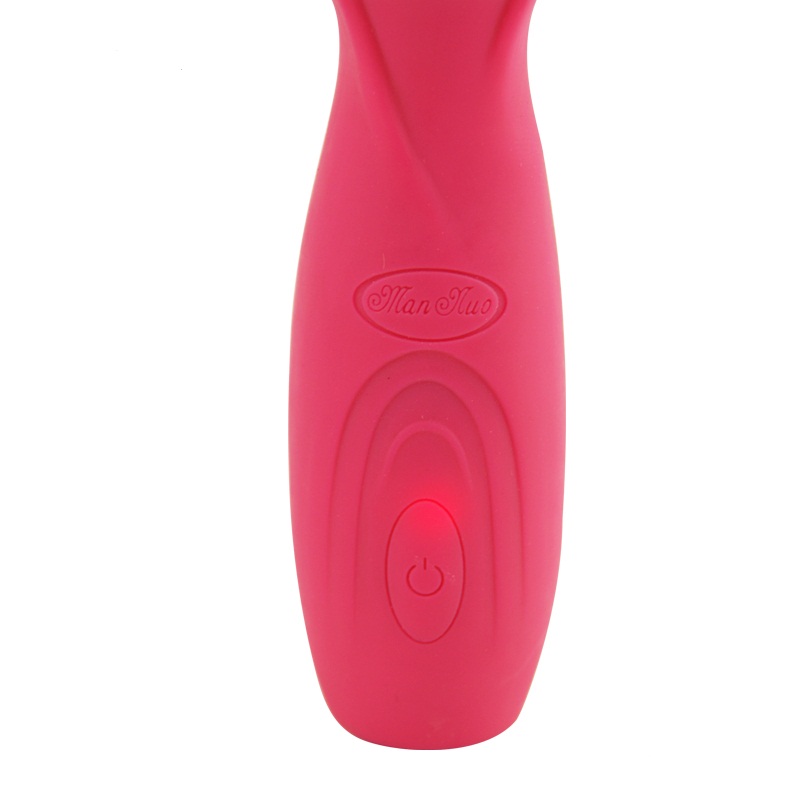
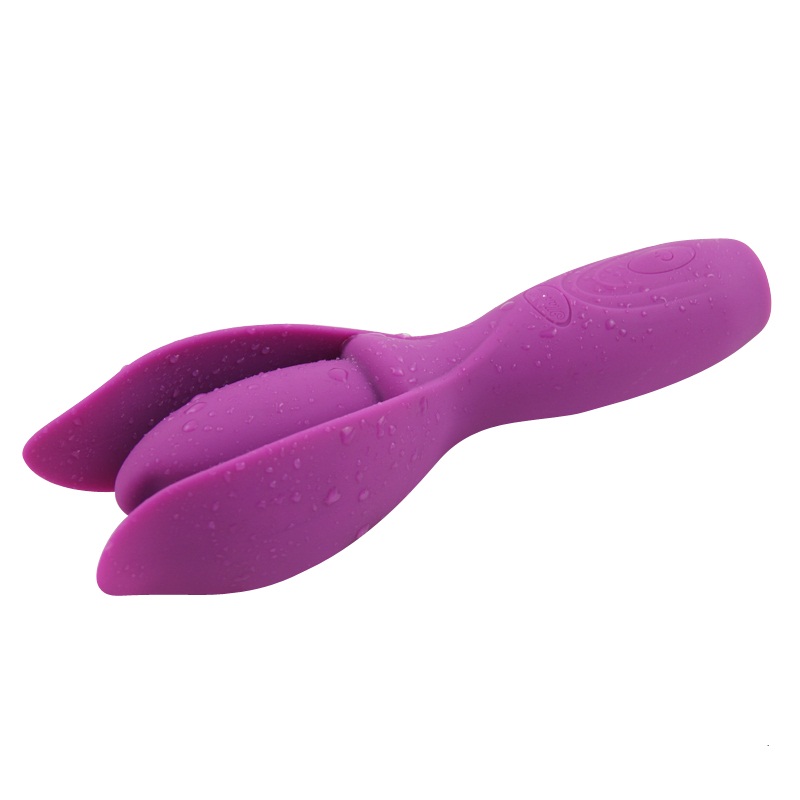
The ManNuo Tani is an external vibrator specifically designed for those seeking interactive experiences. In my experience, it's a straightforward device that delivers what it promises without overcomplicating the process. It features a single vibration motor and connects via Bluetooth through Intiface Central, making it accessible for many users who are already familiar with the Buttplug.io framework.
In terms of build quality, the Tani is lightweight and easy to handle, which makes it perfect for prolonged sessions. The material feels pleasant against the skin — a must for any quality adult toy. During testing, I noticed that the device held up well even after several uses, indicating good durability.
Furthermore, the Tani is designed to be intuitive, so users do not have to struggle with clunky interfaces or difficult setups. It’s an ideal choice for someone just starting with teledildonics, as it offers a glimpse into the possibilities of interactive play without the steep learning curve.
Unique Features of Tani
What makes the Tani unique are its compatibility and connectivity options, which include:
- Single vibration motor that maps directly to funscript values through Intiface Central.
- Buttplug.io compatibility, allowing for seamless integration with Funscript.org.
- Bluetooth connectivity, which simplifies the setup process and enhances user experience.
Here's where it gets interesting: the Tani is capable of delivering surprisingly strong vibrations despite its single motor design. This is particularly beneficial for those who prefer a straightforward setup without the need for multiple motors or complex settings.
Another key feature is its wide-ranging compatibility. Whether you're using a PC, a Mac, or a smartphone, the Tani can connect seamlessly, which is not something all toys manage to achieve. This cross-platform versatility is a highlight, especially for tech-savvy users who frequently switch between devices.
Setting Up Tani with Funscript.org
If you’re new to teledildonics, setting up the Tani with Funscript.org might seem daunting. But rest assured, the process is simpler than it appears. After using the Tani for a few weeks, I’ve got the setup down to a science.
Initial Setup Steps
To start, you’ll need to download and install Intiface Central, which you can find on their official website. This software acts as a bridge between your device and the browser-based platform, enabling Bluetooth connectivity:
- Go to intiface.com and install Intiface Central on your computer or mobile device.
- Launch the Intiface Central and click "Start Server" to initialize a local WebSocket server.
- Switch the Tani into pairing mode as per the device’s manual instructions.
Once the server is running, you can proceed to Funscript.org's Dashboard to complete the pairing process.
In practice, the initial setup might feel a bit technical if you're not familiar with such software. However, the clear instructions provided by both Intiface Central and Funscript.org ensure that even a novice can get things up and running without much hassle. It took me about 10 minutes to set everything up, from downloading the software to seeing it work live with a funscript.
Connecting via Intiface Central
Connecting the Tani using Intiface Central is straightforward and efficient. Here’s how you do it:
- On Intiface Central, click "Start Scanning" to find your device.
- When the Tani appears, select it to establish a connection.
- Navigate to the Funscript.org Dashboard and click on the "Intiface Central" device button.
- Ensure the WebSocket URL reads ws://127.0.0.1:12345 and click "Connect".
And just like that, your Tani is ready to sync with any funscript content available on the platform!
One thing to watch for is the stability of your Bluetooth connection. During my sessions, I found that while the connection was generally stable, occasionally, environmental factors like other Bluetooth devices in proximity could cause slight disruptions. Ensuring minimal interference can help maintain a smooth experience.
Experience with Tani and Funscript.org
The real magic happens when you start using the Tani with Funscript.org. This platform elevates your experience by integrating the device's capabilities with interactive content. Here's what I discovered during my sessions:
Vibration Intensity Mapping
One of the standout features of the Tani is its vibration intensity mapping. This feature allows the device to match the intensity of the funscript values being played. What surprised me was how well the Tani could replicate the nuanced vibrations dictated by different script segments.
This mapping means that as the funscript content escalates in intensity, so do the vibrations from the Tani, providing a truly engaging experience. It's particularly effective with scripts that have varied intensity levels, offering a dynamic range of sensations.
In practice, the vibration mapping is incredibly responsive. During sequences where the script demanded rapid changes, the Tani kept up without a hitch, providing a seamless experience. The only slight delay I noted was during very complex scripts with extremely fast transitions, but this was rare and didn't detract from the overall enjoyment.
Using Funscript Player
The Funscript Player is at the core of this interactive experience, allowing you to sync videos with your Tani. The player supports adjustable intensity and can handle dual-device setups, though the Tani’s single motor simplicity might make additional devices unnecessary.
In practice, the player’s interface is user-friendly. You can load a video and funscript file, and the player will sync the action seamlessly. I found that adjusting the sync offset was particularly helpful for fine-tuning the experience to match personal preferences.
Moreover, the player’s heatmap feature provides a visual representation of the intensity variations throughout the script, which I found helpful for anticipating the upcoming changes. Making quick adjustments on the fly using this feature can enhance the experience significantly.
Enhancing Experience with AI Control
For those looking to take things a notch higher, AI Control offers a fascinating way to interact with your Tani. This feature introduces AI characters that can control the vibrations in real-time, adapting to the flow of the funscript or even creating unique patterns based on the interaction.
It's almost surreal how the AI can personalize the session, making it feel more like an interactive story than a simple playback of a predefined script. During my trials, this feature added an extra layer of excitement, as the AI sometimes anticipates changes before they happen, keeping you guessing and engaged.
The dynamic nature of AI Control means that no two sessions feel exactly the same, offering an ever-evolving experience. This unpredictability can be very appealing if you're someone who enjoys a bit of spontaneity in your interactive sessions.

Tani Compared to Other Devices
While the ManNuo Tani offers a unique set of features, it's always beneficial to understand how it stacks up against other popular devices in the market. This section will cover some of its main competitors and highlight what makes the Tani a worthy option.
Vibrators with Funscript Support
When considering vibrators that support funscript integration, popular options include the lovense Lush 3 and the Magic Motion Zenith. Both devices offer Bluetooth connectivity and are compatible with funscript content via Intiface Central.
Lovense Toys
| Device | Connection | Funscript Support | Price Range | Unique Features |
|---|---|---|---|---|
| ManNuo Tani | Bluetooth via Intiface | Yes | Affordable | Single motor, Buttplug.io compatibility |
| Lovense Lush 3 | Bluetooth | Yes | $100-120 | Wearable design, magnetic charging |
| Magic Motion Zenith | Bluetooth | Yes | $60-90 | App-controlled, waterproof |
As you can see, all these devices support funscript synchronization, but each has its distinct advantages. The Lovense Lush 3 offers a wearable design, making it versatile for different scenarios, while the Magic Motion Zenith is known for its waterproof and app-controlled features.
However, in terms of simplicity and cost-effectiveness, the Tani holds its ground firmly. For users who value straightforward functionality without complex features, the Tani is a practical choice. Its ease of use, coupled with a no-nonsense design, makes it ideal for those who want to enjoy interactive content without heavy investment.
How Tani Stands Out
So, how does the Tani stand out? First off, its compatibility with Intiface Central means it can be used across various platforms, not just Funscript.org. This versatility is a huge plus if you’re someone who likes to experiment with different interactive setups.
Moreover, the Tani's price range and ease of setup make it particularly appealing for beginners. You don’t need to break the bank to access quality interactive experiences, and with the Tani, you’re getting a reliable device without the fuss of overly complicated technology.
Another standout feature is its robust connectivity. Unlike some devices that can struggle with maintaining a stable Bluetooth connection, the Tani’s connection is generally reliable, ensuring that your interactive sessions are not interrupted by technical issues.

Pros and Cons of ManNuo Tani
Every device has its strengths and weaknesses, and the ManNuo Tani is no exception. Here's an honest breakdown of what to expect with this device:
Advantages
- Affordable price point makes it accessible for users new to interactive toys.
- Easy setup process, especially when using Funscript.org’s Dashboard and Intiface Central.
- Wide compatibility with funscript content, thanks to Buttplug.io support.
- Simple design means less can go wrong — the Tani is straightforward and effective.
In my experience, the Tani’s ease of use is its biggest selling point. If you’re looking for a device that’s straightforward to set up and use, this could be a great starting point.
Potential Drawbacks
- Limited to one vibration motor, which might not provide as varied an experience as devices with multiple motors.
- Although versatile, it lacks some of the advanced features found in higher-end devices.
To be fair, the main drawback is the limitation of a single motor. If you’re someone who desires a more complex array of sensations, you might find this a bit restrictive.
Another consideration is the lack of waterproofing, which could be a limitation for those who prefer using their devices in more diverse environments. However, if these factors are not a priority, the Tani remains a solid choice.
Frequently Asked Questions
What makes the ManNuo Tani unique?
The ManNuo Tani stands out due to its compatibility with Intiface Central and Bluetooth connection for funscript integration. This allows for a wide range of interactive experiences across multiple platforms, not just Funscript.org. Its straightforward design and affordability also make it accessible for beginners.
How do I connect the Tani to Funscript.org?
You'll need to use Intiface Central to connect the device via Bluetooth. Once paired, sync it through the Funscript.org Dashboard for seamless integration. The setup process is user-friendly, even for those new to teledildonics, requiring only a few simple steps.
Can the Tani be used with AI Control on Funscript.org?
Yes, AI Control can interact with Tani to offer personalized experiences with real-time device control, adding another layer of interactivity to your sessions. This feature allows AI characters to dynamically adjust the Tani's vibrations, making each session unique and engaging.
Is the Tani compatible with other platforms besides Funscript.org?
Yes, as a Buttplug.io compatible device, it works with various platforms supporting this protocol, giving you flexibility beyond Funscript.org. Its broad compatibility ensures that you can explore different interactive experiences without being tied to a single platform.
What types of funscript content work best with Tani?
Content with varied intensity levels works best to fully utilize the Tani's vibration capabilities, providing a truly dynamic experience. Scripts that incorporate gradual build-ups and sudden peaks can maximize the device's single motor design to deliver satisfying and engaging sessions.
Conclusion
After using the Tani for a few weeks, what stood out was its simplicity and effectiveness in delivering interactive experiences without the hassle of complex setups. It's a great entry point for those new to this world, and while it may not have the multi-motor capabilities of some competitors, its affordability and straightforward usage make it a compelling choice.
If you're looking for a device that integrates well within the Funscript.org ecosystem, the Tani is worth considering. Its compatibility and ease of setup, especially when paired with features like AI Control, make it a versatile tool in your interactive arsenal.