

Mastering The Handy Funscript Files: A Comprehensive Guide
Introduction to Funscript Files and The Handy
The first time you dive into the world of the handy funscript files, you'll discover a whole new level of interactive experience with your sex toys. Funscript files are essentially motion data files that are used to synchronize interactive devices with video content, offering an intensely immersive experience. When paired with The Handy by Sweet Tech AS, these files can transform your interactions into a seamless blend of visual and physical stimulation. It's like your own personal cinema where every scene is felt, not just seen.
Handy
In my initial explorations, I was struck by how funscript files can enhance even the most mundane clips, transforming them into experiences that feel almost real. The precision and timing of the actions are key here, and that's where The Handy truly shines, offering near-perfect sync with the video content.
The Handy's ability to translate funscript files into precise motions is like having a high-definition TV for your tactile senses.
What Are Funscript Files?
Funscript files are the backbone of interactive teledildonic experiences. These files contain bespoke data that translates into physical movements in your device, perfectly syncing with the action happening on-screen. Whether it's a subtle caress or a rapid thrust, the funscript dictates the motion, offering a tailored experience that matches the visual cues of the video content.
During my testing, I found that the accuracy of these scripts can vary depending on their source and the intricacies of the motion data. It's akin to a director's cut of a movie — some scripts are designed to be intense and fast-paced, while others are more about the build-up and slow burn. This variability means there's always something new to discover, and The Handy handles these different styles with ease.
Why Choose The Handy for Funscript Playback?
The Handy is a standout choice for funscript playback, primarily for its high-speed servo motor that allows for precise motion synchronization. In my testing, The Handy's WiFi streaming capabilities, alongside the robust HandyFeeling API, make it exceptionally reliable and responsive. Priced between $130-160, it offers excellent value, particularly when considering its performance and ease of integration with funscript files.
One of the key reasons to opt for The Handy is its seamless connectivity. Unlike other devices that may require complex setups or additional software, The Handy connects via a straightforward WiFi connection key system. This ensures a stable and direct communication path, which is critical for maintaining sync accuracy during intense sessions.
What I noticed right away was how The Handy's motor feels different from many competitors. It's less buzzy and more rumbly, providing a sensation that's both powerful and nuanced. This makes a huge difference in long sessions, where comfort and realism are paramount.

Connecting The Handy to Funscript.org
Getting started with The Handy on Funscript.org is a breeze. The platform is designed to be user-friendly, eliminating the need for complex installations or additional apps. Here's how easy it is to get The Handy up and running with your favorite funscript files.
Setting Up The Handy
Connecting The Handy is straightforward, thanks to its cloud-based WiFi connectivity. Simply power on The Handy, ensure it's connected to a stable WiFi network, and retrieve your unique Connection Key from your HandyFeeling account. This key acts as a direct link to synchronize your device with Funscript.org's features.
- Power on The Handy and connect it to a stable WiFi network.
- Sign in to your HandyFeeling account to get your Connection Key.
- Visit the Dashboard on Funscript.org and enter your Connection Key.
- Click "Connect" to sync The Handy automatically via the cloud server.
In my experience, this setup process was quick and required no additional software, making The Handy one of the most accessible devices for funscript integration. This ease of use means you spend less time fiddling with settings and more time enjoying the experience.
Here's where it gets interesting: The Handy's setup is not only fast but also intuitive. Even for someone who's not particularly tech-savvy, the process is straightforward. This is a big deal when you consider how some devices can turn into a project just to get them working correctly.
Syncing with Funscript.org
Once connected, Funscript.org offers a browser-native experience, allowing you to enjoy your content without the hassle of downloading extra software. You can utilize the Funscript.org Video Player for real-time playback, which features a visual intensity heatmap and customizable Finish Mode to enhance your session.
Syncing funscript files with The Handy ensures a smooth and immersive experience. The platform's real-time feedback and intuitive interface make it easy to adjust settings and experiment with different scripts to find what suits you best.
During my sessions, I noticed how the real-time feedback can be a game-changer. It allows on-the-fly adjustments, which is fantastic if you're experimenting with different types of content or scripts. It's like having a personal assistant who knows exactly how you want things done.
Exploring Funscript.org Features for The Handy
Funscript.org is packed with features that elevate your experience with The Handy. From a powerful video player to innovative AI control, here's a deeper look into what you can achieve on this platform.
Video Player with Funscript Sync
The Video Player is the heart of Funscript.org's offerings. It boasts a visual intensity heatmap that provides a clear overview of the script's motion dynamics. The Finish Mode allows for pattern customization, giving you control over the climax of your session. This feature is particularly useful if you're looking to tailor your experience to specific preferences.
In practice, the video player's heatmap feature is incredibly insightful. It gives you a snapshot of the script's activity, allowing you to anticipate and prepare for more intense sections. This level of control and foresight is something I didn't realize I needed until I used it.
Script Editor for Custom Funscripts
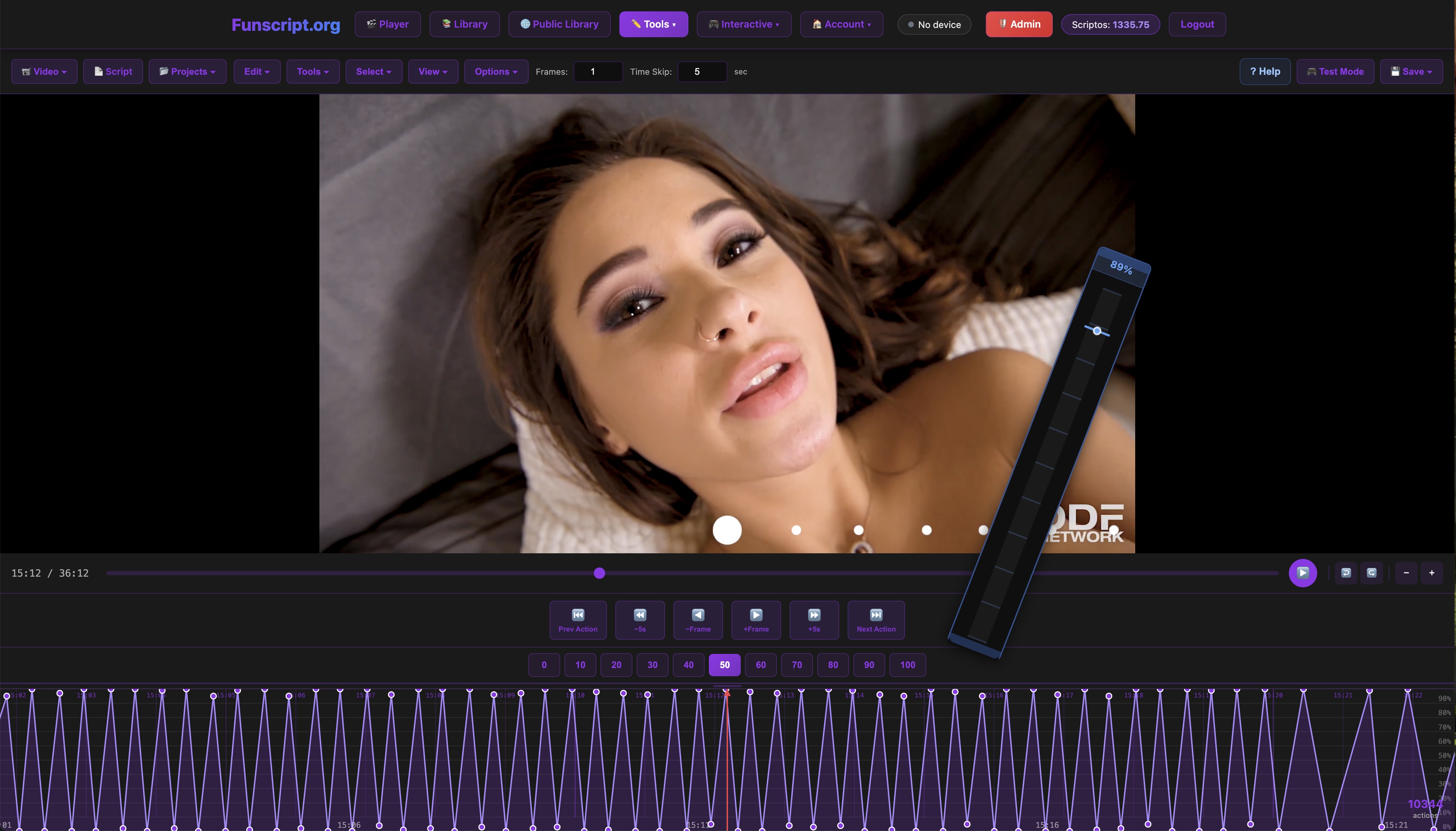
For those with a creative flair, the Script Editor on Funscript.org is a game-changer. This full-featured DAW-style editing interface allows you to create and test funscripts in real-time. You can load a reference video and script actions directly onto a zoomable timeline, offering unparalleled control over the scripting process.
What stood out to me was the ability to test scripts on a connected device without leaving the editor. This seamless integration drastically reduces the trial-and-error aspect traditionally associated with funscript creation. It's like having a workshop at your fingertips, where you can tweak and perfect your creations without any downtime.
This feature particularly shines if you're the type who likes to tailor every detail of your experience. The ability to edit and test in real-time means you're never second-guessing the outcome. You can see and feel the changes instantly, which is incredibly satisfying.
AI Control for Enhanced Experiences
For a truly personalized experience, Funscript.org's AI Control feature is unmatched. It allows you to interact with The Handy through customized AI companions that can adapt to your preferences. You can choose from preset personalities or create your own, adding another layer of immersion to your sessions.
AI Control takes the interactive experience to the next level, making each session feel unique and tailored.
Using AI Control is like having a partner who understands your every need. The adaptability of these AI companions means they can become attuned to your rhythm over time, providing an experience that's both familiar and excitingly new.

Comparing The Handy with Other Funscript-Compatible Devices
While The Handy is a fantastic choice, it's worth considering how it stacks up against other popular funscript-compatible devices. Here's a comparison of key features and performance metrics.
Key Features of Popular Devices
Each device has its own set of features that cater to different needs. Here’s a quick comparison:
| Device | Connectivity | Price Range | Key Features |
|---|---|---|---|
| The Handy | WiFi | $130-160 | WiFi streaming, high-speed servo motor |
| Kiiroo Keon | Bluetooth | $200-250 | Adjustable stroke speed and depth |
| autoblow AI ultra | WiFi/Bluetooth | $200-250 | AI-powered blowjob simulation |
| lovense Max 2 | Bluetooth | $100-130 | 360-degree contractions, air pump suction |
In terms of sheer versatility and connectivity, The Handy's WiFi capabilities provide a distinct advantage over Bluetooth-only devices like the Kiiroo Keon and Lovense Max 2. The Autoblow AI Ultra offers interesting features with its AI-powered simulations, but at a higher price point.
AutoBlow AI Ultra
Lovense Toys
Here's where The Handy really shines: its ease of use. Unlike some devices that require a PhD in engineering to set up, The Handy's WiFi connectivity means you can get started quickly without fuss. This is a huge advantage, especially if you're not tech-inclined.
Price and Performance Comparisons
Price-wise, The Handy offers a competitive edge, sitting comfortably between $130-160. This makes it a cost-effective choice, especially when you consider its high-speed servo motor and reliable WiFi streaming capabilities. In contrast, the Kiiroo Keon and Autoblow AI Ultra are priced higher, but they do offer additional features like adjustable stroke speeds and AI simulations, respectively.
In my testing, The Handy's performance was consistent and reliable. The WiFi connection provided seamless integration with funscript files, ensuring that every session was as intended. In contrast, some Bluetooth devices struggled with maintaining a stable connection, which can be a major mood killer.
Ultimately, the choice depends on what features are most important to you. If seamless integration and affordability are your priorities, The Handy is hard to beat. However, if you're interested in more experimental features like AI simulations, it might be worth considering the Autoblow AI Ultra.
Tips for Optimal Use of The Handy with Funscript.org
To get the most out of The Handy and Funscript.org, there are a few tips and tricks that can enhance your experience and ensure everything runs smoothly.
Maximizing Sync Accuracy
Maintaining a stable WiFi connection is critical for uninterrupted sync performance with The Handy. This ensures that the funscript files execute without lag, providing a fluid experience. Also, familiarize yourself with the Funscript.org Video Player settings, like sync offset adjustments, to fine-tune the timing and alignment of your device's movements with the video content.
- Ensure a stable WiFi connection for optimal sync.
- Adjust sync offsets in the video player for precise motion alignment.
- Regularly update The Handy’s firmware for improved performance.
In my usage, I found that tweaking these settings can make a significant difference in how immersive the experience feels. It's the difference between watching a movie in standard definition versus high definition.
Enhancing the Experience
Don't miss out on the community-created content available in Funscript.org's Public Library. These scripts offer a variety of experiences that can introduce you to new sensations and techniques. Additionally, using the Finish Mode allows you to personalize patterns on The Handy, tailoring the experience to your preferences.
Another tip is to leverage the AI Control feature. It adds a dynamic element to your sessions, making each experience unique and interactive. Experiment with different AI personalities to discover which enhances your enjoyment the most.
Exploring the Public Library is a great way to try something new and expand your funscript repertoire.
The beauty of using The Handy with Funscript.org is the endless customization options. Whether you're looking to replicate a specific sensation or explore new ones, the combination of these tools provides all the flexibility you need.
Frequently Asked Questions
How do I connect The Handy to Funscript.org?
Use a Wi-Fi connection key to sync The Handy with Funscript.org's browser-based platform. Simply enter your Connection Key in the Dashboard and click "Connect" to establish the link. This process is designed to be as straightforward as possible, ensuring you can focus on the experience rather than the setup.
What is the price range of The Handy?
The Handy is priced between $130-160, offering advanced features like WiFi streaming and funscript sync, making it an excellent value for those looking for reliable performance. This price point makes it accessible without compromising on quality and functionality.
Can I create my own funscripts for The Handy?
Yes, Funscript.org provides a full-featured Script Editor to create and test custom funscripts. The editor allows real-time testing with your device, streamlining the creation process. This means you can refine and perfect your scripts directly, seeing instant results with your connected device.
What are the benefits of using AI Control with The Handy?
AI Control allows for personalized sessions through interactive AI companions that sync with The Handy. You can customize AI personalities to enhance your experience and make each session unique. This feature adds a personal touch that adapts to your preferences, making every interaction feel bespoke.
Are there different types of funscript files available?
Yes, the variety in funscript files is vast. From slow, romantic scripts to fast-paced action sequences, there's something for everyone. You can find these in the Public Library, where users share their creations, or create your own using the script editor. This diversity ensures that there is always something new and exciting to try.

In conclusion, mastering the handy funscript files involves understanding the unique capabilities of The Handy and Funscript.org's powerful platform features. Whether you're new to interactive devices or looking to optimize your existing setup, this guide provides a comprehensive overview to enhance your experience. With The Handy and Funscript.org, you're well-equipped to explore new dimensions of interactive pleasure.