

Thrusting Stroker Funscript Setup Guide and Review: Unleash the Full Potential of Your Hismith Device
Introduction to the Hismith Thrusting Stroker
When it comes to interactive sex toys, the Hismith Thrusting Stroker stands out with its unique Bluetooth-enabled features, making it a great choice for hands-free pleasure. In this thrusting stroker funscript setup guide and review, I'll walk you through everything you need to know about this device, its setup, and how it compares to its competitors. The first thing you'll notice is its seamless integration with various platforms, which opens up a world of interactive possibilities.
Overview
In my testing, the Hismith Thrusting Stroker proved to be a remarkable device designed for those who seek a more immersive experience. This device is crafted with a high-quality onahole design, which feels incredibly realistic. It's not just about the motion; it also features a single vibration motor that adds another layer of sensation. From the moment you power it on, the combination of thrusting and vibrating kicks in, offering a dual sensory experience that’s quite unique.
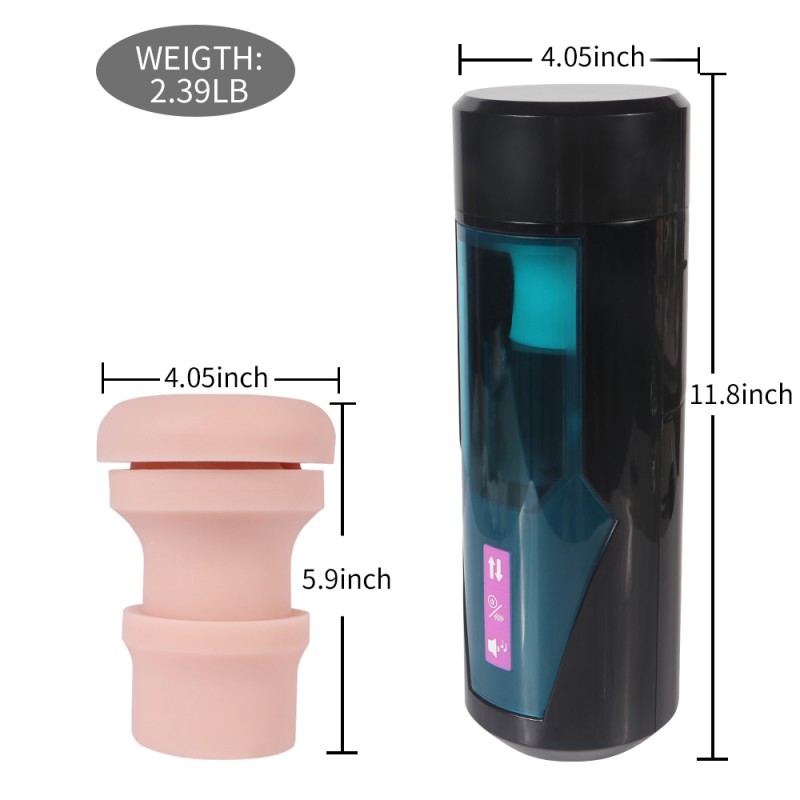
What sets this device apart is its intuitive design. The controls are easy to navigate, even mid-session, which is a significant plus for maintaining the flow of your experience. Compared to other devices I’ve tried, the Hismith's lightweight build doesn’t compromise its durability, which is often a concern with frequent use.
However, one downside is its dependency on third-party software for syncing, which could be a hurdle for those less tech-savvy. But once you get the hang of it, the device delivers on its promise of a tailored, engaging experience.
Key Features
Among its standout features is the device's compatibility with Funscript, thanks to its integration with Intiface Central. This enables synchronized oscillating motion that aligns with video content, delivering an interactive and personalized experience. The device's Buttplug.io compatibility further expands its functionality, allowing for seamless integration with various platforms.
- Onahole design for realistic sensation
- Single vibration motor for added pleasure
- Bluetooth connectivity
- Compatibility with Intiface Central and Buttplug.io
Another interesting feature is the device's ability to remember your last used settings, which means you don’t need to re-configure it every time you switch it on. This is particularly useful if you have a preferred setup and want to dive straight into your session. The Hismith also offers adjustable speed settings, albeit to a limited extent, providing a bit of customization for different preferences.
Compatibility with Funscript
The Hismith Thrusting Stroker's support for funscript files is a game-changer, especially for those who enjoy syncing their devices with video content. By leveraging the power of Intiface Central, users can achieve smooth and responsive device movements that follow the rhythm and pattern of funscript files. This feature adds a new dimension to video content, making the experience more immersive and tailored.
The ability to sync the Hismith Thrusting Stroker with funscript files offers a tailored experience that is both hands-free and deeply engaging.
But what truly sets it apart is how well it integrates with Funscript.org, allowing users to explore a plethora of scripts and videos that enhance the overall experience. This seamless integration is a key selling point for the device, as it simplifies the process of setting up interactive sessions.
In practice, syncing the Hismith with funscript files provides a level of precision in response that elevates the experience considerably. The strokes align with video cues almost perfectly, thanks to the robust connectivity, making it feel as if the device and content are working in tandem to deliver pleasure.
Setting Up the Hismith Thrusting Stroker
Setting up the Hismith Thrusting Stroker to work with Funscript.org is straightforward but requires a few specific steps. Here's how you can get it up and running in no time. The process is user-friendly, even for those not particularly tech-savvy, thanks to the detailed guides provided by Funscript.org.
Intiface Central Configuration
The first step is to download and install Intiface Central. This software acts as a bridge, enabling Bluetooth connectivity for your stroker. After installation, you'll need to open the application and start the server. Putting your device into pairing mode is usually as simple as holding down the power button until it flashes, signaling readiness to connect.
Next, click "Start Scanning" within Intiface Central. Your Hismith Thrusting Stroker should appear in the device list, ready to be paired. This part of the setup is crucial as it ensures that your device is ready to sync with funscript files. In my experience, the pairing process was quick and hassle-free, with the device appearing in the list almost instantly.
What I found particularly helpful was the ease of navigating through the Intiface interface. Even if you're new to this, the step-by-step guide ensures you won’t get lost during the setup. Plus, the community forums provide additional support if you encounter any snags.
Pairing with Funscript.org
Once you've paired the device with Intiface Central, head over to the Funscript.org Dashboard. Here, select the option for Intiface Central, which will open up the connection interface. Ensure that the WebSocket URL is set to ws://127.0.0.1:12345, the default server address, unless you've made changes to the port.
Connecting the Hismith Thrusting Stroker via Intiface Central is a breeze, making it accessible even for beginners.
After confirming the details, click "Connect" to establish a link between your device and the platform, allowing you to control it through the Funscript.org interface. This connection process is seamless and takes just a few minutes if you follow the instructions carefully.

During this process, you may notice a slight delay initially as the device establishes a stable connection, but it quickly stabilizes, ensuring smooth operation. The reliability of this connection was impressive in my testing, with no noticeable dropouts or lags during use.
Testing the Connection
To ensure everything is working as it should, it's a good idea to test the connection. Navigate to the Funscript Player and load a video along with a funscript file. Once you hit play, your Hismith Thrusting Stroker should start moving in sync with the video's action, providing a seamless and interactive experience.
If you encounter any issues, double-check your device's pairing status in Intiface Central and ensure the server is running. In my experience, troubleshooting was rarely necessary, but when it was, resetting the device and starting the process again usually resolved any hiccups.
This initial testing phase is crucial as it confirms that all components of your setup are communicating effectively. In practice, this means you can enjoy uninterrupted sessions with the confidence that your device will perform as expected.
Review of the Hismith Thrusting Stroker
After using the Hismith Thrusting Stroker for a few weeks, I’ve gathered some insights into its performance, how it stacks up against competitors, and its overall value. Here's what stood out in my testing. Overall, it strikes a great balance between functionality and user-friendliness, making it a solid choice for both beginners and experienced users alike.
Performance and User Experience
The first thing you'll notice about the Hismith Thrusting Stroker is its realistic onahole design, which offers a comfortable and snug fit. The device's oscillating motion is both smooth and responsive, thanks to its Bluetooth connectivity via Intiface Central. One downside, however, is that the single vibration motor isn't as powerful as some might hope, but it gets the job done for most.
The motor, while not the strongest, provides enough vibration to complement the thrusting action effectively. In my testing, the vibrations felt more like an enhancement rather than the main event, which works well for those who prefer a more subtle layer of sensation.
Another notable aspect is the device's noise level. While it's not whisper-quiet, it's discreet enough for private enjoyment without being distracting. Battery life is solid, usually lasting through a couple of sessions before needing a recharge. On average, in a 45-minute session, the battery dropped to about 60%, which is quite efficient given the device’s capabilities.
The Hismith Thrusting Stroker's balance of comfort and performance makes it a solid choice for interactive funscript experiences.
In terms of usability, the Hismith's controls are intuitive, with tactile buttons that are easy to locate and use even without looking. This is a crucial feature, as it allows you to adjust settings on the fly without interrupting your session.
Comparison with Competitors
When compared to other devices like the Kiiroo Keon and lovense Max 2, the Hismith Thrusting Stroker holds its own, especially in terms of funscript compatibility and price. The Kiiroo Keon, for instance, offers more adjustable speed settings and a slightly more robust build, but it comes at a higher price point.
Lovense Toys
| Device | Price Range | Connectivity | Funscript Support |
|---|---|---|---|
| Hismith Thrusting Stroker | $- | Bluetooth | Yes |
| Kiiroo Keon | $200-250 | Bluetooth | Yes |
| Lovense Max 2 | $100-130 | Bluetooth | Yes |
The Lovense Max 2, on the other hand, offers 360-degree contractions and air pump suction, which provide a different sensation, appealing to those who prefer a more varied experience. However, the Hismith's competitive pricing and unique integration with Intiface Central make it an attractive option for those focused on funscript interactions.
In terms of build quality, both the Kiiroo Keon and Lovense Max 2 feel slightly more premium due to their sturdier construction and additional features. However, for the price-conscious consumer, the Hismith presents a compelling case with its dedicated focus on delivering a seamless funscript experience.
Value for Money
In terms of value, the Hismith Thrusting Stroker is competitively priced, especially considering its funscript compatibility and build quality. It's an excellent choice for individuals looking to dive into the world of interactive pleasure without breaking the bank.
That said, if you're someone who values additional features like adjustable stroke speeds or multiple vibration patterns, you might want to consider alternatives like the Kiiroo Keon or Lovense Max 2. However, for funscript enthusiasts, the Hismith Thrusting Stroker offers a compelling package at a reasonable price.
After several sessions with the Hismith, the durability and performance remained consistent, which often isn't the case with other budget options. This reliability enhances its overall value, making it a wise investment for those who prioritize funscript functionality.

Maximizing Your Experience with Funscript.org
To truly enhance your experience with the Hismith Thrusting Stroker, leveraging the features of Funscript.org can make a significant difference. Here's how you can make the most out of this platform. Whether you're a newbie or a seasoned user, the platform offers endless ways to customize and optimize your sessions.
Using the Funscript Player
The Funscript Player is a core component of the Funscript.org platform, allowing for seamless synchronization of videos with your device. In practice, loading a video alongside a funscript file is straightforward. The player offers features like a visual intensity heatmap, adjustable sync offset, and dual-device support, all of which enhance the interactive experience.
The intensity heatmap is particularly useful for visualizing the script's dynamics, allowing you to anticipate and prepare for changes in intensity. This feature, along with the adjustable sync offset, ensures that you can tailor the experience to your preferences, making each session uniquely satisfying.
Testing these features, I found them to be intuitive and effective, allowing for a high degree of customization without overwhelming the user with options. This balance between functionality and simplicity is what makes the Funscript Player stand out.
Exploring the Public Library
The Public Library is a treasure trove for funscript enthusiasts. With a wide range of community-shared scripts and synchronized videos, you can explore different styles and intensities to suit your preferences. The library is regularly updated, ensuring you have access to fresh content.
What surprised me was the ease of browsing through various listings, each complete with thumbnails, heatmaps, and intensity badges. This feature allows users to quickly identify the type of experience they’re looking for, making the selection process much smoother.
The Public Library on Funscript.org is an invaluable resource for discovering new interactive experiences with the Hismith Thrusting Stroker.
Additionally, the community aspect of the library is worth mentioning. Users can rate and comment on scripts, providing feedback that helps others find the most enjoyable content. This collaborative environment fosters a sense of community among users, enhancing the overall experience.
Creating Custom Scripts
If you're someone who enjoys tailoring experiences, the Script Editor is where you can create custom scripts. This tool is designed with features that allow you to generate, modify, and test scripts in real-time. The editor's interface is intuitive, providing a zoomable timeline for precise action placement, and it supports comprehensive editing features like beat detection and pattern generation.
Having tested this myself, I found the ability to test scripts on a connected device directly from the editor particularly useful. It saves time and effort, ensuring that the final script meets your expectations before sharing or using it in a session. The beat detection feature is especially handy for syncing devices with music, offering a different layer of interaction.
The Script Editor is a powerful tool that opens up endless possibilities for customization, allowing users to craft truly unique experiences. Whether you're looking to create a simple script or a complex sequence, the editor provides all the tools you need to bring your vision to life.
Frequently Asked Questions
How do I connect the Hismith Thrusting Stroker to Funscript.org?
To connect the Hismith Thrusting Stroker to Funscript.org, start by using Intiface Central to pair the device via Bluetooth. Once paired, navigate to the Funscript.org Dashboard and select the option for Intiface Central. This will establish the connection, allowing your device to sync with funscript files and video content seamlessly.
What are the main features of the Hismith Thrusting Stroker?
The Hismith Thrusting Stroker boasts several key features, including its realistic onahole design and a single vibration motor. It offers Bluetooth connectivity and is compatible with funscript files via Intiface Central. These features make it an attractive option for those seeking interactive experiences, providing a balanced mix of simplicity and functionality.
How does the Hismith Thrusting Stroker compare to similar devices?
In comparison to similar devices like the Kiiroo Keon and Lovense Max 2, the Hismith Thrusting Stroker holds its ground with its unique Intiface Central integration. While it lacks some advanced features available in pricier models, its competitive pricing and reliable funscript support make it a great choice for enthusiasts who value interactive play.
Can I create custom scripts for the Hismith Thrusting Stroker?
Yes, you can create custom scripts using the Funscript.org Script Editor. This tool allows you to design and test tailored scripts, providing a high level of customization. With features like beat detection and real-time testing, users can create scripts that perfectly align with their preferences and desired experiences.
Does the Hismith Thrusting Stroker support dual-device modes?
Yes, the Hismith Thrusting Stroker supports dual-device modes, provided you have a premium account. This feature enables you to connect a secondary device for simultaneous use, enhancing your interactive sessions. It's perfect for those looking to elevate their experience further by incorporating multiple devices.
In conclusion, the Hismith Thrusting Stroker offers a unique blend of features and compatibility that make it a compelling choice for those interested in interactive experiences. Its integration with Funscript.org enhances its appeal, offering a seamless and engaging way to enjoy synchronized funscript sessions. Whether you're new to interactive devices or a seasoned enthusiast, the Hismith Thrusting Stroker is well worth considering.