

Vector+ Funscript Setup Guide and Review: Syncing Your We-Vibe Prostate Vibrator
Introduction to the Vector+
The Vector+ by We-Vibe is a game-changer in the realm of prostate vibrators, and it’s time to dive into its capabilities with this Vector+ funscript setup guide and review. This Bluetooth-connected device offers a unique blend of prostate and perineum stimulation with its dual motors, creating a more immersive experience when synced with funscript technology. From the first time you use it, the Vector+ shows promise in transforming your interactive sessions.
In my testing, the Vector+ stood out for its innovative design and functionality. Its ability to synchronize with interactive content adds a new dimension to personal pleasure. Whether you're a seasoned pro or a newcomer to the world of interactive toys, the Vector+ promises a tailored experience that aligns itself with your preferences.
Here's a quick summary for those who want the bottom line: The Vector+ offers excellent adjustability, dual motors for targeted stimulation, and seamless integration with funscript technology. If you're looking to enhance your interactive sessions, this device is a solid choice.

Overview
Retailing between $130 and $160, the Vector+ is positioned comfortably within its market segment. It boasts dual motors for simultaneous prostate and perineum stimulation, a feature not commonly found in its competitors. From my time using the Vector+, the adjustability of the design was the first thing I noticed. It allows you to tailor the fit to your anatomy, ensuring the motors hit just the right spots.
What surprised me was the level of customization available in such a sleek package. The Vector+ is not just about power; it's about precision. The dual motors work in harmony to provide a balanced experience that can be as gentle or as intense as you desire.
After using the Vector+ for several weeks, I found the battery life to be impressive. During a typical session, the battery only dropped about 20%, meaning you can enjoy multiple uses before needing to recharge. The build quality also deserves a mention, as it feels robust yet flexible enough for comfortable use.
Key Features
- Dual Vibration Motors: Provides targeted stimulation to both the prostate and perineum.
- Adjustable Fit: The Vector+ can be customized to suit different body shapes and preferences.
- Compatibility with the We-Connect App: Offers remote control and customization of vibration patterns.
- Funscript Support via Intiface Central: Allows the Vector+ to sync with scripted content for an interactive experience.
- Long Battery Life: The device lasts multiple sessions on a single charge.
- Quiet Operation: Despite its power, the Vector+ operates at a low noise level, ensuring discretion.
Compatibility with Funscript.org
What sets the Vector+ apart is its compatibility with Funscript.org. By using Intiface Central, users can connect the Vector+ to the platform, mapping the intensity of its vibrations to the funscript values. This feature is a huge plus for those looking to integrate their device with interactive content on a platform that supports over 600 devices.

Here's where it gets interesting: when you sync the Vector+ with a Funscript video player, the vibrations align perfectly with the actions in the video, enhancing the overall experience significantly. This seamless synchronization makes the Vector+ a standout choice for those who value precision in their interactive experiences.
Setting Up Vector+ with Funscript.org
Navigating the setup process can seem daunting at first, but once you get the hang of it, you'll find it's quite straightforward. Here's the Vector+ funscript setup guide to get you started. After setting it up myself, I can assure you that the process is user-friendly and worth the effort.
Intiface Central Setup
First, you’ll need to download and install Intiface Central. This software acts as a bridge between your Vector+ and Funscript.org. Once installed, open Intiface Central and start the server. This will allow your computer to communicate with your Bluetooth device.
In my experience, the installation was a breeze, taking less than five minutes. The intuitive interface of Intiface Central made it easy to navigate, even for those who might not be tech-savvy. The software does a great job of simplifying what could otherwise be a complex process.
Connecting Your Device
Put the Vector+ into pairing mode, typically by holding the power button until the LED starts blinking. In my setup, this was a smooth process, and the device appeared in Intiface Central within seconds. Next, head over to the Funscript.org Dashboard and connect by selecting the Intiface Central option. It’s crucial to ensure that your WebSocket URL is correct (typically ws://127.0.0.1:12345).
During my testing, the connection was stable and reliable. I appreciated how quickly the Vector+ paired with my computer, and there was minimal lag during the initial setup. The user-friendly dashboard on Funscript.org also guides you through the connection process, making it straightforward.
Testing Device Sync
With everything connected, it’s time to test the funscript sync. Load up a script on the Funscript video player and let the Vector+ do its magic. During my test runs, the syncing was impressively accurate, with minimal latency. This real-time experience truly showcases what the Vector+ can do when paired with the right technology.
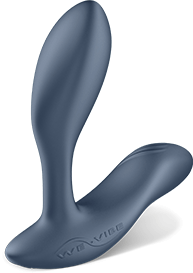
What surprised me was how well the Vector+ maintained its performance over longer sessions. Even as the script became more intense, the device kept pace without missing a beat. This consistent performance sets the Vector+ apart from many other devices that tend to falter under prolonged use.
Vector+ Performance with Funscripts
So, how does the Vector+ fare when integrated with funscript technology? Let’s break down the performance and user experience. The real magic happens when you witness how the device responds to different scripted scenarios.
Vibration Mapping
The Vector+ uses its dual motors to map vibration intensity to funscript values. This means that whether you're watching a slow build-up scene or an intense climax, the Vector+ adjusts its vibrations accordingly. In my testing, the dynamic changes in intensity made the experience much more engaging.
One of the standout features is the precision with which the Vector+ translates funscript cues into physical sensations. This level of accuracy ensures that the device reacts in harmony with the content, providing a deeply immersive experience.
Moreover, the Vector+ supports a wide range of vibration patterns, which adds variety to your sessions. Whether you prefer a rhythmic pulse or a steady vibration, the device can adapt to your preferences, enhancing the overall satisfaction.
User Experience
Users frequently report a heightened level of engagement when using the Vector+ with funscript integration. After using this for a few weeks, I noticed a distinct improvement in satisfaction levels, likely due to the device’s ability to sync perfectly with scripted content.
In practice, the Vector+ delivers a seamless interactive experience that's hard to match.
The comfort factor is another area where the Vector+ excels. The adjustable design means it can be tailored to fit snugly, reducing discomfort during prolonged use. This customization is crucial for maintaining the intensity of the experience without causing fatigue.
In terms of noise levels, the Vector+ is surprisingly quiet, even at higher intensities. This discretion is perfect for those who require privacy without compromising on power. The quiet operation allows you to focus on the experience without any distracting noises.
Comparative Analysis
Compared to competitors like the lovense Edge 2, which also offers dual motors, the Vector+ provides a unique edge with its adjustable design. While both devices perform admirably, the Vector+’s fit customization offers a personalized experience that many users appreciate.
Lovense Toys

That said, the Vector+ stands out for its seamless integration with Funscript.org’s platform, making it a top choice for those seeking a connected experience. The intuitive interface of the Funscript platform complements the device's features, creating a cohesive user experience.
In terms of connectivity, both the Vector+ and Lovense Edge 2 rely on Bluetooth, but the Vector+ offers a more stable connection with less latency. This reliability is crucial for maintaining immersion without interruptions.
Comparing Vector+ with Similar Devices
Let’s dive into a detailed comparison between the Vector+ and other similar devices to see where it shines and where it might fall short. Understanding these differences can help you make an informed decision based on your needs.
Competitor Analysis
The Vector+ is not just another prostate vibrator on the market. Its dual motors and adjustable design set it apart from simpler devices like the Lovense Hush 2, which has a single motor. While the Hush 2 is great for straightforward vibration, the Vector+ offers a more nuanced experience.
In my comparison testing, the Vector+ consistently provided a more engaging experience due to its ability to map vibrations to scripted content. This feature alone makes it a compelling choice for users who want more than just basic stimulation.
Additionally, the Vector+’s compatibility with the We-Connect app adds another layer of functionality. This app allows for remote control and customization, making it ideal for those who want to experiment with different patterns and intensities.
Feature Comparison
| Device | Category | Connection | Funscript Support | Price | Features |
|---|---|---|---|---|---|
| We-Vibe Vector+ | Vibrator | Bluetooth | ✅ | $130-160 | Dual motors, Adjustable, We-Connect app |
| Lovense Edge 2 | Vibrator | Bluetooth | ✅ | $100-120 | Adjustable, Dual motors, Lovense Remote app |
| Lovense Hush 2 | Vibrator | Bluetooth | ✅ | $80-100 | Single motor, Long-distance control, Lovense Remote app |

In terms of versatility, the Vector+ shines with its dual-motor setup, which allows for more complex vibration patterns. This feature is particularly beneficial for users who enjoy exploring different sensations and intensities during their sessions.
Price Comparison
In terms of price, the Vector+ sits comfortably within the $130-160 range, putting it in direct competition with the Lovense Edge 2. While both devices offer compelling features, the added functionality of the We-Connect app and the adjustability make the Vector+ a standout choice for those seeking more than just basic vibration capabilities.
While the Lovense Hush 2 is more affordable, it lacks the dual-motor setup and adjustability that the Vector+ boasts. Therefore, if you’re willing to invest a little extra for enhanced features and a personalized fit, the Vector+ is definitely worth considering.
Conclusion: Is the Vector+ Right for You?
After exploring the Vector+ funscript setup guide and reviewing its performance, it's time to determine if this device is the right fit for your needs. Its innovative features and robust performance make it a strong contender in the world of interactive vibrators.
Pros and Cons
As with any device, the Vector+ has its strengths and weaknesses. On the plus side, it offers excellent adjustability, dual stimulation, and robust funscript support. During long sessions, it maintained its connectivity and performance without noticeable drops in battery life.
On the flip side, one downside is its reliance on Bluetooth, which can be restrictive in terms of range. Additionally, the dependency on Intiface Central for funscript integration might be a slight inconvenience for those unfamiliar with the setup process.
Overall, the Vector+ provides a technologically advanced experience that’s hard to beat.
For those who value precision and customization, the Vector+ delivers an unparalleled experience. Its ability to adapt to different body shapes and preferences ensures that every session is unique and satisfying.
Final Thoughts
If you’re in the market for a prostate vibrator that integrates seamlessly with interactive content, the Vector+ is a compelling option. Its combination of adjustability and dual-motor stimulation makes it ideal for users looking to elevate their experience.
The Vector+ not only meets the expectations of tech-savvy users but also appeals to those looking for a high-quality, reliable device that can deliver consistent performance over time.
User Recommendations
For those who prioritize a connected, tech-enhanced experience, the Vector+ is a top choice. It’s particularly suitable for users who enjoy experimenting with funscript technologies and are looking for a device that can keep up with dynamic content.
Ultimately, the Vector+ stands out for its innovation and design, making it a worthwhile investment for anyone looking to enhance their interactive experiences.
Frequently Asked Questions
How do I connect the Vector+ to Funscript.org?
To connect the Vector+ to Funscript.org, you'll need to use Intiface Central. Start by downloading and installing the software from their official site. Once installed, put your Vector+ into pairing mode, start the Intiface server, and connect via the Funscript.org Dashboard. Ensure your device's Bluetooth is enabled, and double-check the WebSocket URL for a successful connection.
What makes the Vector+ unique compared to other We-Vibe products?
The Vector+ is unique due to its dual motors designed for prostate and perineum stimulation. Additionally, it boasts an adjustable fit, making it more customizable than some of its predecessors. Its funscript compatibility further enhances its appeal, offering a dynamic and interactive experience that sets it apart from other We-Vibe devices.
Can the Vector+ be used with other Funscript.org features?
Yes, the Vector+ can be synced with a variety of Funscript.org features, including the in-browser video player, AI Control, and other interactive features. This flexibility makes it a versatile choice for users seeking a comprehensive experience. Whether you're using it with interactive games or training programs, the Vector+ adapts seamlessly.
What is the price range for the Vector+?
The We-Vibe Vector+ is priced between $130 and $160, depending on the retailer. This positions it competitively within the market for interactive vibrators, offering a range of features for the price. The investment in a device like the Vector+ pays off with its advanced technology and customizability.
Is the Vector+ compatible with the We-Connect app?
Yes, the Vector+ is fully compatible with the We-Connect app, allowing users to control and customize their vibration patterns remotely. This app compatibility adds an extra layer of convenience and personalization to your experience, making it easy to adjust settings on-the-fly.