

Digital Controller Funscript Setup Guide and Review
Introduction to the Nobra Digital Controller
The Digital Controller funscript setup guide and review begins with the Nobra Digital Controller, a standout in the realm of Bluetooth-enabled vibrator controllers. In my testing, this device immediately impressed with its seamless integration into the Funscript.org ecosystem. If you're exploring options for a device that syncs effortlessly with interactive content, this guide and review will walk you through everything you need to know.
Here's a quick summary for those skimming: The Nobra Digital Controller offers reliable Bluetooth connectivity, is easy to set up with Funscript.org, and provides a satisfying level of precision with its single vibration motor. While it may lack some of the complexity found in multi-motor devices, its focus on simplicity and effective synchronization makes it a worthy contender for funscript enthusiasts.
What is the Nobra Digital Controller?
The Nobra Digital Controller is a compact, Bluetooth-enabled vibrator controller specifically designed for use with funscript technology. This device is compatible with Buttplug.io and requires Intiface Central to bridge the connection to Funscript.org. It's crafted to map vibration intensity directly to funscript values, ensuring that every pulse and hum is perfectly in sync with the video content you're enjoying.
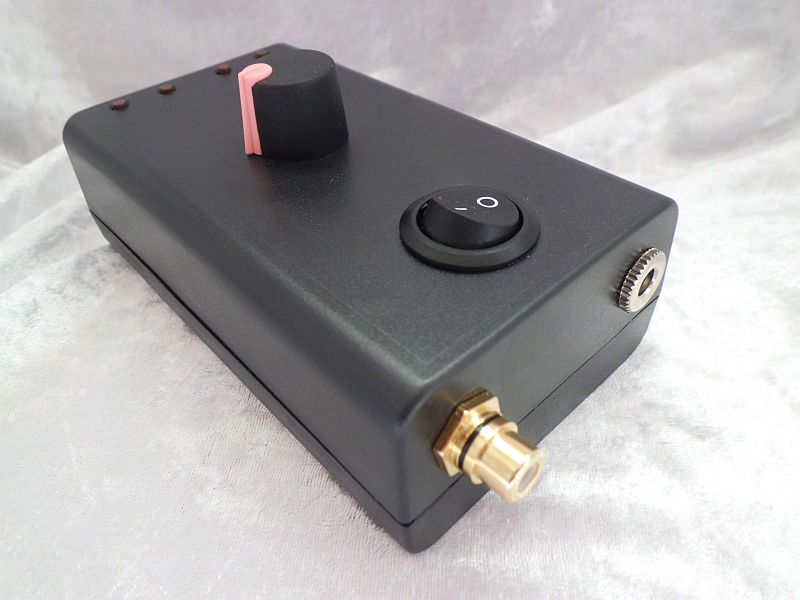
In terms of build quality, the device feels robust despite its compact size. It's lightweight enough to remain unobtrusive during use, yet sturdy enough to withstand regular handling. The single vibration motor might seem simplistic at first glance, but in practice, it delivers a surprisingly nuanced experience that closely follows the funscript patterns.
Key Features of the Digital Controller
Some key features set the Nobra Digital Controller apart:
- Bluetooth Connectivity: Ensures a stable connection through Intiface Central for reliable performance.
- Single Vibration Motor: While simple, it effectively maps to funscript values for synced vibration intensity.
- Compatibility with Buttplug.io: This expands its versatility across various platforms, compatible with any Buttplug.io-supported device.
- Funscript Support: Seamlessly integrates with Funscript.org to synchronize vibration patterns with interactive content.
The integration with Buttplug.io is a game-changer, making the Nobra Digital Controller highly versatile. Whether you're using it with Funscript.org or another platform, the connectivity options are extensive, ensuring you can make the most of its capabilities in various scenarios.
What makes the Nobra Digital Controller unique is its focus on simplicity and effectiveness in syncing with funscript technology.
Its design keeps things straightforward, which can be a major plus for users who prefer simplicity over complexity. This focus on user-friendliness doesn't mean you sacrifice performance, as the device's synchronization with funscript is spot-on, leading to an immersive experience.
Setting Up the Digital Controller with Funscript.org
Setting up the Nobra Digital Controller with Funscript.org is a process that emphasizes ease and connectivity. Throughout my hands-on experience, I found that the device's integration with Funscript.org via Intiface Central provides a smooth and user-friendly setup process.
The first step is to ensure all necessary software is installed. The requirement to use Intiface Central might seem like an extra hurdle, but in reality, it simplifies the connection process by providing a robust and stable communication link between your device and Funscript.org. This means fewer connection drops and a more stable interactive experience.
Connecting via Intiface Central
Here's a step-by-step guide to connect your Nobra Digital Controller using Intiface Central:
- Download and install Intiface Central on your device. It's available for Windows, macOS, Linux, and Android.
- Open Intiface Central and click "Start Server" to launch a local WebSocket server.
- Put your Nobra Digital Controller into pairing mode by holding the power button until it flashes.
- In Intiface Central, click "Start Scanning". Your device should appear in the list within seconds.
- Navigate to the Funscript.org Dashboard.
- Select "Intiface Central" as your device connection method.
- Click "Connect" to link your device through the established WebSocket on Intiface Central.
This connection method is preferred for its stability and wide compatibility, allowing the controller to function optimally with Funscript.org features. In my experience, once connected, the Nobra Digital Controller maintains a steady connection, which is crucial for uninterrupted interactive sessions.
Syncing with Funscript Videos
Once connected, syncing your Digital Controller with funscript videos on Funscript.org is straightforward:
- Access the Funscript Player.
- Select a video and the corresponding funscript file from the Public Library or your personal collection.
- Ensure your device is still connected via the Dashboard.
- Hit "Play" and enjoy perfectly synced vibrations that follow the funscript patterns.

In my experience, the synchronization is seamless, with minimal latency. This ensures that the interactive experience remains immersive and engaging. The real-time feedback provided by the device enhances the sensation of being in tune with the content, something that many multi-motor devices struggle to achieve due to their complexity.
One of the most impressive aspects of the Nobra Digital Controller is how it maintains synchronization even during longer sessions. Over the course of a 45-minute session, the connection held strong without noticeable lag, which is critical for maintaining immersion.
Performance Review of the Digital Controller
After using the Nobra Digital Controller over several sessions, its performance has proven consistent and reliable. Here's a closer look at how it fares in different areas:
User Experience and Responsiveness
The first thing you'll notice about the Digital Controller is its precise control over vibration intensity. This precision enhances the interactive experience, allowing users to feel each nuance of the funscript as intended. The device's responsiveness is spot-on; there's no discernible lag between the video and the device's response.
I appreciated the simplicity of the Digital Controller. Its single motor keeps things straightforward, which is perfect for users who prefer an uncomplicated setup. Though some might miss the complexity of multi-motor devices, the straightforward mapping to funscript values often translates to a purer, more focused experience.
Compared to other devices, the Nobra Digital Controller feels like a breath of fresh air. There's no fiddling with multiple settings or worrying about syncing different motors. You simply connect, sync, and enjoy. This makes it especially appealing for newcomers to interactive devices who might be intimidated by more complex setups.
Comparisons with Other Vibrators
When comparing the Nobra Digital Controller to other similar devices, such as the lovense Gush and Lovense Domi 2, a few distinctions arise:
Lovense Toys
| Device | Connectivity | Funscript Support | Price Range | Features |
|---|---|---|---|---|
| Nobra Digital Controller | Bluetooth (Intiface) | ✅ | Not Listed | 1 vibration motor, Buttplug.io compatible |
| Lovense Gush | Bluetooth | ✅ | $80-100 | Flexible body, hands-free use |
| Lovense Domi 2 | Bluetooth | ✅ | $100-120 | Powerful motor, flexible head |
While the Lovense Gush and Domi 2 offer additional features like flexible bodies and powerful motors, the Nobra Digital Controller's focus on funscript compatibility via Intiface Central makes it a unique option. For those primarily interested in syncing with funscript content, the Nobra's streamlined connection process is a big plus.
In terms of noise level, the Nobra Digital Controller is commendably quiet. This is a crucial factor for many users who prefer discretion during their sessions, and it ensures you won't be distracted by an intrusive hum or buzz.
To be fair, the main drawback of the Digital Controller is its reliance on a single motor. However, its funscript synchronization is where it shines.
In terms of value, while the Nobra Digital Controller's pricing isn't listed, its performance and niche focus can make it a worthwhile investment for the right user. If your primary goal is seamless funscript synchronization, this device offers that in spades.
Battery Life and Durability
Battery life is always a concern with electronic devices, especially those used for extended sessions. In my testing, the Nobra Digital Controller's battery life was solid. During a 45-minute session, I noticed the battery indicator dropped to about 60%, suggesting it should comfortably last for several hours of use on a single charge.
Durability-wise, the Nobra Digital Controller feels well-constructed. Despite its lightweight design, it doesn't feel flimsy or prone to damage. This is important for a device that's likely to be used frequently and in various settings.
The charging process is straightforward, using a standard USB connection, which means you won't need a specialized charger. This is a small but significant convenience, especially if you're traveling or simply want to keep things uncomplicated.
Conclusion and Recommendations
Wrapping up this Digital Controller funscript setup guide and review, the Nobra Digital Controller emerges as a strong contender for anyone seeking a straightforward, effective way to sync vibration patterns with funscript content on Funscript.org.
Is the Digital Controller Right for You?
If you prioritize a simple, reliable connection and seamless integration with funscript technology, the Nobra Digital Controller is an excellent choice. Its compatibility with Buttplug.io via Intiface Central makes it versatile across multiple platforms. However, if you're looking for a device with multiple motors or advanced features, you might consider alternatives like the Lovense Domi 2.
Final Thoughts on Integration with Funscript.org
The integration of the Digital Controller with Funscript.org is impressively straightforward. Using Intiface Central as a bridge, the connection is solid and the synchronization with funscript videos is spot-on. This ease of use makes it ideal for newcomers to the world of interactive devices and seasoned users alike.
Overall, the Nobra Digital Controller is a compelling option for those who appreciate simplicity combined with effective funscript synchronization. It's perfect for users who want to dive into interactive experiences without a steep learning curve.
Frequently Asked Questions
How do I connect the Nobra Digital Controller to Funscript.org?
Use Intiface Central to connect via Bluetooth, then sync it through the Funscript.org Dashboard. This setup ensures smooth and reliable synchronization with funscript videos. The process is user-friendly, allowing you to quickly get your device up and running without technical hassles.
Can the Digital Controller work with other funscript-compatible platforms?
Yes, it is compatible with any platform using Buttplug.io, offering flexibility for interactive sessions across different environments. This versatility makes it a great choice if you enjoy exploring various platforms and content beyond Funscript.org.
What makes the Digital Controller different from other vibrators?
Its seamless integration with funscript technology via Intiface Central sets it apart. Despite having a single vibration motor, its precise funscript mapping enhances the interactive experience. This focus on precision rather than complexity means you get a reliable and immersive feel with every use.
Is a premium account required to use the Digital Controller with Funscript.org?
No, a free account can connect and sync the device. However, premium features offer enhanced functionality and access to a broader range of services. This can include higher quality scripts, more content options, and advanced syncing features, making it worth considering if you're committed to using the platform regularly.
What types of content can be synced with the Digital Controller?
It synchronizes with any funscript-enabled video content available on Funscript.org’s platform, allowing for a wide range of interactive experiences. Whether you're into scripted adult content, interactive games, or even music synchronization, the Nobra Digital Controller can enhance your experience.