
How to Create Your Own Funscripts — A Step-by-Step Scripting Tutorial with The Handy and More
If you're looking to enhance your interactive experiences, learning how to create your own funscripts is an invaluable skill. In this tutorial, I'll walk you through the exciting process of crafting these motion files, which bring adult content to life with synced device movements. From selecting the right tools and devices to testing and sharing your creations, you'll become a scripting pro in no time.
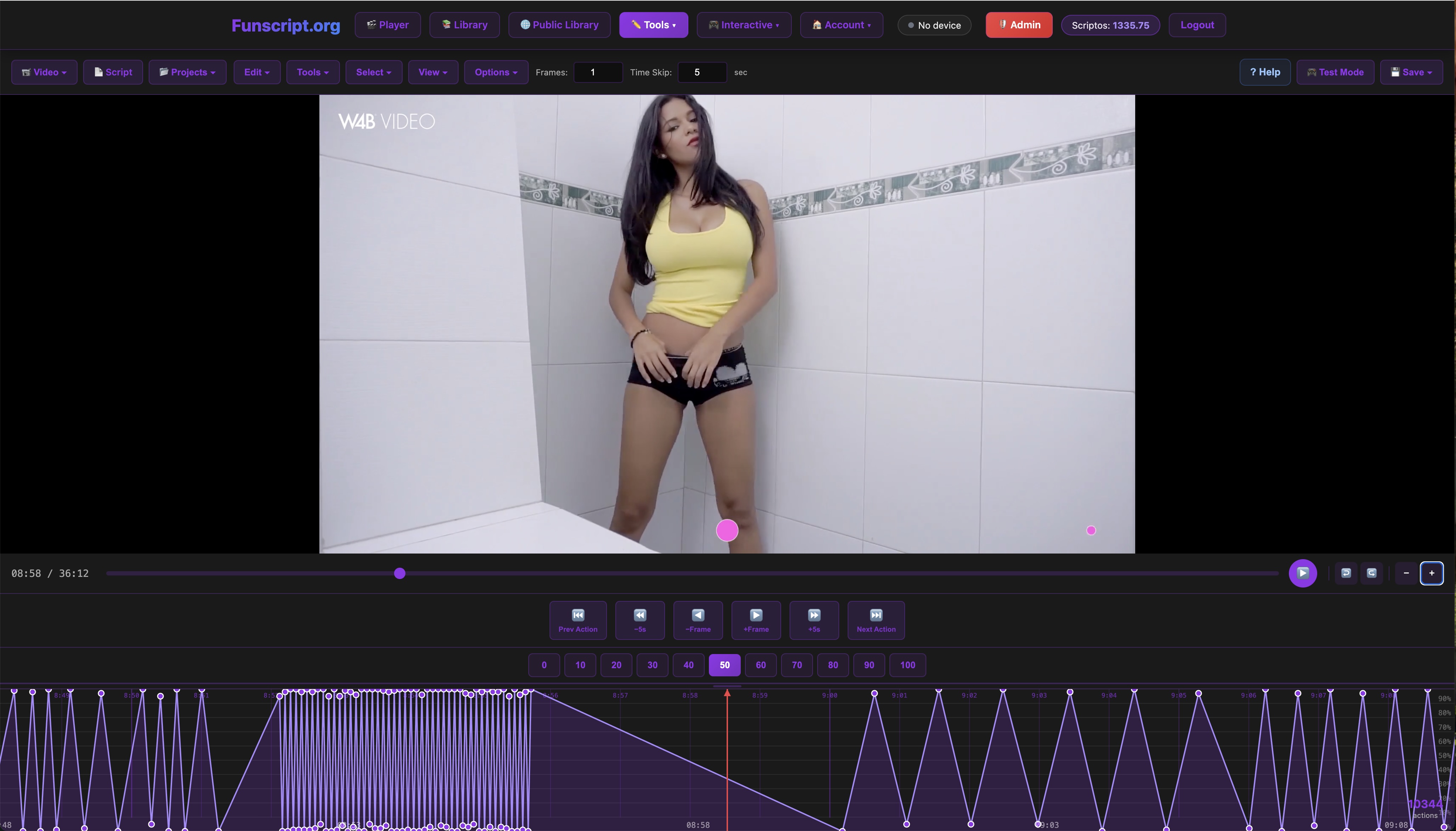
Quick Summary: Funscript creation involves using tools like the Funscript.org Script Editor to sync motion files with interactive sex toys. With personalized scripts, you can control the intensity and timing of your device for a custom experience. Whether you're using The Handy, Kiiroo Keon, or lovense Max 2, this guide will help you create and share your funscripts efficiently.
Lovense Toys
Introduction to Funscript Creation
What is a Funscript?
A funscript is essentially a motion file that syncs with interactive sex toys to enhance adult video content. These files dictate how a device behaves, moving in perfect harmony with the action on screen. Imagine your toy stroking or vibrating in rhythm with a scene — that's the magic of funscripts.
In my testing, funscripts transform a solitary video session into an immersive interactive experience. The first thing you'll notice is how fluidly the device responds, making the content come alive in a way static videos never could. It's almost like having a direct line to the pulse of the video, creating a seamless blend of sight and sensation.
Beyond just syncing, funscripts can significantly enhance the emotional impact of a scene. For instance, during a particularly intense moment, the precision of the device's movements can amplify the overall effect, making the experience more engaging and lifelike.
Why Create Your Own Funscripts?
Creating your own funscripts allows you to tailor the experience to your preferences. You're no longer at the mercy of pre-made scripts that may not match your tastes or the nuances of your chosen content. Plus, there's a certain satisfaction in knowing you crafted an experience from scratch.
During my time scripting, the ability to adjust motion points for precise timing and intensity meant I could fine-tune the device's actions to my liking. This level of control is what sets custom funscripts apart from generic ones. It's like having a custom soundtrack for your favorite movie, but for your interactive sessions.
Moreover, creating your own scripts opens up possibilities for experimentation. You can try out different styles and techniques, such as varying the speed and depth of strokes or layering multiple movements. This creative freedom is a significant advantage, allowing you to continuously refine and enhance your experiences.
Crafting your own funscript puts you in the director's chair, letting you choreograph your experience down to the last detail.
Getting Started: Tools and Devices
Essential Tools for Funscript Creation
The journey begins with gathering the right tools. You'll need a video file, the Funscript.org Script Editor, and a compatible device. The Script Editor is a browser-based tool that allows you to create and edit .funscript files with precision.
What surprised me was how intuitive the Script Editor is. The visual timeline and easy-to-use motion point controls make it accessible, even for beginners. You can load a video directly into the editor, allowing for seamless integration of motion scripting. The editor's interface is designed to be user-friendly, with features that facilitate both quick edits and detailed adjustments.
Besides the Script Editor, you might find it helpful to have a set of headphones or a good speaker setup. Sound can play a critical role in timing your scripts accurately. By listening closely to the audio cues of your video, you can better synchronize the motion points for a more immersive experience.
Choosing the Right Device for Scripting
Choosing the right device is crucial for a seamless experience. Some of the top choices include The Handy, Kiiroo Keon, and Lovense Max 2. Each has its strengths, but The Handy stands out with its high-speed servo motor and WiFi streaming capabilities for smooth funscript sync.
Here's a quick look at these devices:
| Device | Price | Features |
|---|---|---|
| The Handy | $130-160 | WiFi streaming, high-speed servo motor, full positional stroke sync |
| Kiiroo Keon | $200-250 | Bluetooth, adjustable stroke speed and depth, FeelConnect app |
| Lovense Max 2 | $100-130 | 360-degree contractions, air pump suction, Lovense Remote app |

In my experience, The Handy's WiFi connectivity ensures a stable, lag-free connection, crucial for maintaining sync with funscripts. On the flip side, the Kiiroo Keon offers versatility with its Bluetooth connection and customizable stroke settings. Lovense Max 2, with its air pump suction, provides a unique sensation that can be creatively utilized in scripting.
While The Handy excels in precision and speed, the Kiiroo Keon's appeal lies in its adaptability. You can adjust the stroke settings to suit different scripts, making it a versatile choice for those who enjoy experimenting with various styles. The Lovense Max 2, meanwhile, is perfect for users who prefer a more intimate and enveloping experience.
Step-by-Step Guide to Creating Funscripts
Using the Funscript.org Script Editor
With your tools ready, it's time to dive into the scripting process. Start by loading your chosen video into the Funscript.org Script Editor. The editor offers a dynamic timeline where you can place motion points that correspond to the action on screen.
In practice, this process involves watching the video in segments and marking points where you want the device to move. The interface is user-friendly, allowing you to drag and drop points to adjust motion effortlessly. The real-time preview feature is particularly useful, letting you see how changes affect the overall flow immediately.
One tip I discovered is to take advantage of the editor's layering feature. By creating multiple layers of motion points for different intensities or speeds, you can craft a more nuanced script. This approach also allows you to experiment with complex sequences, adding depth to your interactive experiences.
Scripting Techniques and Tips
Here's where your creativity comes into play. You can use AI-assisted auto-generation to populate the timeline quickly and refine it with manual adjustments for more nuanced scripts. I found that blending AI with manual tweaks offers the best of both worlds — efficiency and precision.
- Use the zoom feature to get a detailed view of the waveform and place motion points with accuracy.
- Leverage the focus mode to concentrate on scripting without distraction.
- Experiment with different motion densities to see what feels best with your device.
What I noticed is that creating a script can be as quick or as meticulous as you want. Having the flexibility to adjust every point means no two scripts are ever the same. This freedom allows you to inject your personality into each script, making the experience truly your own.
Another useful technique is to incorporate pauses and sudden changes in motion. These elements can add excitement and unpredictability, keeping the experience engaging from start to finish. In my testing, scripts with these dynamic shifts often resulted in more memorable sessions.
Testing and Refining Your Funscripts
Testing Your Script with The Handy
After crafting your script, it's crucial to test it with your device. For The Handy, connect via WiFi using the HandyFeeling API. This allows real-time feedback, so you can see how the device responds to your script immediately.
Handy
In my testing, The Handy's responsiveness was impressive. The sync was seamless, and testing variations in real-time helped refine the timing and intensity quickly. This immediate feedback loop is invaluable for making precise adjustments to enhance the script's effectiveness.
One critical aspect of testing is to pay attention to the device's noise level. Although The Handy is generally quiet, testing in a sound-sensitive environment can help you identify any distracting mechanical sounds that may need addressing in your script's timing.
Refining for Different Devices
Not all devices respond the same way to funscripts, so adjustments may be necessary. For vibration-only devices like the Lovense Lush 3, you'll need to tweak intensity values to ensure they respond optimally to the script.
During a session with the Lovense Max 2, its air pump and vibration features required careful calibration of intensity points to maintain a smooth experience. It's a balance of ensuring the device's unique features are utilized effectively. Adjusting the script to accommodate these features can vastly improve the overall experience.
Another consideration when refining scripts is the battery life of your device. In my experience, a 45-minute session with the Lovense Max 2 would typically consume about 40% of its battery. Being mindful of energy consumption allows you to plan your sessions better, ensuring your device doesn't run out of juice mid-experience.
Sharing and Using Your Funscripts
Uploading to the Public Library
Once satisfied with your script, consider sharing it with the community. The Public Library on Funscript.org allows you to upload your creations for others to enjoy. It's a fantastic way to get feedback and improve your scripting skills.
What I found great about the library is the ease of access — users can immediately play the shared scripts in-browser without needing to download anything. This seamless integration encourages more people to try different scripts, fostering a vibrant community of creators and users.
Uploading to the library also opens the door to collaborations. You can connect with other script creators, exchange ideas, and even co-create scripts with complementary styles. This collaborative environment is both inspiring and educational, pushing the boundaries of what's possible with funscripts.
Using Funscripts in the Funscript Player
To fully enjoy your scripts, use the Funscript Player. It syncs your device with the video content, offering features like heatmap visualization for perfect timing adjustments. The player supports dual-device setups, allowing you to control primary and secondary devices independently.
In my experience, the player's heatmap feature is a game-changer. It provides a visual cue about motion density, helping refine the script further for a flawless interactive experience. By analyzing the heatmap, you can fine-tune the script to align perfectly with the video's pacing, ensuring an immersive experience.

Additionally, the Funscript Player's ability to handle multiple scripts simultaneously is a boon for those who enjoy complex experiences. By synchronizing different devices, you can create a layered experience that elevates the interactivity to new heights.
Exploring Alternatives: Comparing Funscripts with Other Interactive Content
While funscripts offer a unique way to synchronize device movements with video content, it's worth exploring how they compare to other interactive content formats like VR experiences and teledildonic games. Each platform offers its own set of advantages and challenges, catering to different preferences and scenarios.
VR experiences, for instance, provide an immersive visual environment that can be deeply engaging. However, they often require more expensive equipment and space considerations. In contrast, funscripts are more accessible and can be used with a wide range of devices, making them a versatile choice for many users.
Interactive games like those available in the Funscript.org Games section, such as "Fappy Bird" and "Twerk Invaders," offer a playful and dynamic way to engage with your device. These games can be a fun diversion from video content and offer a new dimension of interactivity.
Ultimately, the choice between these formats depends on personal preferences and the type of experience you're seeking. While funscripts provide a direct and customizable way to sync with video content, other formats like VR and games can offer varied and multi-sensory experiences.
Frequently Asked Questions
What are funscripts used for?
Funscripts sync interactive sex toys with adult video content for an immersive experience, allowing devices to move in sync with on-screen action. This synchronization enhances the realism and engagement, transforming a standard viewing session into an interactive experience.
How do I start creating a funscript?
Begin by loading a video into the Funscript.org Script Editor and placing motion points along the timeline to dictate device movements. This step-by-step approach allows you to tailor the motion to match the video precisely, creating a customized interactive experience.
Can I use funscripts with any device?
Yes, any device supported by Buttplug.io or Intiface Central is compatible with Funscript.org, which ensures broad compatibility across various brands and models. This means you can use funscripts with most modern interactive sex toys available on the market.
What devices work best for funscript sync?
Devices like The Handy and Kiiroo Keon provide full positional stroke sync for detailed motion replication, making them ideal choices for funscript sync. These devices are designed to handle the precise movements dictated by funscripts, offering a seamless and immersive experience.
How can I share my funscripts?
Upload your funscripts to the Funscript.org Public Library for community access and feedback. Sharing helps improve your skills and contributes to the community by providing others with new experiences and inspiration for their own scripts.
By following these steps and leveraging the tools and platforms available on Funscript.org, you'll not only create funscripts but also enhance the way you interact with adult content. Whether for personal use or sharing with the community, the possibilities are endless.