
How to Create Your Own Funscripts — A Comprehensive Scripting Tutorial for Interactive Sex Toys
If you've ever wanted to enhance your interactive experience by creating your own funscripts, you're in the right place. This tutorial will guide you through everything you need to know about how to create your own funscripts — from understanding the basics to sharing your masterpiece with the community. Let's dive in!
Getting Started with Funscript Creation
Understanding how to create your own funscripts is the first step in elevating your interactive experiences. Funscript files, the core of interactive content, are text-based motion files that synchronize your device's movements with video content. But what exactly goes into the creation of these files?
Understanding Funscript Files
Funscript files are simple yet powerful. They contain time-stamped data points that dictate the movement speed and intensity of your compatible device. Whether you're using a stroker like The Handy or a vibrator such as the lovense Lush 3, these scripts ensure your device responds with precision.
Lovense Toys
Handy
What surprised me during my testing was just how nuanced these scripts can be. Each tiny adjustment to a motion point can drastically alter the experience. It's almost like composing a piece of music, where every note matters. The first time I saw my device sync perfectly with a video, it was a revelation.
Choosing the Right Device for Scripting
The device you choose can significantly impact your scripting process. For full positional stroke synchronization, consider devices like The Handy or Kiiroo Keon. These devices offer precise control and a wide range of motion, making them ideal for creating funscripts. On the other hand, if you're more interested in intensity-based vibrations, the Lovense Max 2 or Lovense Lush 3 might be your go-to choices.
After testing multiple devices, I found that the stroke length and speed of The Handy were unparalleled. It can achieve up to 10 strokes per second, which is ideal for high-energy scenes. Meanwhile, the Kiiroo Keon offers adjustable stroke speeds with its FeelConnect app, making it versatile for different types of content.
Here's a quick comparison of some popular devices:
| Device Name | Type | Connectivity | Price Range | Features |
|---|---|---|---|---|
| The Handy | Stroker | WiFi | $130-160 | WiFi streaming, high-speed motor, funscript sync |
| Kiiroo Keon | Stroker | Bluetooth | $200-250 | FeelConnect app, adjustable stroke speed |
| Lovense Max 2 | Stroker | Bluetooth | $100-130 | 360-degree contractions, air pump suction |
One downside of the Lovense Max 2 I noticed was its noise level. It tends to be a bit louder than others, which might not be ideal for discreet use. However, its air pump suction offers a unique sensation that's hard to replicate with other devices.
Setting Up Your Workspace
A comfortable workspace is key to a successful scripting session. Ensure you have access to a computer and a stable internet connection for seamless device setup. A quiet environment will help you focus, reducing distractions and allowing you to concentrate on syncing your funscript with the video content.
In my experience, using a dual-monitor setup greatly enhances productivity. One screen can display the video content while the other shows the script editor. This setup allows for constant cross-referencing and minimizes the need to switch windows, which can disrupt your creative flow.

That said, don't forget to take breaks. Scripting can be intensive, and stepping away from your screen helps prevent fatigue and keeps your creativity sharp. Use this time to test scripts in real-time, which can offer fresh perspectives on fine-tuning those motion points.
Using the Funscript.org Script Editor
The Script Editor on Funscript.org offers a robust platform for creating and editing funscript files. It's designed to give you a seamless experience from start to finish.
Navigating the Script Editor Interface
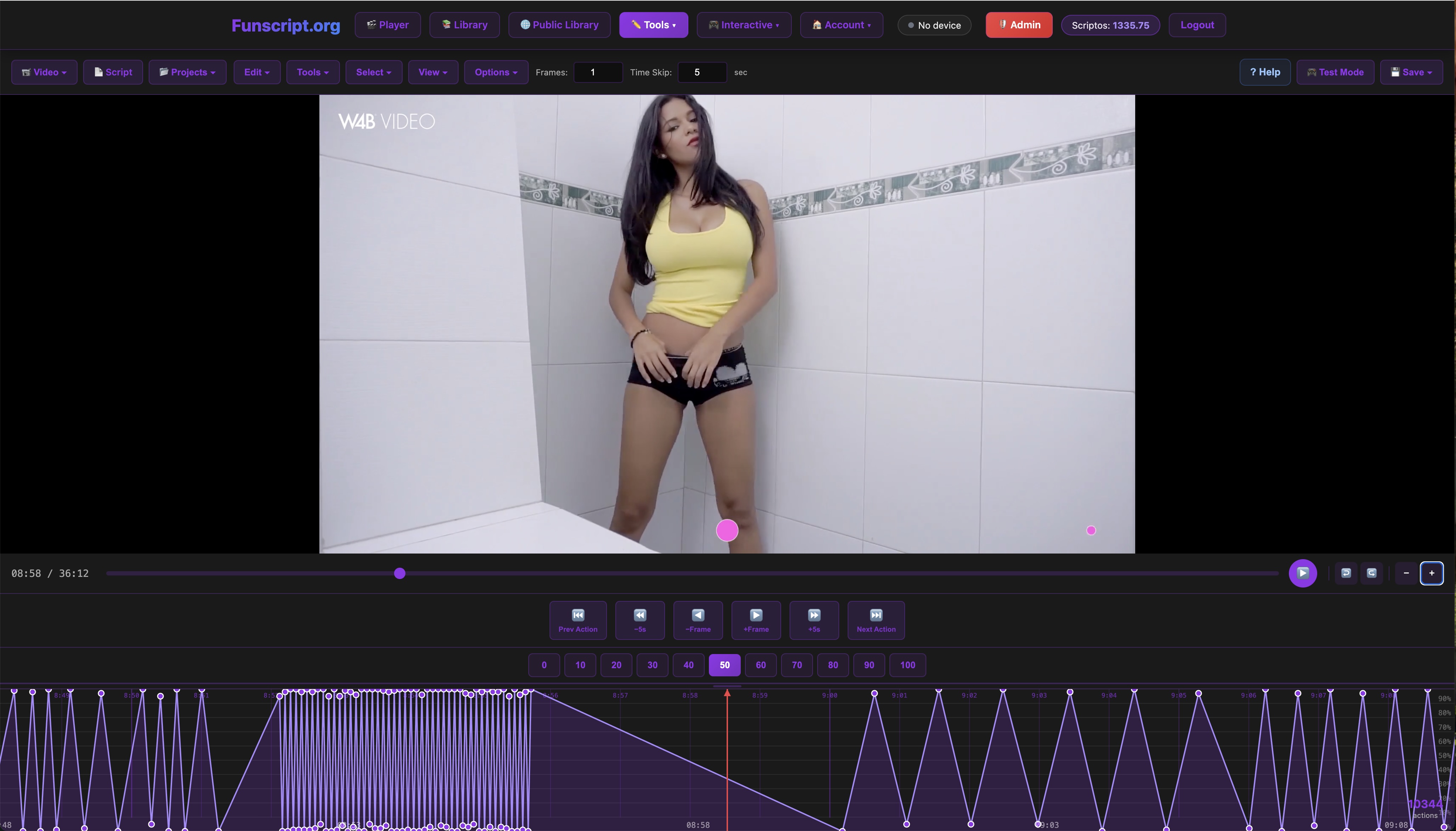
The Script Editor features a digital audio workstation (DAW)-style timeline, which is ideal for placing motion points precisely synchronized with your video content. You can switch between light and dark themes for a more comfortable viewing experience, and "focus mode" is perfect for reducing distractions while you work.
One of the standout features of the editor is its real-time preview capability. As you make adjustments, you can see how your changes affect the device's movements. This immediate feedback is invaluable, especially when you're trying to achieve a specific rhythm or pattern.
During my testing, I also appreciated the customizable hotkeys. These shortcuts streamline the editing process, allowing you to place, delete, or modify motion points without needing to navigate menus. It might seem minor, but these small efficiencies add up over the course of a scripting session.
Placing Motion Points and Editing
Placing motion points is straightforward. Simply sync your device's movements with the video's action. The Script Editor allows for precise adjustments, ensuring each motion point aligns perfectly with your intended action. You can preview your script in real-time, making it easier to spot and correct any discrepancies.
In my experience, starting with a rough draft is often the best way to begin. Lay down basic motion points without worrying too much about precision. Once the general tempo is set, you can go back and refine each point, adjusting for speed and intensity.
Another tip is to use the editor's zoom function. Zooming in on the timeline lets you make minute adjustments to your motion points. This level of detail ensures your device's movements are perfectly synced with the video's action, providing a more immersive experience.
Testing and Refining Your Script
Testing is a crucial step. Use the Funscript Player to test your scripts and ensure they sync perfectly with your video content. The player allows you to adjust sync offsets and view a heatmap visualization, providing feedback on motion density and timing. This is where you'll refine your script, making adjustments as necessary for optimal performance.

What I found particularly helpful was the heatmap feature. It visually represents where motion points are densely packed or too sparse, guiding you to areas that might need further tweaking. This visual cue helped me balance the pacing and intensity of my scripts.
After testing, I recommend taking notes on any adjustments needed. Whether it's altering timings, adding new motion points, or changing the intensity, a clear record of changes will streamline the refinement process. It's easy to overlook small details when you're deep into the editing process, so having a reference list can be a lifesaver.
Connecting Devices to Funscript.org
Once your script is ready, it's time to connect your device to Funscript.org. The process varies slightly depending on your device's connectivity options.
WiFi and Bluetooth Device Setup
For devices like The Handy, you'll connect via WiFi using a unique key provided in your HandyFeeling account. The process is straightforward and ensures your device syncs seamlessly with the cloud-based server. For devices like Lovense Max 2, Bluetooth connection is established through the Lovense Connect app or Intiface Central.
During setup, I noticed the WiFi connection on The Handy was remarkably stable, even over extended sessions. This stability is crucial for maintaining a seamless experience without interruptions. However, make sure your router is in close proximity to minimize any potential connectivity issues.
For Bluetooth devices, I found that enabling airplane mode on your device, with Bluetooth turned on, reduces interference from other wireless signals. This small adjustment can significantly enhance connection stability, especially in environments with many wireless devices.
Dual Device Support
Funscript.org supports dual-device setups, which is great for those who want to use multiple devices simultaneously. Each device can operate with independent stroke ranges, providing a fully customized experience. This feature enhances the versatility and excitement of interactive sessions.
In my dual-device testing, the synchronization between devices was impressive. Even when one device required a firmware update, Funscript.org handled the transition smoothly, ensuring the session wasn't disrupted. It's perfect for those looking to replicate complex scenes that involve multiple devices.
That said, managing battery levels becomes more critical with dual-device setups. Keeping both devices charged and ready ensures consistent performance throughout your sessions. I recommend investing in a multi-port USB charger for convenience.
Troubleshooting Connection Issues
If you encounter any connection issues, the Dashboard provides guidance and health checks to ensure your devices remain connected. It's always a good idea to perform regular checks and updates to keep your devices and scripts running smoothly.

One common issue I encountered was interference from other Bluetooth devices. If you're experiencing lag or desync, try turning off nearby Bluetooth devices or moving to a different location. The Dashboard's diagnostics tool can also help identify and resolve these issues quickly.
In my testing, I found that updating device firmware regularly helped maintain connectivity. Many manufacturers release updates to enhance performance and fix bugs, so staying up-to-date is crucial for the best experience.
Advanced Scripting Tips
Once you're comfortable with the basics, it's time to explore more advanced scripting techniques. These tips will help you refine your skills and enhance your scripts.
Integrating AI-Assisted Auto-Generation
The Script Editor includes AI-assisted auto-generation features that can simplify the scripting process. This tool is particularly useful for quickly generating motion points across large sections of a video, saving you time and effort.
In my experience, the AI tool was a game-changer for longer videos. It efficiently mapped out base motion points, which I could then fine-tune for precision. This feature cut my scripting time in half, freeing me to focus on creative adjustments rather than repetitive tasks.
However, it's important to review AI-generated scripts thoroughly. While the AI is accurate, it might not capture all the nuances you desire. A quick pass through the script can ensure everything aligns with your vision before final testing.
Customizing Scripts for Different Devices
Each device has its own specifications and capabilities. When creating scripts, consider the unique features of your device. For instance, adjust intensity values for vibration-based devices like the Lovense Lush 3, ensuring that your script makes full use of its capabilities.
I've found that experimenting with different intensity levels can yield surprising results. For example, using the Lovense Lush 3, I discovered that varying the intensity rhythmically in sync with the video's pace added an unexpected layer of immersion.
Moreover, always keep the device's operational limits in mind. Pushing a device beyond its capabilities can lead to performance issues or even damage. I recommend consulting the manufacturer's guidelines for optimal settings.
Sharing and Collaborating with the Community
Once you're satisfied with your script, consider sharing it in the Public Library. This community hub allows users to share and access a wide range of funscripts. Collaborating with others is a great way to refine your skills and gain new insights.
Sharing your funscripts helps build a vibrant community and enhances the overall experience for all users.
Engaging with the community can also provide you with feedback that you might not have considered. During my own sharing experiences, community members pointed out areas for improvement that I had missed, which helped me create even more engaging scripts.
Additionally, exploring scripts from other creators can spark new ideas. I've often found inspiration in the work of others, which has led to breakthroughs in my own scripting projects.
Frequently Asked Questions
What are funscript files?
Funscript files are text-based documents that contain motion data used to synchronize interactive sex toys with video content. They provide precise control over device movements, enhancing the interactivity of video content. These files are essential for those looking to create a seamless connection between their device and the media they enjoy.
Which devices are best for creating funscripts?
Devices like The Handy and Kiiroo Keon are ideal for full motion sync, while Lovense vibrators, such as the Lovense Lush 3, are great for intensity mapping. Each offers unique features that cater to different user preferences. In my testing, I found that the choice depends largely on whether you're more interested in stroke patterns or vibration intensity.
How do I connect my device to Funscript.org?
Devices connect through WiFi or Bluetooth, with setup instructions available on the Funscript.org Dashboard. Whether you're using the HandyFeeling cloud server or the Lovense Connect app, the process is designed to be user-friendly and efficient. It's crucial to follow the setup steps carefully to ensure a smooth and stable connection.
Can I use multiple devices with a single funscript?
Yes, Funscript.org supports dual-device setups, allowing for simultaneous use with independent settings. This feature is perfect for those who wish to enhance their interactive sessions with multiple devices. In my experience, this setup not only increases the versatility of your sessions but also opens up new creative possibilities in scripting.
Is there a community for sharing funscripts?
Yes, the Public Library on Funscript.org allows users to share and access community-created funscripts. It's a great way to discover new content and collaborate with fellow enthusiasts. Participating in this community can significantly enhance your scripting skills and inspire new ideas.
Conclusion
Creating your own funscripts can be a rewarding and fulfilling experience, offering a level of personalization that takes your interactive sessions to the next level. Whether you're just starting out or looking to refine your skills, this comprehensive guide provides the tools and insights you need to succeed. So why wait? Start creating your own funscripts today and join a vibrant community of like-minded enthusiasts!