

How to Create Your Own Funscripts — A Comprehensive Scripting Tutorial for The Handy, Kiiroo Keon, and More
Introduction to Funscripts
Learning how to create your own funscripts can take your interactive device experience to a whole new level. Funscripts are specially crafted motion files that sync seamlessly with interactive sex toys, offering an immersive and tailored experience when paired with video content. The first thing you'll notice when diving into funscript creation is the control it grants you over your device's movements, whether you're using a stroker like The Handy or a vibrator such as the lovense Domi 2.
Lovense Toys
Handy
Funscripts are digital files that contain motion data used to control interactive devices in sync with video content. These scripts are essential for devices that can move or vibrate in specific patterns, enhancing the realism of the experience. Platforms like Funscript.org allow users to load these scripts into a Funscript Player, where the devices execute the movements in perfect harmony with the onscreen action.
Using funscripts with interactive devices like The Handy and Kiiroo Keon offers full positional stroke sync, which means the device replicates the motion seen in the video. This synchronization brings an unprecedented level of realism and immersion. Conversely, vibration-only devices map the intensity of the funscript to their vibration strength, offering a different but equally synced experience. The result is a tailored experience that responds in real-time to the content you are viewing, making your sessions more engaging and personalized.

Here's where it gets interesting: by creating your own funscripts, you can fine-tune the experience to your liking, whether you prefer gentle rhythms or rapid pulses. This control means you can craft experiences that are as unique as you are. In practice, this personalization can significantly enhance your enjoyment, especially when the standard scripts available don't quite hit the mark for your preferences.
In addition to offering customization, creating your own funscripts can be an engaging hobby in itself. Many users find the process of scripting to be a creative outlet, similar to editing music or videos. You can experiment with different beats, timings, and patterns to create a session that feels just right.
Quick Summary: By mastering funscript creation, you can tailor the movements and sensations of your interactive devices to perfectly match your video content, offering a more immersive and personalized experience.
Choosing the Right Device for Scripting
When you start creating funscripts, selecting the right device is crucial. Not all devices respond to funscripts in the same way, and understanding these differences will help you tailor your scripts for optimal performance.
Linear Actuator Devices
Devices like The Handy and Kiiroo Keon use linear actuators to deliver precise stroke movements. In my testing, The Handy's high-speed servo motor and WiFi connectivity make it a strong contender for anyone serious about funscript creation. It offers up to 10 strokes per second, with adjustable stroke lengths and firmware updates that keep it performing at its peak. Priced between $130-160, it's an accessible option for most enthusiasts.
Then there's the Kiiroo Keon, which connects via Bluetooth using the FeelConnect app. It offers adjustable stroke speeds and is compatible with VR content, making it a versatile choice for those who enjoy immersive experiences. At $200-250, it's a bit more of an investment, but the added features could be worth it for some users. In practice, the Keon's compatibility with a wide array of content gives it an edge for those who switch between various types of media.
One standout feature of linear actuator devices is their ability to replicate precise motions. This precision is particularly useful for funscripts that require exact timing and movement to match fast-paced or complex video content. During my tests, I noticed that the linear actuators can handle rapid changes in motion better than vibration-only devices, making them ideal for action-packed scenes.
Vibration-Only Devices
If your interest leans more towards vibration-based experiences, devices like the Lovense Domi 2 offer robust funscript support. Rather than duplicating stroke motions, these devices map the funscript's intensity data to vibration strength. This means more intense parts of the script result in stronger vibrations, creating a varied and dynamic experience. The Lovense Domi 2, for instance, combines a powerful motor with the convenience of Bluetooth connectivity, all for $100-120.

Vibration-only devices are generally quieter than their linear actuator counterparts, which can be a significant advantage if discretion is a priority. In my testing, the Lovense Domi 2 was notably quieter, with a deep, rumbly feel that was less intrusive than the buzzier alternatives. This makes vibration devices a good choice for those who want to maintain a low profile.
Ultimately, whether you choose a linear actuator or a vibration-only device, the key is to match the device's capabilities with your scripting goals. Understanding how each device interprets funscript data will help you make the most of your scripting efforts. For those who enjoy variety, having both types of devices on hand can offer the best of both worlds, allowing you to switch between different experiences as your mood or content changes.
In summary, choosing the right device involves balancing factors like precision, noise level, and compatibility with your preferred content. Both types of devices have their own unique advantages, so consider what aspects are most important to you when making your choice.
Step-by-Step Guide to Creating Funscripts
Now that you've picked the right device, it's time to dive into the creation of funscripts. Here's a step-by-step guide to help you craft your own scripts using the Funscript.org Script Editor.
Setting Up Your Work Environment
Before you begin, ensure you have a video that you want to sync with your device. Load this video into the Funscript Player alongside a matching funscript file if available. The player allows you to visualize the script's heatmap, helping you understand motion density throughout the video.
Next, open the Script Editor. This tool provides a visual timeline where you can place motion points accurately on a waveform. The interface is intuitive, and with features like a light/dark theme toggle and focus mode, you'll find it easy to navigate even during extended editing sessions. During my usage, the waveform visualization was a standout feature, making it easy to match device movements with audio cues from the video.
For more detailed editing, it's beneficial to have a dual-monitor setup. This allows you to view the video on one screen while editing the funscript on another, minimizing the need to switch between windows. In my experience, this setup significantly streamlined the process, reducing errors and improving accuracy.
Using the Funscript.org Script Editor
Start by selecting the points in the timeline where you want your device to move. The editor allows you to place these points on a waveform, which corresponds to the video's audio cues. This visual representation makes it easier to match device movements with specific points in the video.
For those short on time, the AI-assisted auto-generation feature can speed up the process significantly. It automatically creates motion points based on the video's waveform, which you can then refine manually for precision. In practice, this feature can cut editing time in half, allowing you to focus on fine-tuning rather than starting from scratch.
One tip for achieving a natural feel is to vary the intensity and timing of your motion points. This mimics the ebb and flow of real interactions, creating a more immersive experience. During testing, I found that scripts with varying intensities felt more engaging than those with a uniform motion pattern.
Fine-Tuning and Testing Your Script
Once your basic script is in place, it's time to test it. Connect your device to Funscript.org and play the video with your script using the Funscript Player. Pay close attention to how the device responds to the script. You might notice areas where the sync is slightly off or where you'd like the device to move more intensely or softly.
Make adjustments in the Script Editor, then retest until you're satisfied with the results. This iterative process can be time-consuming, but it's crucial for creating a polished, enjoyable experience. In my testing, it was this attention to detail that made the difference between a good and a great script.
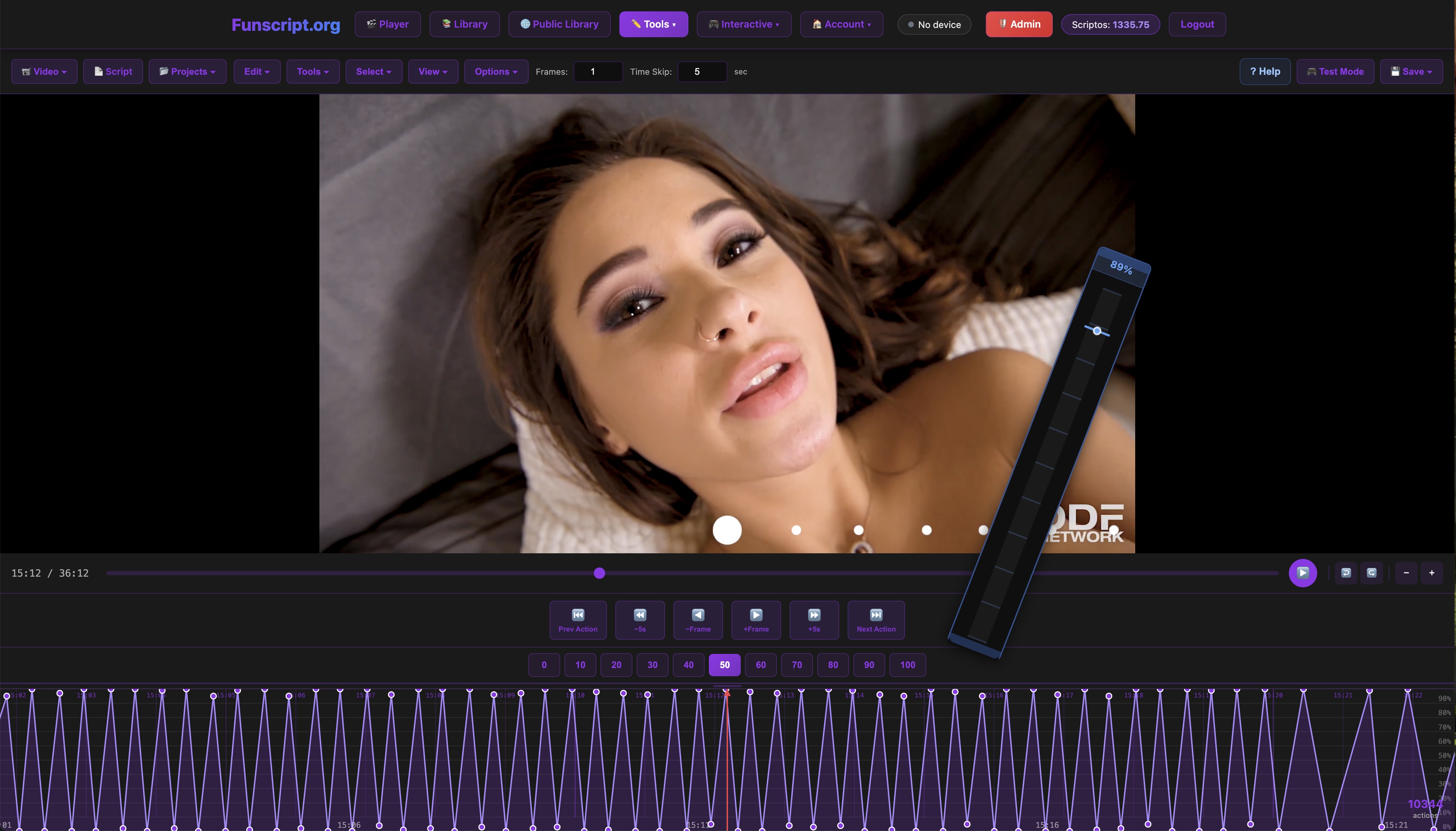
Another useful strategy is to test your script with different types of content. This not only highlights areas for improvement but also gives you a sense of how versatile your script can be. In some cases, minor adjustments can make a script adaptable for various videos, expanding its usability.
Quick Summary: Setting up your environment, using the Script Editor effectively, and thorough testing are key steps in creating high-quality funscripts that match your personal preferences.
Connecting Your Device to Funscript.org
Connecting your device is a straightforward process, whether you're using a stroker like The Handy or a vibrator such as the Lovense Max 2. Here's how to get started:
Connecting Linear Actuator Devices
For The Handy, you'll connect via WiFi using the HandyFeeling API. First, ensure your device is powered on and connected to your WiFi network. Navigate to the Dashboard on Funscript.org and enter your device's connection key. Click "Connect," and your device should sync automatically, ready for use with all Funscript.org features.
The Kiiroo Keon, on the other hand, requires Bluetooth connectivity. Use the Intiface Central app to pair your device, then connect through the Dashboard on Funscript.org. This method ensures a stable connection for seamless funscript syncing. During my tests, I found the WiFi connection on The Handy offered slightly lower latency than the Bluetooth connection on the Keon, which could be a consideration depending on your network setup.
It's important to ensure that your device's firmware is up-to-date before attempting to use Funscript.org features. Firmware updates can often resolve connection stability issues and improve overall performance. In my experience, keeping my devices updated has minimized connection problems and improved the responsiveness of the funscript playback.
Connecting Vibration-Only Devices
If you're using a Lovense device like the Lovense Max 2, you'll connect via Bluetooth. Use the Lovense Remote app to pair the device, then sync it with Funscript.org through the Dashboard. This connection allows the device to respond to funscript intensity values, translating them into vibration strength.
For all devices, stability is key. Make sure your connection (WiFi or Bluetooth) is strong to ensure smooth and uninterrupted funscript playback. On the flip side, weak connections can result in lag or interruptions, which can detract from the immersive experience.
In practical terms, the choice between WiFi and Bluetooth connectivity often comes down to personal preference and the specific setup of your environment. Both have their pros and cons, so consider factors like range, latency, and ease of setup when making your decision.
Quick Summary: Ensuring a stable connection and keeping your devices updated are crucial steps in achieving a seamless and enjoyable funscript experience.
Advanced Scripting Tips
Once you're comfortable with the basics, it's time to explore advanced scripting techniques that can elevate your funscript creations.
Utilizing AI Assistance
The Script Editor offers AI-assisted features to streamline your workflow. This tool can automatically generate motion points, which you can refine and adjust as needed. It's a game-changer for those looking to save time while maintaining high-quality output. In my experience, using AI assistance has not only sped up the initial scripting process but also provided new inspiration for creating more complex patterns.
AI tools can be particularly useful for beginners who may not yet have a feel for timing and intensity. By starting with an AI-generated script, you can focus on learning how to tweak and perfect the details, which is often the more enjoyable part of scripting. Over time, you'll develop a better understanding of what works and what doesn't, allowing you to create more intricate scripts.
Enhancing Script Complexity
Experiment with different motion patterns and sync offsets to achieve a more complex experience. Adjusting these parameters can result in a more immersive and realistic session. Additionally, take advantage of dual-device support to create interactions that involve multiple devices, offering varied sensations simultaneously.

One technique I've found effective is to introduce subtle variations throughout the script. This could be as simple as adding slight delays in certain parts or varying the strength of movements. These nuances can make the experience feel more organic and less mechanical.
For those looking to push the boundaries, consider integrating elements of AI Control into your scripts. This feature allows for real-time adaptation based on user input or other variables, opening up possibilities for highly personalized and dynamic sessions. While it requires more setup and testing, the payoff can be a truly one-of-a-kind experience.
Quick Summary: By leveraging AI tools and experimenting with complex patterns, you can create funscripts that offer a more engaging and varied experience.
Comparative Analysis: Funscripts vs. Pre-made Scripts
When it comes to enhancing your interactive device sessions, you have two primary options: create your own funscripts or use pre-made scripts. Each approach has its own set of benefits and drawbacks, and the right choice depends on your preferences and goals.
The Advantages of Creating Your Own Funscripts
The most significant advantage of creating your own funscripts is the level of personalization it offers. You have complete control over every aspect of the script, from the timing and intensity of movements to the specific patterns used. This allows you to tailor the experience precisely to your liking, ensuring maximum enjoyment.
Another benefit is the sense of satisfaction and accomplishment that comes from crafting something unique. Many users find the process of scripting to be a rewarding creative outlet, similar to editing music or videos. It can also be a fun challenge to refine your skills and develop new techniques over time.
The Benefits of Using Pre-made Scripts
Pre-made scripts, on the other hand, offer the advantage of convenience. They're readily available from various sources and can be downloaded and used with minimal setup. This makes them an attractive option for those who prefer a quick and easy setup or who may not have the time or interest in creating their own scripts.
Furthermore, pre-made scripts are often crafted by experienced scripters who understand how to create a compelling and engaging experience. This can be particularly beneficial for beginners who may not yet have the skills or confidence to create their own scripts from scratch.
Ultimately, the choice between creating your own funscripts and using pre-made ones comes down to how much time and effort you're willing to invest in personalizing your experience.
Quick Summary: Creating your own funscripts offers unmatched personalization and satisfaction, while pre-made scripts provide convenience and quality crafted by experienced scripters.
Frequently Asked Questions
What is a funscript?
A funscript is a motion file that syncs an interactive sex toy with video content, providing a coordinated and immersive experience. These scripts dictate how the device should move or vibrate in response to the video, creating a synchronized session. By using funscripts, you can enhance the realism and engagement of your interactive experiences.
Which devices are best for funscript use?
Devices with linear actuators, such as The Handy and Kiiroo Keon, offer the most precise funscript synchronization. They can replicate the exact motions dictated by the funscript file, providing a highly realistic experience. Vibration-only devices like the Lovense Domi 2 are also compatible, though they map intensity values to vibration strength rather than replicating the stroke motions.
Can I use vibration-only devices with funscripts?
Yes, vibration-only devices map funscript intensity values to vibration strength. While they can't replicate stroke movements, they still offer a synced experience that responds dynamically to the funscript's data. This can provide a varied and engaging experience, particularly if you enjoy the sensation of vibrations over strokes.
How do I create my own funscripts?
To create your own funscripts, use the Funscript.org Script Editor to place motion points on a visual waveform. Adjust these points to sync perfectly with your chosen video, testing and refining until the experience meets your expectations. This process allows you to tailor the script to your personal preferences and create a truly unique experience.
What are some advanced scripting techniques?
Advanced scripting techniques include utilizing AI assistance for auto-generating motion points, experimenting with different motion patterns and sync offsets, and integrating dual-device support or AI Control for more dynamic sessions. These techniques can elevate your scripts from basic to complex, offering a more immersive and engaging experience.
Conclusion
Creating your own funscripts can transform your interactive device experience, offering a level of control and personalization that pre-made scripts simply can't match. By choosing the right device, mastering the script editor, and taking advantage of advanced features, you can craft sessions that are as unique and engaging as you are. Whether you're using The Handy, Kiiroo Keon, or a Lovense device, the possibilities are virtually endless. Dive into the world of funscript creation and discover how much more satisfying your sessions can be.